Manual · Microscan
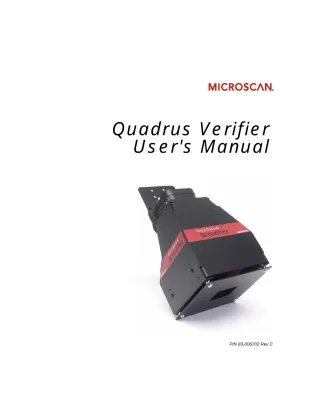
Quadrus Verifier User's Manual
Manual470 pagesPDF 4.1 MB
User's manual for the Microscan Quadrus Verifier: setup, ESP software, symbol verification, communications and configuration.
Covers · 1 model
The models it covers
Summary
What is in it
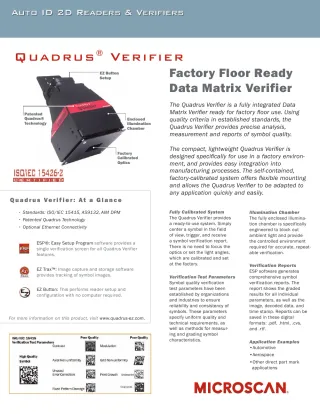
The complete user's manual for the Microscan Quadrus Verifier, a fixed verifier with ISO/IEC 15415, AS9132 and AIM DPM verification options. It starts with an 11-step quick start, then covers the ESP configuration software, verification setup and output, unique item identifiers, communications, read cycle, symbologies, I/O parameters, matchcode, diagnostics, camera setup, the IP database, terminal, utilities, output format and Ethernet, with specifications in the appendices.
Its parts
- Quick Start
- Using ESP
- Verification
- Unique Item Identifiers
- Communications
- Read Cycle
- Symbologies
- I/O Parameters
- Matchcode
- Diagnostics
- Camera Setup
- IP Database
- Terminal
- Utilities
- Output Format
From the manual
Key facts from this manual
Each line names its page in the PDF.
User's manual (P/N 83-006702 Rev C) for the Microscan Quadrus Verifier, a Data Matrix verifier. It shows how to connect it, set it up with the ESP software, calibrate reflectance, grade symbols to ISO/IEC 15415, AS9132 and AIM DPM, and save reports, and it gives the specifications and wiring.
- Device
- Data Matrix verifier with self-contained, factory-calibrated optics and lighting p. 9
- Standards
- AIM DPM, ISO/IEC 15415, AS9132; verifier certification ISO/IEC 15426-2 p. 416
- Symbology
- Data Matrix (ECC 0-200) p. 416
- Interface
- RS-232, Ethernet p. 416
- Host connector
- 25-pin host connector carrying power, serial, Ethernet and I/O p. 418
- Power
- 10 to 28 VDC, 333 mA at 24 VDC p. 418
- Camera
- CCD array, 656 x 496 pixels p. 416
- Light source
- High output LEDs; external 45° and 30° lighting at 660 nm p. 416
- Video output
- EIA (RS-170), 525 lines 2:1 interlaced, analog 1Vp-p/75 ohm p. 416
- Size and weight
- 251 mm high, 128 mm wide, 121 mm deep; about 1,700 g p. 416
- Operating temperature
- 0° to 43°C; 40°C maximum on a non-metal surface p. 416
- Discrete I/O
- Trigger, New Master, Input 1 optoisolated, 5 to 28 VDC; Outputs 1/2 and light control Output 3, 1 to 28 VDC p. 418
- Connectivity options
- IB-150 Interface Kit, Ethernet/USB Interface, Terminal Strip Interface Kit p. 422, 423, 424
- ESP software needs
- Windows Vista, XP or 2000; 64 MB RAM; 40 MB disk space p. 16
What this manual walks you through
- Getting the verifier running quickly and testing sample symbols p. 13
- Connecting to a host by RS-232 through the IB-150 Kit p. 15
- Installing ESP and its system requirements p. 16
- Calibrating reflectance with the calibration symbol card p. 19, 21
- Running ISO/IEC 15415, AS9132 or AIM DPM verification p. 23
- What each verification type reports and how it is graded p. 24, 25
- Generating and saving a verification report p. 26
- Serial commands for calibration and verification p. 46
- Host pinout and optoisolated input and output wiring p. 418, 419, 420, 421
- Wiring through the IB-150, Ethernet/USB and terminal strip interfaces p. 422, 423, 424
Good to know
- The manual recommends recalibration and recertification once a year, even if the verifier has not been used. p. 48
- Keep the reference card with the calibration symbol safe; it is the key setup tool. p. 19
- Clean the hard-coated window only with 100% isopropyl alcohol. p. 435
- Do not insulate the stand mount; the bottom needs metal-to-metal contact to shed heat. p. 435
- Viewing the LED output through magnifiers or microscopes within 100 mm could cause serious eye injury. p. 11
Questions this manual answers
How often does the Quadrus Verifier need recalibration?
Once every year, counted from the original factory calibration, even if it has not been used. p. 48
What formats can Quadrus Verifier reports be saved in?
ESP saves reports as PDF, HTML, RTF or CSV. p. 26
What power does the Quadrus Verifier need?
10 to 28 VDC with at most 200 mV p-p ripple, drawing 333 mA at 24 VDC. p. 418
Do I cross pins 2 and 3 when wiring the IB-150 to a host?
Cross them for a host with a 25-pin connector; do not cross them for a 9-pin host connector. p. 15
Which standards can the Quadrus Verifier grade Data Matrix symbols to?
ISO/IEC 15415, AS9132 and the AIM DPM quality guideline. p. 47
Contents
Chapters and sections
Each line opens the PDF at its page.
The whole text · 47 parts
Read the manual here as text
Its text as extracted from the PDF, unedited, in parts; each page opens the PDF at that page.
- Pages 1 to 101-10
- Pages 11 to 2011-20
- Pages 21 to 3021-30
- Pages 31 to 4031-40
- Pages 41 to 5041-50
- Pages 51 to 6051-60
- Pages 61 to 7061-70
- Pages 71 to 8071-80
- Pages 81 to 9081-90
- Pages 91 to 10091-100
- Pages 101 to 110101-110
- Pages 111 to 120111-120
- Pages 121 to 130121-130
- Pages 131 to 140131-140
- Pages 141 to 150141-150
- Pages 151 to 160151-160
- Pages 161 to 170161-170
- Pages 171 to 180171-180
- Pages 181 to 190181-190
- Pages 191 to 200191-200
- Pages 201 to 210201-210
- Pages 211 to 220211-220
- Pages 221 to 230221-230
- Pages 231 to 240231-240
- Pages 241 to 250241-250
- Pages 251 to 260251-260
- Pages 261 to 270261-270
- Pages 271 to 280271-280
- Pages 281 to 290281-290
- Pages 291 to 300291-300
- Pages 301 to 310301-310
- Pages 311 to 320311-320
- Pages 321 to 330321-330
- Pages 331 to 340331-340
- Pages 341 to 350341-350
- Pages 351 to 360351-360
- Pages 361 to 370361-370
- Pages 371 to 380371-380
- Pages 381 to 390381-390
- Pages 391 to 400391-400
- Pages 401 to 410401-410
- Pages 411 to 420411-420
- Pages 421 to 430421-430
- Pages 431 to 440431-440
- Pages 441 to 450441-450
- Pages 451 to 460451-460
- Pages 461 to 470461-470
The file