Manual · Microscan
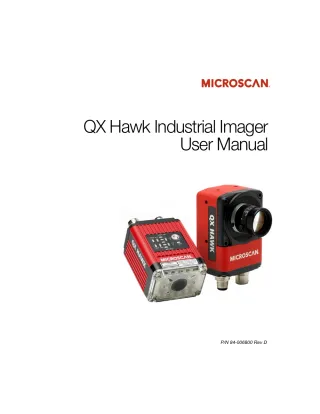
QX Hawk Industrial Imager User Manual
Manual460 pagesPDF 10 MB
User manual for the Microscan QX Hawk industrial imager (standard and C-Mount), covering setup, ESP software, wiring and serial commands.
Covers · 1 model
The models it covers
Summary
What is in it
The full user manual for the Microscan QX Hawk Industrial Imager, in standard and C-Mount versions, used with the QX-1 interface device. It walks through an 11-step quick start, the ESP (Easy Setup Program) software, M12 cordsets, connectors and pinouts, camera setup and calibration, and every parameter group (communication, read cycle, symbologies, I/O, symbol quality, matchcode, diagnostics). Appendices give specifications, serial commands, Ethernet TCP/IP, EtherNet/IP and Allen-Bradley PLC setup.
Its parts
- Quick Start
- Using ESP
- Hardware Integration
- Setup
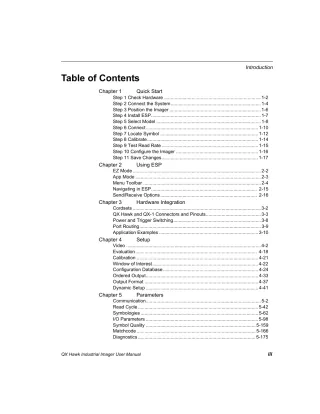
- Parameters
- Terminal
- Utilities
From the manual
Key facts from this manual
Each line names its page in the PDF.
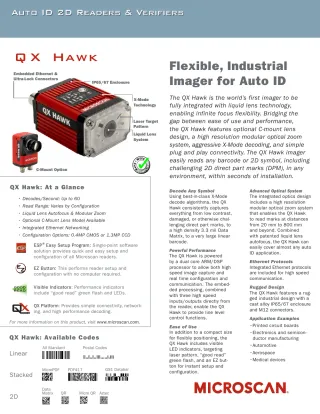
User manual (P/N 84-006800 Rev D) for the Microscan QX Hawk Industrial Imager, FIS-6801, in its Standard and C-Mount versions. It walks through quick setup with the ESP software, wiring through the QX-1 interface device, configuration parameters and serial commands, and gives specifications, read ranges, pinouts and accessory part numbers.
- Device
- Industrial imager with liquid lens, in Standard and C-Mount versions p. 5
- Optic options
- 12, 15, 30 or 45 degree optic, or C-Mount optic; serial or Ethernet models p. 324
- Image sensor
- WVGA CMOS 752 x 480 pixels or SXGA CCD 1280 x 960 pixels p. 318
- Interfaces
- RS-232/422/485, Ethernet p. 318
- Connectors
- A: M12 12-pin plug on all models; B: M12 12-pin socket (serial) or M12 8-pin socket (Ethernet) p. 327
- Power
- 5-28VDC; 135 mA (CMOS) or 170 mA (CCD) at 24VDC typical p. 327
- Interface and supply
- QX-1 Interface Device 98-000103-02; QX Power Supply 97-000012-01, 100-240VAC, +24VDC p. 325
- Host cordsets, 1 m
- Ethernet to RJ45: 61-000160-01 (Ultra-Lock), 61-000160-02 (Screw-On); serial to DB9: 61-000152-02 (plug), 61-000153-02 (socket) p. 325
- Lens kits
- 12° 98-000147-04, 15° 98-000147-01, 30° 98-000147-02, 45° 98-000147-03 p. 325
- Discrete I/O
- Input 1/Trigger/New Master 4.5-28V; Outputs 1, 2, 3 optoisolated, 1-28V p. 319
- Symbologies
- Data Matrix, QR Code, Micro QR Code, Aztec Code, PDF417, MicroPDF417, GS1 DataBar, Code 39, Code 128 and other linear codes p. 318
- Decode rate
- Up to 60 per second (CMOS), up to 20 per second (CCD) p. 319
- Size and weight
- Standard: 40.5 x 57.6 x 96.3 mm (H x W x D), 280 g; C-Mount: 102.3 x 57.6 x 40.5 mm, 320 g p. 318
- Operating temperature
- CMOS: 0° to 50° C; CCD: 0° to 45° C p. 318
What this manual walks you through
- Setting up and testing the imager quickly with ESP p. 9
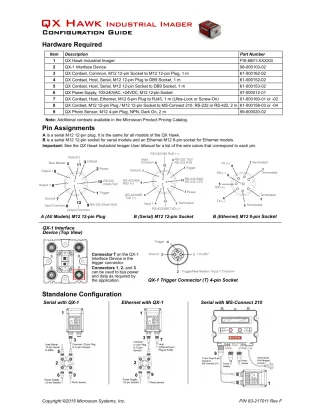
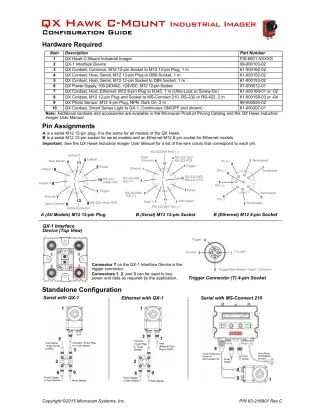
- Checking the hardware needed for a serial or Ethernet setup p. 10, 11
- Connecting the imager, QX-1, photo sensor and power supply p. 12
- Configuring through ESP, serial commands or the EZ Button p. 5
- Pinouts and wire colors of the M12 connectors p. 327, 328
- Routing power and trigger through the QX-1 switches p. 329
- Wiring the optoisolated outputs as NPN or PNP p. 330
- Read range, field of view and depth of field for each optic p. 322, 323
Good to know
- Do not power more than four imagers from one power supply in a daisy chain; add a QX-1 and a supply for every four more. p. 10
- Make all connections secure before applying power, and power down before disconnecting cables. p. 10
- Align Ultra-Lock connector pins and push them in; twisting bends the pins. p. 12
- The manual calls for a UL-listed Class II direct plug-in power unit rated 10 to 28 VDC at 5 watts or more. p. 6
- The imager has no user-serviceable parts inside. p. 6
Questions this manual answers
What power supply does the QX Hawk use?
The manual lists the QX Power Supply 97-000012-01 (100-240VAC in, +24VDC out, M12 12-pin socket). The imager itself takes 5-28VDC. p. 325, 327
Does the QX Hawk need an Ethernet crossover cable?
No. The imager does its own internal crossover, so the straight-through cordset 61-000160-01 or -02 is used. p. 10
How many QX Hawk imagers can run from one power supply?
No more than four in a daisy chain. Add a QX-1 and one power supply for every four additional imagers. p. 10
What is the QX Hawk operating temperature range?
0° to 50° C for CMOS models and 0° to 45° C for CCD models, at up to 90% non-condensing humidity. p. 318
Which barcode types can the QX Hawk read?
2D codes such as Data Matrix, QR Code, Micro QR Code and Aztec Code, stacked codes such as PDF417 and GS1 DataBar, and linear codes such as Code 39 and Code 128. p. 318
Contents
Chapters and sections
Each line opens the PDF at its page.
The whole text · 46 parts
Read the manual here as text
Its text as extracted from the PDF, unedited, in parts; each page opens the PDF at that page.
- Pages 1 to 101-10
- Pages 11 to 2011-20
- Pages 21 to 3021-30
- Pages 31 to 4031-40
- Pages 41 to 5041-50
- Pages 51 to 6051-60
- Pages 61 to 7061-70
- Pages 71 to 8071-80
- Pages 81 to 9081-90
- Pages 91 to 10091-100
- Pages 101 to 110101-110
- Pages 111 to 120111-120
- Pages 121 to 130121-130
- Pages 131 to 140131-140
- Pages 141 to 150141-150
- Pages 151 to 160151-160
- Pages 161 to 170161-170
- Pages 171 to 180171-180
- Pages 181 to 190181-190
- Pages 191 to 200191-200
- Pages 201 to 210201-210
- Pages 211 to 220211-220
- Pages 221 to 230221-230
- Pages 231 to 240231-240
- Pages 241 to 250241-250
- Pages 251 to 260251-260
- Pages 261 to 270261-270
- Pages 271 to 280271-280
- Pages 281 to 290281-290
- Pages 291 to 300291-300
- Pages 301 to 310301-310
- Pages 311 to 320311-320
- Pages 321 to 330321-330
- Pages 331 to 340331-340
- Pages 341 to 350341-350
- Pages 351 to 360351-360
- Pages 361 to 370361-370
- Pages 371 to 380371-380
- Pages 381 to 390381-390
- Pages 391 to 400391-400
- Pages 401 to 410401-410
- Pages 411 to 420411-420
- Pages 421 to 430421-430
- Pages 431 to 440431-440
- Pages 441 to 450441-450
- Pages 451 to 460451-460
The file