Manual · Microscan
QX-830 Compact Industrial Scanner User Manual
Manual422 pagesPDF 7.7 MB
User manual for the Microscan QX-830 compact industrial laser barcode scanner: setup, ESP software, wiring, parameters and serial commands.
Covers · 1 model
The models it covers
Summary
What is in it
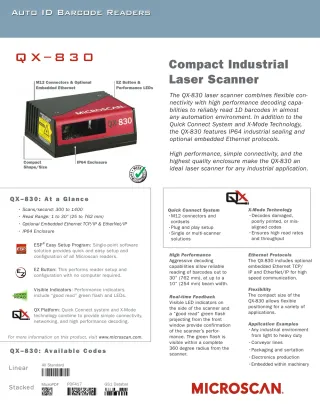
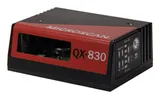
The full user manual for the Microscan QX-830 Compact Industrial Scanner, a fixed-mount laser barcode scanner with Ethernet TCP/IP and EtherNet/IP. It walks through a nine-step quick start with the ESP (Easy Setup Program) software, then covers hardware integration with the QX-1 interface device and cordsets, calibration and output format, every scanner parameter, the terminal and utility commands, and appendices on specifications, serial and protocol commands, and Allen-Bradley PLC setup.
Its parts
- Quick Start
- Using ESP
- Hardware Integration
- Scanner Setup
- Scanner Parameters
- Terminal
- Utilities
From the manual
Key facts from this manual
Each line names its page in the PDF.
The full user manual for the Microscan QX-830 Compact Industrial Scanner and its companion QX-1 Interface Device. It walks the reader through setup with the ESP software, wiring and grounding, every scanner parameter and serial command, firmware updates, and Ethernet TCP/IP and EtherNet/IP setup including Allen-Bradley PLCs.
- Device
- Compact industrial bar code scanner with X-Mode decoding, Ethernet TCP/IP and EtherNet/IP, and an EZ Button p. 5
- Setup methods
- ESP software, serial commands such as <K100,1>, or the EZ Button on the side p. 5
- Interfaces
- RS-232, RS-422, RS-485, Ethernet p. 290
- Connectors
- Connector A: M12 12-pin plug on all models; connector B: 12-pin socket on serial models, 8-pin socket on Ethernet models p. 43
- Power
- 10-28VDC, 180mA at 24VDC (typ.), 7.5 Watts (max.) at 28VDC p. 294
- Power pins
- 12-pin connectors: pin 1 Trigger (white), pin 2 Power (brown), pin 7 Ground (blue) p. 294
- Power supply
- QX Power Supply, 100-240VAC, +24VDC, M12 12-pin Socket p. 12
- Ethernet cordset
- Straight-through cordset 61-000160-01 or -02; no crossover needed p. 12
- Discrete I/O
- Input 1 (Trigger / New Master), optoisolated, 4.5–28V (13 mA at 24VDC); outputs 1, 2, 3 optoisolated, 1–28V p. 290
- Scan rate
- Adjustable from 300 to 1,400 scans per second; default 500 p. 290
- Symbologies
- Code 39, Codabar, Code 93, Interleaved 2 of 5, Code 128, PDF417, MicroPDF417, Pharmacode, UPC, GS1 DataBar; EAN-128, AIAG p. 290
- Size and weight
- Height 2.59" (66 mm), width 3.47" (88 mm), depth 1.38" (35 mm); 7.5oz. (212 g) p. 290
- Environment
- Die-cast aluminum, IP65 rated; operating 0° to 50° C (32° to 122° F); storage –29° to 70° C p. 290
- QX-1 Interface Device
- Connectors 1 and 3 are 12-pin plugs, connector 2 a 12-pin socket, plus a 4-pin trigger socket; Power and Trigger switches p. 47
What this manual walks you through
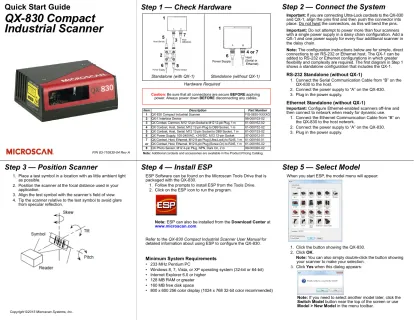
- Checking the hardware for a standalone setup p. 12
- Wiring the QX-830 connectors (pin assignments and wire colors) p. 43, 44
- Grounding the scanner and avoiding ground loops p. 45, 46
- Routing power and trigger signals through the QX-1 switches p. 47, 48
- Assigning data types to ports with Port Routing p. 49
- Setting up a daisy chain of scanners over a conveyor p. 50
- Updating the scanner firmware from ESP p. 275
- Setting the IP address, subnet and gateway by serial command p. 314
Good to know
- One power supply may power at most four scanners in a daisy chain; add a QX-1 and a supply for every four more. p. 12
- Do not interrupt power or disconnect the host cable while firmware is downloading. p. 275
- Outputs can be NPN or PNP, but the two cannot be mixed because all outputs share one common. p. 296
- Signal ground must not be used as power ground or earth ground. p. 46
- The scanner has no user-serviceable parts, and opening it can expose laser diode power of up to 7mW. p. 6
Questions this manual answers
Does the QX-830 need a crossover Ethernet cable?
No. The scanner does its own internal crossover, so a straight-through cordset such as 61-000160-01 or -02 works. p. 12
How do I update the QX-830 firmware?
In ESP open Utilities, Firmware, choose App Code under Firmware Update and browse to the *.mot file; the download takes about a minute. p. 275
What power supply can run the QX-830?
The manual calls for a UL-listed direct plug-in power unit marked Class II, rated 10 to 28 VDC at 5 watts or greater. p. 6
How can I configure the QX-830?
With Microscan's ESP software, with serial commands sent from a terminal, or with the EZ Button on the side of the scanner. p. 5
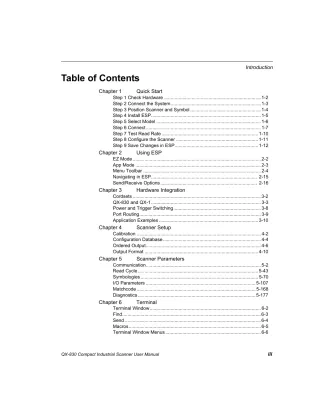
Contents
Chapters and sections
Each line opens the PDF at its page.
The whole text · 43 parts
Read the manual here as text
Its text as extracted from the PDF, unedited, in parts; each page opens the PDF at that page.
- Pages 1 to 101-10
- Pages 11 to 2011-20
- Pages 21 to 3021-30
- Pages 31 to 4031-40
- Pages 41 to 5041-50
- Pages 51 to 6051-60
- Pages 61 to 7061-70
- Pages 71 to 8071-80
- Pages 81 to 9081-90
- Pages 91 to 10091-100
- Pages 101 to 110101-110
- Pages 111 to 120111-120
- Pages 121 to 130121-130
- Pages 131 to 140131-140
- Pages 141 to 150141-150
- Pages 151 to 160151-160
- Pages 161 to 170161-170
- Pages 171 to 180171-180
- Pages 181 to 190181-190
- Pages 191 to 200191-200
- Pages 201 to 210201-210
- Pages 211 to 220211-220
- Pages 221 to 230221-230
- Pages 231 to 240231-240
- Pages 241 to 250241-250
- Pages 251 to 260251-260
- Pages 261 to 270261-270
- Pages 271 to 280271-280
- Pages 281 to 290281-290
- Pages 291 to 300291-300
- Pages 301 to 310301-310
- Pages 311 to 320311-320
- Pages 321 to 330321-330
- Pages 331 to 340331-340
- Pages 341 to 350341-350
- Pages 351 to 360351-360
- Pages 361 to 370361-370
- Pages 371 to 380371-380
- Pages 381 to 390381-390
- Pages 391 to 400391-400
- Pages 401 to 410401-410
- Pages 411 to 420411-420
- Pages 421 to 422421-422
The file