Manual · Microscan
MS-890 Industrial Automation Scanner User's Manual
Manual308 pagesPDF 3.0 MB
User manual for the Microscan MS-890 Industrial Automation Scanner: setup, ESP software, communications, symbologies and calibration.
Covers · 1 model
The models it covers
Summary
What is in it
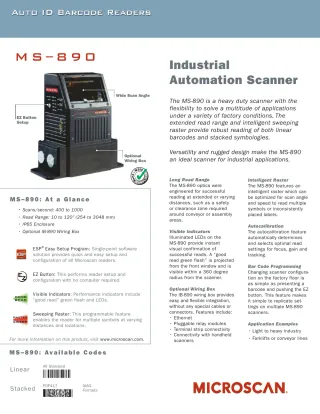
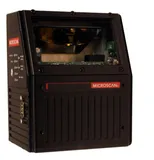
The complete user's manual for the Microscan MS-890 Industrial Automation Scanner, a raster laser scanner in an IP65 enclosure. It covers a quick start, the ESP (Easy Setup Program) software, host and auxiliary communications, read cycle and trigger settings, symbologies, I/O parameters, matchcode, diagnostics, calibration, raster and laser setup, the terminal, utilities, output formatting and the optional wiring box, with specifications and serial commands in the appendices. It also explains how to move settings over from an MS-880.
Its parts
- Quick Start
- Using ESP
- Communications
- Read Cycle
- Symbologies
- I/O Parameters
- Matchcode
- Diagnostics
- Calibration
- Raster/Laser
- Terminal
- Utilities
- Output Format
- Wiring Box
From the manual
Key facts from this manual
Each line names its page in the PDF.
The Microscan user's manual (P/N 83-000890 Rev C) for the MS-890 Industrial Automation Scanner, a long range raster laser scanner. It covers setup with the EZ Button, ESP software and serial commands, communications, read cycle, symbologies, I/O, diagnostics, calibration and the optional wiring box, with general and electrical specifications in the appendices.
- Device
- Long range industrial scanner with a wide angle sweeping raster and IP65 enclosure p. 8
- Read range
- 10 to 120 in. (254 to 3,048 mm) p. 8
- Scan rate
- Adjustable from 400 to 1000 scans/second (default 500) p. 266
- Versions
- Long Range Stand Alone and Long Range Wiring Box-Ready, both RS-232/485, 10-28VDC p. 267
- Power
- 10 to 28VDC, 200mV p-p max. ripple, 230mA at 24VDC (typ.); 24 Watts maximum p. 268
- Connectors
- Host 25-pin D-sub, 3-pin microchange power plug, 4-pin microchange trigger socket, 9-pin D-sub programming plug p. 268
- Interfaces
- RS-232, RS-422/485, daisy chain/aux port, dedicated configuration port; RS-422 and RS-232 both on by default p. 266, 268
- Discrete I/O
- Trigger, New Master and Input 1 optoisolated, 5-28V rated; Outputs 1, 2, 3 optoisolated, 1-28VDC p. 266
- Symbologies
- Code 39, Code 128, UPC/EAN, Interleaved 2 of 5, Codabar, Code 93, PDF417; AIAG, GS1-128 p. 266
- Laser
- Semiconductor visible laser diode, 650 nm nominal; 50,000 hours at 25 C p. 266
- Size and weight
- Height 3.5 in. (88 mm), width 5 in. (127 mm), depth 6 in. (152 mm); 5 lbs. (2268 g) p. 266
- Environment
- IP65; 0 to 50 C (32 to 122 F) operating; humidity up to 90%, non-condensing p. 266
- Setup methods
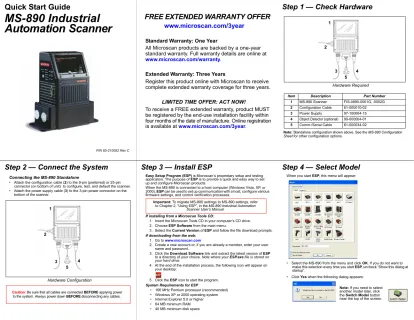
- EZ Button, ESP (Easy Setup Program) including its App Mode, or serial commands sent from a terminal or encoded in Code 128 symbols p. 8
- Wiring box terminals
- 14 - 28 AWG wire, .24 in. (6 mm) strip length, 13A maximum; four 3/4 in. pipe thread portal holes p. 256
What this manual walks you through
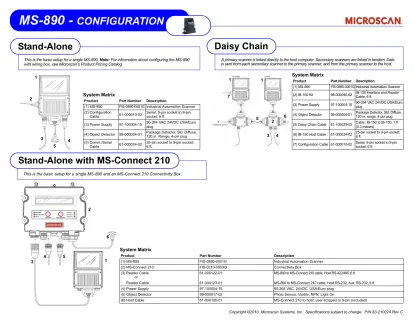
- Checking the hardware and connecting a standalone system p. 13, 14
- Moving an MS-880 application and its settings to an MS-890 p. 13
- Turning on laser current and NOVRAM warning messages p. 173, 174
- Reading the NOVRAM warning messages and what each means p. 174
- Installing and wiring the optional wiring box p. 255, 257
- Host 25-pin connector pin assignments p. 269
- Wiring optoisolated outputs, trigger and New Master inputs p. 270, 272
Good to know
- Connect all cables before applying power, and power down before disconnecting any cable. p. 14
- There are no user serviceable parts; opening the scanner can expose the user to laser diode power of up to 7mW. p. 10
- With your own power supply, check the power and ground lines; mixing chassis, power and signal grounds can cause failure. p. 269
- No more than 100mA may pass through an output optoisolator. p. 270
- European models must use a Class I or Class II power supply certified to EN 60950. p. 10
Questions this manual answers
What does the MS-890 NVRAM-C message mean?
It flags an error in the user settings and repeats every 30 minutes; the manual says to restore customer settings and send a <Z> command. p. 174
What power does the Microscan MS-890 need?
10 to 28VDC with no more than 200mV p-p ripple, typically 230mA at 24VDC. p. 268
Can I send a trigger to the MS-890 without the host cable?
Yes. Trigger pulses can go through the host 25-pin connector or a separate 4-pin trigger connector on the bottom. p. 272
How do I move MS-880 settings to an MS-890?
Open the latest MS-880 .esp file in ESP, connect and send all settings to the MS-890, switch the model to MS-890, then receive settings. p. 13
Contents
Chapters and sections
Each line opens the PDF at its page.
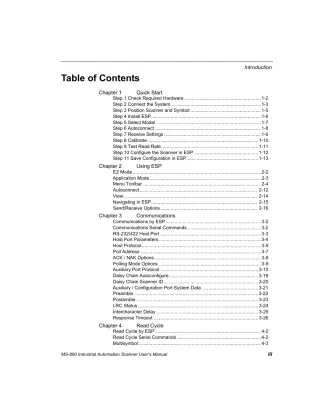
- MS-890 Industrial Automation Scanner User’s Manual1
- About the MS-890 Industrial Automation Scanner8
- About This Manual8
- Highlighting8
- Host Communications8
- Statement of Agency Compliance9
- Warning and Caution Summary10
- Statement of RoHS Compliance11
- 1 Quick Start13
- 2 Using ESP27
- 3 Communications45
- 4 Read Cycle71
- 5 Symbologies95
- 6 I/O Parameters123
- 7 Matchcode155
- 8 Diagnostics169
- 9 Calibration181
- 10 Raster/Laser203
- 11 Terminal213
- 12 Utilities219
- 13 Output Format241
- 14 Wiring Box255
- Appendices265
The whole text · 31 parts
Read the manual here as text
Its text as extracted from the PDF, unedited, in parts; each page opens the PDF at that page.
- Pages 1 to 101-10
- Pages 11 to 2011-20
- Pages 21 to 3021-30
- Pages 31 to 4031-40
- Pages 41 to 5041-50
- Pages 51 to 6051-60
- Pages 61 to 7061-70
- Pages 71 to 8071-80
- Pages 81 to 9081-90
- Pages 91 to 10091-100
- Pages 101 to 110101-110
- Pages 111 to 120111-120
- Pages 121 to 130121-130
- Pages 131 to 140131-140
- Pages 141 to 150141-150
- Pages 151 to 160151-160
- Pages 161 to 170161-170
- Pages 171 to 180171-180
- Pages 181 to 190181-190
- Pages 191 to 200191-200
- Pages 201 to 210201-210
- Pages 211 to 220211-220
- Pages 221 to 230221-230
- Pages 231 to 240231-240
- Pages 241 to 250241-250
- Pages 251 to 260251-260
- Pages 261 to 270261-270
- Pages 271 to 280271-280
- Pages 281 to 290281-290
- Pages 291 to 300291-300
- Pages 301 to 308301-308
The file