Manual · Microscan
Microscan MS-890 Configuration Guide
Manual1 pagePDF 209 KB
The page is below, with its text.
Covers · 1 model
The models it covers
From the manual · read page by page
Key facts from this manual
Each line names its page in the PDF.
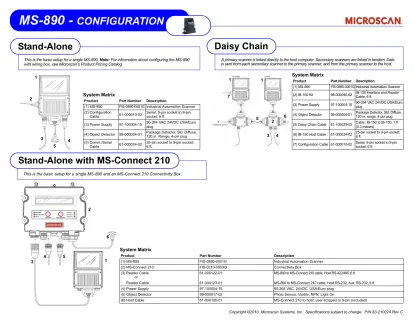
Microscan's one-page configuration sheet (P/N 83-210024 Rev C, 2010) for the MS-890 Industrial Automation Scanner. It shows three system setups (stand-alone, daisy chain, and stand-alone with an MS-Connect 210 Connectivity Box) with the part numbers of the cables, power supply and object detectors each one uses.
- Device
- MS-890 Industrial Automation Scanner, part number FIS-0890-0001G p. 1
- Power supply
- 97-100004-15: 90-264 VAC, 24VDC, USA/Euro plug p. 1
- Configuration cable
- 61-000010-02: serial, 9-pin socket to 9-pin socket, 6 ft. p. 1
- Comm./serial cable
- 61-000034-02: 25-pin socket to 9-pin socket, 6 ft. (also the IB-150 host cable) p. 1
- Object detectors
- 99-000004-01 package detector, std. diffuse, 120 in. range, 4-pin plug; 99-000017-02 photo sensor, visible, NPN, light on (MS-Connect 210 setup) p. 1
- IB-150 kit
- 98-000040-02: IB-150 interface and reader cable, 6 ft. p. 1
- Daisy chain cable
- 61-100029-03: IB-150 to IB-150, 1 ft. (0.3 meters) p. 1
- Connectivity box
- MS-Connect 210, FIS-0210-000XG p. 1
- Reader cables
- MS-890 to MS-Connect 210: 61-000122-01 host RS-422/485, 6 ft.; 61-000123-01 host RS-232, aux. RS-232, 6 ft. p. 1
- Host cable
- 61-000105-01: MS-Connect 210 to host, user-stripped to 9-pin (included) p. 1
What this manual walks you through
- Setting up a single stand-alone MS-890 p. 1
- Daisy chaining secondary scanners through a primary scanner to the host p. 1
- Connecting an MS-890 through an MS-Connect 210 Connectivity Box p. 1
Good to know
- Configuring the MS-890 with a wiring box is not shown; the sheet refers to Microscan's Product Pricing Catalog. p. 1
- In a daisy chain, secondary scanners send data through the primary scanner to the host. p. 1
- Specifications are subject to change. p. 1
Questions this manual answers
What power supply does the Microscan MS-890 use?
Power supply 97-100004-15: 90-264 VAC input, 24VDC, with a USA/Euro plug. p. 1
Which cable configures the MS-890 from a PC?
Configuration cable 61-000010-02, a 6 ft. serial cable with 9-pin sockets at both ends. p. 1
How do I daisy chain several MS-890 scanners?
The daisy chain setup uses the IB-150 kit (98-000040-02) and the 1 ft. IB-150 to IB-150 daisy chain cable (61-100029-03); the primary scanner links to the host. p. 1
What cables connect the MS-890 to an MS-Connect 210?
Reader cable 61-000122-01 for host RS-422/485 or 61-000123-01 for host RS-232 with aux. RS-232, both 6 ft. p. 1
The file
Size and text
Every page · 1
Read it here
Each page as it is printed, and its words beside it, so a phone can search and copy them.
Page1of 1
Open in the PDF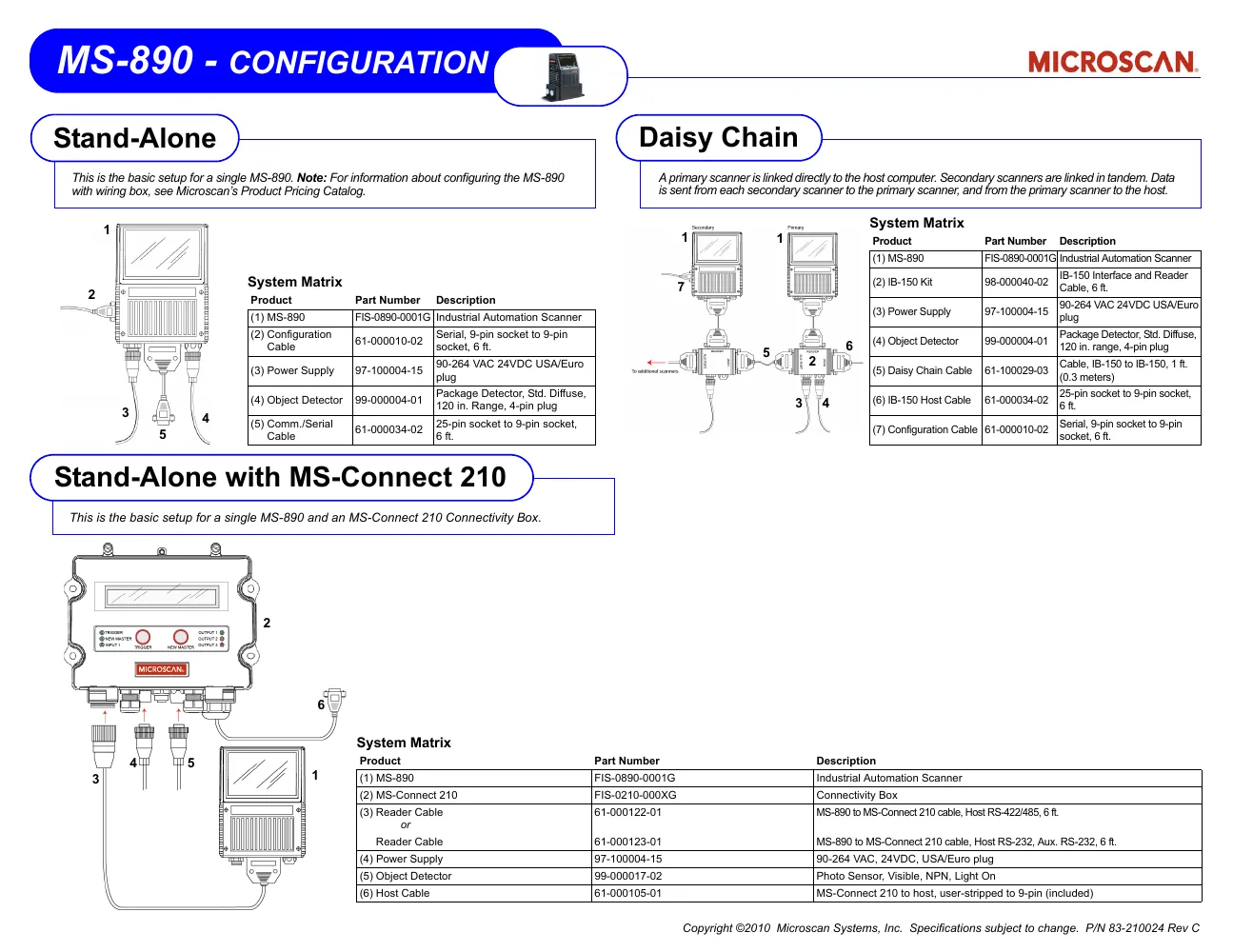
The text of page 1, from the PDF itself
MS-890 - CONFIGURATION Daisy Chain
Stand-Alone This is the basic setup for a single MS-890. Note: For information about configuring the MS-890 with wiring box, see Microscan’s Product Pricing Catalog.
A primary scanner is linked directly to the host computer. Secondary scanners are linked in tandem. Data is sent from each secondary scanner to the primary scanner, and from the primary scanner to the host.
1System Matrix1System Matrix234 517ProductPart Number(1) MS-890
FIS-0890-0001G Industrial Automation Scanner
Description
(2) Configuration Cable
61-000010-02
Serial, 9-pin socket to 9-pin socket, 6 ft.
(3) Power Supply
97-100004-15
90-264 VAC 24VDC USA/Euro plug
(4) Object Detector
99-000004-01
Package Detector, Std. Diffuse, 120 in. Range, 4-pin plug
(5) Comm./Serial Cable
61-000034-02
25-pin socket to 9-pin socket, 6 ft.
652 34ProductPart Number(1) MS-890
FIS-0890-0001G Industrial Automation Scanner
(2) IB-150 Kit
98-000040-02
IB-150 Interface and Reader Cable, 6 ft.
(3) Power Supply
97-100004-15
90-264 VAC 24VDC USA/Euro plug
(4) Object Detector
99-000004-01
Package Detector, Std. Diffuse, 120 in. range, 4-pin plug
(5) Daisy Chain Cable
61-100029-03
Cable, IB-150 to IB-150, 1 ft. (0.3 meters)
(6) IB-150 Host Cable
61-000034-02
25-pin socket to 9-pin socket, 6 ft.
(7) Configuration Cable 61-000010-02
Description
Serial, 9-pin socket to 9-pin socket, 6 ft.
Stand-Alone with MS-Connect 210 This is the basic setup for a single MS-890 and an MS-Connect 210 Connectivity Box.
26System Matrix 4 351ProductPart NumberDescription(1) MS-890FIS-0890-0001G
Industrial Automation Scanner
(2) MS-Connect 210FIS-0210-000XGConnectivity Box(3) Reader Cable or61-000122-01
MS-890 to MS-Connect 210 cable, Host RS-422/485, 6 ft.
Reader Cable
61-000123-01
MS-890 to MS-Connect 210 cable, Host RS-232, Aux. RS-232, 6 ft.
(4) Power Supply
97-100004-15
90-264 VAC, 24VDC, USA/Euro plug
(5) Object Detector
99-000017-02
Photo Sensor, Visible, NPN, Light On
(6) Host Cable
61-000105-01
MS-Connect 210 to host, user-stripped to 9-pin (included)
Copyright ©2010 Microscan Systems, Inc. Specifications subject to change. P/N 83-210024 Rev C