Manual · Intermec
JANUS 2050 Vehicle-Mount Computer (4MB) User's Manual
Manual419 pagesPDF 2.0 MB
User's manual for the Intermec JANUS 2050 vehicle-mount computer (4MB version): setup, operation, configuration and troubleshooting.
Names · 1 model
The models it names
Filed with · 1 model
Also filed with these models on the old site
Summary
What is in it
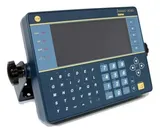
The user's manual for the 4MB version of the Intermec JANUS 2050 vehicle-mount computer. It covers unpacking, mounting the unit on a vehicle, connecting vehicle power, the antenna and a scanner, then the keypad, boot modes, status LEDs, drives and memory. Later chapters explain the DOS software, configuration parameters and bar code symbologies, PC cards, network communications, IRL programming, troubleshooting, command references and specifications.
Its parts
- Getting Started
- Operating the JANUS 2050
- Using the JANUS Software
- Configuring the JANUS 2050
- Using PC Cards
- Communicating With the JANUS 2050
- Working With IRL
- Troubleshooting
- Command Reference
- Configuration Commands
From the manual
Key facts from this manual
Some pages are scans or cannot be read; this says only what the readable text supports. Each line names its page in the PDF.
Intermec's user's manual (P/N 065716-001) for the JANUS 2050 Vehicle-Mount Computer, 4MB version, an RF data collection computer that mounts on a forklift or other vehicle. It walks through mounting, wiring to vehicle power, the antenna and scanner, then configuration, PC cards, communications, IRL programs, troubleshooting and the specifications.
- Device
- Rugged RF vehicle-mount data collection computer, powered by the vehicle's power supply p. 24
- Power
- Nominal 12 to 48 VDC universal power supply with surge, over voltage and reversal protection p. 356
- Memory
- 4MB battery-backed RAM, 512K flash drive C, 2MB ROM drive D; Type I/II PC card drive (not with the 2.4 GHz radio option) p. 357
- Display
- Electroluminescent CGA display, 25 lines x 80 characters, or oversized 13 x 80, 24 x 40 or 13 x 40 p. 356
- Radio
- 900 MHz or 2.4 GHz; works with the Intermec 9181 Base Radio Unit, 9183 Radio Repeater or 0100 Access Point p. 25, 26, 31
- Serial ports
- Two RS-232 serial ports; the scanner port (COM1) and COM2 share one internal hardware port p. 357
- Backup battery
- NiCad, constantly recharged; about 15 hours to charge fully when not operating, 30 hours when operating p. 30, 356
- Operating system
- MS-DOS 6.2 p. 362
- Keypad options
- Full alphanumeric U.S.; French, German, Italian, Spanish; IBM 3270 and 5250 p. 357
- Laser scanners
- 1517, 1518, 1519, 1545 and 1550 laser scanners p. 38
- Scanner cables
- 1545 cable 062798 (6 ft), 062799 (15 ft); 1550 cable 064051 (6 ft), 064052 (15 ft) p. 38
- Other cables
- Battery power cable 058527 (shipped with the unit); null modem adapter cable 063092; printer cable 055001; scanner mount stand 061063 p. 38
- Size and weight
- 13.85 in wide, 5.5 in deep, 10.25 in high; 18 lb (8.18 kg) p. 356
- Environment
- Operating -4°F to +122°F (-20°C to +50°C); storage -4°F to +158°F (-20°C to +70°C); 10% to 90% relative humidity p. 356
What this manual walks you through
- Mounting the unit on a vehicle with the mounting bracket p. 27, 28, 29
- Wiring the power cable to the vehicle battery and chassis ground p. 30
- Attaching the radio antenna p. 31
- Connecting a laser scanner to the input device connector p. 32, 33
- Turning the unit on for the first time through the Boot Loader menu p. 34
- Setting the time and date p. 35
- Scanning angles and avoiding the dead zone p. 37
- COM port pin assignments and the parts to build a COM port connector p. 358
- Input device connector pin assignments p. 359, 360
- The memory map and how memory simulates disk drives p. 361, 362
Good to know
- The antenna must be attached before the unit is turned on, or the internal radio could be damaged; keep units at least 2 feet apart. p. 31
- Turn the unit off before connecting or disconnecting the power or any cable. p. 30, 32
- COM2 cannot be used at the same time as a scanner or other device on the scanner port. p. 357
- Cables that connect 151X or 1545 scanners to a 9450 VMU do not work with the JANUS 2050. p. 359
- The internal battery must be fully charged for the unit to keep its data through a power loss; mounting hardware is not supplied. p. 28, 30
Questions this manual answers
What voltage does the JANUS 2050 need?
It runs from the vehicle's power through a nominal 12 to 48 VDC universal power supply. p. 356
How do I wire the JANUS 2050 power cable?
Cable P/N 058527: red to the battery positive terminal, white to chassis ground, black to the battery negative terminal, shield to chassis ground. p. 30
Which scanners work with the JANUS 2050?
The 1517, 1518, 1519, 1545 and 1550 laser scanners are listed as accessories. p. 38
How much memory does the 4MB JANUS 2050 have?
4MB of battery-backed RAM, a 512K flash drive C and a 2MB ROM drive D. p. 357
Does the yellow button turn the JANUS 2050 off?
No. It puts the unit into a suspend state; the On/Off switch on the back controls power. p. 34
The whole text · 42 parts
Read the manual here as text
Its text as extracted from the PDF, unedited, in parts; each page opens the PDF at that page.
- Pages 1 to 101-10
- Pages 11 to 2011-20
- Pages 21 to 3021-30
- Pages 31 to 4031-40
- Pages 41 to 5041-50
- Pages 51 to 6051-60
- Pages 61 to 7061-70
- Pages 71 to 8071-80
- Pages 81 to 9081-90
- Pages 91 to 10091-100
- Pages 101 to 110101-110
- Pages 111 to 120111-120
- Pages 121 to 130121-130
- Pages 131 to 140131-140
- Pages 141 to 150141-150
- Pages 151 to 160151-160
- Pages 161 to 170161-170
- Pages 171 to 180171-180
- Pages 181 to 190181-190
- Pages 191 to 200191-200
- Pages 201 to 210201-210
- Pages 211 to 220211-220
- Pages 221 to 230221-230
- Pages 231 to 240231-240
- Pages 241 to 250241-250
- Pages 251 to 260251-260
- Pages 261 to 270261-270
- Pages 271 to 280271-280
- Pages 281 to 290281-290
- Pages 291 to 300291-300
- Pages 301 to 310301-310
- Pages 311 to 320311-320
- Pages 321 to 330321-330
- Pages 331 to 340331-340
- Pages 341 to 350341-350
- Pages 351 to 360351-360
- Pages 361 to 370361-370
- Pages 371 to 380371-380
- Pages 381 to 390381-390
- Pages 391 to 400391-400
- Pages 401 to 410401-410
- Pages 411 to 419411-419
The file