Manual · Allen-Bradley
AdaptaScan Software (Cat. No. 2755-ASN) User Manual
Manual224 pagesPDF 2.8 MB
User manual for Allen-Bradley AdaptaScan Software (2755-ASN), used to configure 2755-SN3, -SN5 and -SN8 AdaptaScan bar code readers.
Names · 5 models
The models it names
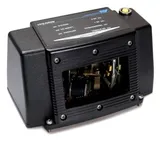 Accu-Sort 2755-SN3Decoded fixed-mount laser barcode scanner from$1,995.001 in stock Accu-Sort 2755-SN5Decoded fixed-mount laser barcode scanner from$1,795.0025 in stock Allen-Bradley 2755-SN5Decoded fixed-mount laser barcode scanner from$1,795.0054 in stock Accu-Sort 2755-SN8Decoded fixed-mount laser barcode scanner from$1,995.009 in stock Allen-Bradley 2755-SN8Decoded fixed-mount laser barcode scanner from$1,995.0014 in stock
Filed with · 1 model
Also filed with these models on the old site

Summary
What is in it
Allen-Bradley user manual for AdaptaScan Software (Cat. No. 2755-ASN), the Windows 95 or Windows NT package used to create, store and download applications to AdaptaScan bar code readers (2755-SN3, -SN5, -SN8). It covers installation, projects, on-line monitoring, a getting started example, scanner and decoder setup, label definitions, serial, DeviceNet, DF1 and DH485 communications, discrete inputs and outputs, messages, match tables, downloading configurations, printing and Dynamic Data Exchange, plus preset read ranges.
Its parts
- Installation
- Working with Projects
- On-Line Communications
- Getting Started
- Scanner Setup
- Defining Labels
- Decoder Setup
- Communication Port Settings
- Configuring Discrete Inputs and Outputs
- Defining Messages
- Using Match Tables
- Uploading/Downloading Configurations
- Printing a Project
- Dynamic Data Exchange
From the manual
Key facts from this manual
Each line names its page in the PDF.
The Allen-Bradley user manual (Publication 2755-838) for AdaptaScan Software, catalog number 2755-ASN, the Windows program that configures the AdaptaScan 2755-SN3, -SN5 and -SN8 bar code readers. It covers installing the software, downloading reader firmware, a getting started example, and setting up the scanner, decoder, ports, inputs and outputs, messages and match tables. Appendices give the preset read range charts for each reader.
- Document
- User manual for AdaptaScan Software, Cat. No. 2755-ASN (Publication 2755-838) p. 1, 12
- Reader
- Scanner and decoder in one compact package, configured from Windows 95 or Windows NT p. 8
- PC requirements
- 486/25 MHz minimum, 8 MB RAM, VGA, 3.5 inch 1.44 MB drive, 2 MB free disk, Windows 95 or Windows NT p. 11
- Configuration cable
- 2755-NC48 for Series B readers, 2755-NC43 for Series A; 9 pin male D to 4 pin female circular p. 11, 15
- Power supplies
- 2755-PW46 120V AC wallmount or 2755-PW47 230V AC desktop p. 50
- Laser
- 660nm laser diode, 1.0 milliwatt max output, Class II p. 75
- Symbologies
- Interleaved 2 of 5, Code 39, Discrete 2 of 5, UPC-A, UPC-E, USPS 2 of 5, EAN-8, EAN-13, Code 128, Pharma Code, Codabar, Code 93 p. 101
- Ports and protocols
- DeviceNet, RS-422/RS-485 and RS-232; serial protocols Terminal (ASCII), DF1 and DH-485 p. 111
- Inputs and outputs
- Two I/O module positions in the wiring base; DeviceNet supports up to 15 discrete outputs and 7 discrete inputs p. 123, 124
- Scan rate
- 2755-SN3: 300, 2755-SN5: 500, 2755-SN8: 800 scans per second p. 198, 199, 200
- Usable scan angle
- 2755-SN3: 60, 2755-SN5: 40, 2755-SN8: 24 degrees at maximum scan angle p. 198, 199, 200
- Operating temperature
- 0 to 50 C p. 197
- Default DeviceNet address
- 63 p. 16
- Preset focus ranges
- A 20, B 104, C 158, C+ 180 units (of 0 to 255), roughly matching 2755-LD4, -LD8 scanners p. 81
What this manual walks you through
- Installing AdaptaScan Software on a PC p. 11, 12, 13, 14
- Checking the reader's DeviceNet address and downloading release firmware p. 15, 16, 17, 18
- Wiring power and a DL10 display for a first UPC-A test setup p. 48, 49, 50, 51, 52
- Choosing linear or raster scanning and setting scan width and angles p. 76, 77, 78, 79
- Focusing the scanner with presets, manual focus or autofocus p. 80, 81, 82
- Choosing a communication port and protocol p. 111
- Using discrete, DeviceNet, timer, package detect and ASCII inputs as triggers p. 124, 125
- Read range charts for each reader by bar width and focus preset p. 197, 198, 199, 200
- LRC and checksum transmission checks on messages p. 205
Good to know
- Downloading firmware while the scanner is on a DeviceNet master/slave network causes unrecoverable damage to the scanner. p. 15
- All devices on the same network must have the same firmware. p. 15
- Do not stare into the laser beam. p. 75
- In raster mode the 2755-SN8 scan width cannot be set below 50%. p. 79
- Settings sent with Apply are lost at power down unless the configuration is downloaded to the reader. p. 78
Questions this manual answers
What computer does AdaptaScan 2755-ASN software need?
At least a 486/25 MHz PC with 8 MB RAM, VGA, a 3.5 inch 1.44 MB drive and 2 MB free disk, running Windows 95 or Windows NT. p. 11
Which configuration cable does an AdaptaScan reader need?
2755-NC48 for a Series B reader or 2755-NC43 for a Series A reader; a 9-to-25 pin adapter may be needed. p. 11, 15
What bar codes can the AdaptaScan reader decode?
Interleaved 2 of 5, Code 39, Discrete 2 of 5, UPC-A, UPC-E, USPS 2 of 5, EAN-8, EAN-13, Code 128, Pharma Code, Codabar and Code 93. p. 101
How fast do the 2755-SN3, -SN5 and -SN8 scan?
300, 500 and 800 scans per second at maximum scan angle. p. 198, 199, 200
What is the default DeviceNet address of an AdaptaScan reader?
It ships with DeviceNet address 63. p. 16
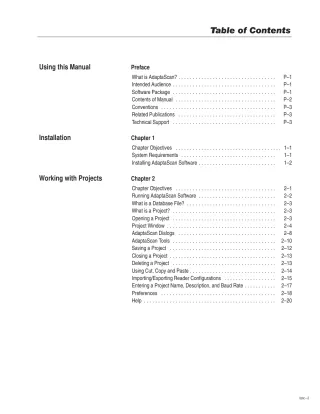
Contents
Chapters and sections
Each line opens the PDF at its page.
- Front Cover1
- Important User Information2
- Preface - Using this Manual8
- 1 - Installation11
- 2 - Working with Projects19
- Chapter Objectives19
- Running AdaptaScan Software20
- What is a Database File?21
- What is a Project?21
- Opening a Project21
- Project Window22
- AdaptaScan Dialogs26
- AdaptaScan Tools28
- Saving a Project30
- Closing a Project31
- Deleting a Project31
- Using Cut, Copy and Paste32
- Importing/Exporting Reader Configurations33
- Entering a Project Name, Description, and Baud Rate35
- Preferences36
- Help38
- 3 - On-Line Communications39
152 more lines, from page 45 on
- Displaying Scanner Metrics45
- 4 - Getting Started48
- Chapter Objectives48
- Configuration Description48
- What You Need49
- Connecting Power50
- Connecting the DL10 Slave51
- Installing the Reader52
- Connecting the Configuration Cable52
- Power-up Sequence52
- Running the AdaptaScan Software53
- Communications Setup54
- Creating a Project55
- Creating a New Reader Configuration55
- Downloading Firmware56
- Defining the Label Setup58
- Configuring the Scanner60
- Configuring the Decoder63
- Configuring the Discrete Outputs64
- Defining a Package66
- Setting the Timer68
- Setting the Serial Port69
- Configuring Message Output70
- Downloading the Configuration72
- Monitoring Reader Operation73
- Dataliner Operation74
- 5 - Scanner Setup75
- 6 - Defining Labels83
- 7 - Decoder Setup100
- 8 - Communication Port Settings110
- 9 - Configuring Discrete Inputs and Outputs122
- Chapter Objectives122
- Helpful Hints122
- Type of Outputs123
- Types of Inputs124
- Selecting Inputs and Outputs126
- Configuring Discrete Inputs and the Package Detect127
- Configuring Discrete Outputs129
- Configuring the Timer130
- Configuring the Input Timers 1 and 2131
- Configuring an ASCII Trigger133
- DeviceNet I/O134
- Configuring DeviceNet Inputs136
- Configuring DeviceNet Outputs137
- 10 - Defining Messages138
- 11 - Using Match Tables153
- Chapter Objectives153
- Helpful Hints153
- What is a Match Table?154
- Match Table Applications155
- Match Rules155
- Defining a Package156
- Using Auto-Load157
- Configuring Match Tables159
- Configuring the Contents of Match Tables161
- Configuring Match Table Outputs163
- Configuring the Match Entry Counter164
- Configuring a Package Definition165
- Configuring a Package Using Match Table Entries167
- Configuring Package Outputs169
- Configuring the Package Counter170
- Configuring the Auto-Load Trigger171
- Viewing Readers with Same Trigger Source172
- 12 - Uploading/Downloading Configurations173
- 13 - Printing a Project180
- 14 - Dynamic Data Exchange186
- A - ASCII Character Set194
- B - Preset Read Ranges A, B, C, C+197
- C - Metacharacters201
- D - Transmission Check205
- Glossary206
- Index218
- Back Cover224
The whole text · 27 parts
Read the manual here as text
Its text as extracted from the PDF, unedited, in parts; each page opens the PDF at that page.
- Pages 1 to 71-7
- Preface - Using this Manual8-10
- 1 - Installation11-18
- 2 - Working with Projects, pages 19 to 2819-28
- 2 - Working with Projects, pages 29 to 3829-38
- 3 - On-Line Communications39-47
- 4 - Getting Started, pages 48 to 5648-56
- 4 - Getting Started, pages 57 to 6557-65
- 4 - Getting Started, pages 66 to 7466-74
- 5 - Scanner Setup75-82
- 6 - Defining Labels, pages 83 to 9183-91
- 6 - Defining Labels, pages 92 to 9992-99
- 7 - Decoder Setup100-109
- 8 - Communication Port Settings110-121
- 9 - Configuring Discrete Inputs and Outputs, pages 122 to 129122-129
- 9 - Configuring Discrete Inputs and Outputs, pages 130 to 137130-137
- 10 - Defining Messages138-152
- 11 - Using Match Tables, pages 153 to 162153-162
- 11 - Using Match Tables, pages 163 to 172163-172
- 12 - Uploading/Downloading Configurations173-179
- 13 - Printing a Project180-185
- 14 - Dynamic Data Exchange186-193
- A - ASCII Character Set194-196
- B - Preset Read Ranges A, B, C, C+197-200
- C - Metacharacters201-204
- Pages 205 to 217205-217
- Pages 218 to 224218-224
The file