Manual · Allen-Bradley
AtomScan Bar Code Scanner (Catalog No. 2755-L6SA, -L6RA, -L6SB, -L6RB) User Manual
Manual44 pagesPDF 198 KB
User manual for the Allen-Bradley AtomScan 2755-L6 compact laser bar code scanners, single line and raster, used with 2755 decoders.
Names · 1 model
The models it names
Filed with · 1 model
Also filed with these models on the old site

Summary
What is in it
Allen-Bradley's user manual for the AtomScan bar code scanners, catalog numbers 2755-L6SA, -L6RA, -L6SB and -L6RB: small fixed-mount laser scanners for packaging and labeling machines that send signals to an Enhanced Decoder such as the 2755-DS1A or 2755-DD1A. It describes the product family and accessories, how to design the system (symbol orientation, read range, scans per symbol, pitched symbols), installation and wiring, package sensors, laser safety and operation, cleaning, troubleshooting and specifications.
Its parts
- Using this Manual
- AtomScan Product Family
- Designing the System
- Installing the AtomScan Scanner
- Operating the Scanner
- Maintenance and Troubleshooting
From the manual
Key facts from this manual
Each line names its page in the PDF.
User manual for the Allen-Bradley AtomScan bar code scanner, catalog numbers 2755-L6SA, -L6RA, -L6SB and -L6RB. It explains how to choose, mount, aim and wire the scanner with a package sensor and a 2755-DS1A or -DD1A Enhanced Decoder, how to operate it safely, and how to clean and troubleshoot it, with full specifications.
- Device
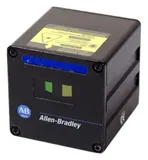
- Small fixed laser bar code scanner with a 10-sided rotating mirror, suited to small packaging and labeling machines p. 7
- Scan beam
- 2755-L6SA and -L6SB: single line; 2755-L6RA and -L6RB: raster (10 scan lines over 2 degrees of arc) p. 9
- Decoders
- Needs an adapter and cable to a 2755-DS1A Enhanced Single-Head or 2755-DD1A Enhanced Dual-Head Decoder p. 10
- Scan rate and range
- 330 scans per second; 1 to 10 inches from the front window p. 39
- Connector
- RJ-45 8-pin modular socket; cable up to 15-feet (4.5 m) p. 39
- Cables and adapter
- 2755-CS10 10 feet (3 meters) or 2755-CS15 15 feet (4.6 meters) scanner to adapter; 2755-NC18 adapter cable to decoder; 2755-CP13 package detect extension 13 ft. p. 10
- Mounting plate
- 2755-NM7 for top mounting; otherwise four threaded #6-32 holes in the base p. 10, 29
- Package sensors
- 12 V DC sinking photoswitch with QD option, such as 42SRU-6203-QD or 42GRU-9200-QD p. 11
- Package sensor port
- +12V DC on pin 1, at most 100mA; sense line on pin 2 must sink 5mA at +12V DC p. 33
- Size and weight
- 2.25 x 2.25 x 2.25 inches (5.7 x 5.7 x 5.7 cm); 8 oz. (227 g) p. 39
- Operating temperature
- 32° to 104° F (0° to 40° C); humidity up to 95%, non-condensing p. 39
- Scan line width
- 8.5 inches at an 8-inch distance (21.5 cm at 20 cm) p. 39
- Label contrast
- 25% minimum absorption dark/light differential at 670 nm p. 39
- Laser life
- 50,000 hrs. at 25° C p. 39
What this manual walks you through
- Choosing the right AtomScan scanner for distance, bar width, symbol size and speed p. 18
- Aiming the scanner 20 to 30 degrees off the perpendicular p. 28
- Mounting from the bottom or with the mounting plate p. 29, 30
- Connecting the scanner, adapter module and decoder p. 31
- Placing and wiring a package sensor p. 32, 33
- Setting the laser to on, triggered or off from the decoder p. 35
- Checking operation with the decoder's performance reading p. 36
- Cleaning the scan windows p. 37
- What to check when the scanner does not scan or the decoder does not decode p. 38
Good to know
- Made for clean places; it tolerates light dust but not harsh settings such as wash-down, where the manual points to the NEMA Type 4 2755-LD4x4 or 2755-LD8x4. p. 28
- Do not connect or disconnect the scanner while the decoder has power on. p. 31
- If an intense dot of light appears instead of a thin line, remove power from the decoder at once and replace the scanner. p. 35
- The scanner has no user-serviceable parts and should not be opened. p. 35
- The manual states it is a Class II laser product (670 nm, 1.0 milliwatt max); do not stare into the beam. p. 8
Questions this manual answers
What decoder works with the Allen-Bradley AtomScan 2755-L6?
The 2755-DS1A Enhanced Single-Head Decoder or the 2755-DD1A Enhanced Dual-Head Decoder, connected through an adapter and cable. p. 10
What is the difference between the 2755-L6SA and 2755-L6RA?
The L6SA projects a single scan line; the L6RA projects a raster pattern, which helps with poor quality bar code symbols. p. 9
Which cable connects the AtomScan scanner to the decoder?
A 2755-CS10 (10 ft) or 2755-CS15 (15 ft) cable runs from the scanner's RJ-45 to the 2755-NC18 Adapter Module, whose DB15 connector plugs into the decoder's Scanner port. p. 10, 31
How far can the 2755-L6 read a bar code?
Its operating range is 1 to 10 inches from the front window. p. 39
What should I check if the AtomScan does not scan?
Check decoder power and the scanner connections, set the laser to Always ON, test the package sensor, and replace the scanner if nothing else is wrong. p. 38
Contents
Chapters and sections
Each line opens the PDF at its page.
The whole text · 8 parts
Read the manual here as text
Its text as extracted from the PDF, unedited, in parts; each page opens the PDF at that page.
The file