Manual · Allen-Bradley
DS/DD Bar Code Decoder to 2760-RB/PLC-5 Application Note
Manual12 pagesPDF 80 KB
Application note for connecting the Allen-Bradley 2755-DS/DD bar code decoder to a PLC-5 through the 2760-RB module over RS-232.
Covers · 2 models
The models it covers

Summary
What is in it
An Allen-Bradley application note on interfacing the 2755-DS or 2755-DD enhanced bar code decoder to the 2760-RB flexible interface module in a 1771 rack with a PLC-5, using dumb terminal protocol over RS-232 with the 2760-SFC1 or -SFC2 protocol cartridge. It lists hardware and software requirements, DIP switch settings, the decoder and 2760-RB configuration screens, example PLC ladder programs and cable diagrams.
Its parts
- Overview
- Hardware Requirements
- Software Requirements
- Related Publications
- Configuration
- Running the Application
From the manual · read page by page
Key facts from this manual
Each line names its page in the PDF.
Allen-Bradley application note from September 1995 on connecting a 2755-DS or 2755-DD bar code decoder to a PLC-5 through a 2760-RB interface module over RS-232, using a 2760-SFC1 or -SFC2 protocol cartridge. It gives the hardware and software needed, DIP switch and configuration settings, sample ladder programs and cable diagrams.
- Purpose
- Connects a 2755-DS/DD decoder to a 2760-RB interface module by dumb terminal protocol over RS-232 p. 1
- Hardware
- 2760-RB in a Bulletin 1771 rack with a PLC-5 processor; 2760-SFC1 or -SFC2 protocol cartridge; 1784-KT card in the PC p. 1
- Software
- Bulletin 6200 development software for the PLC-5; a terminal emulator such as Procomm p. 1
- Mounting
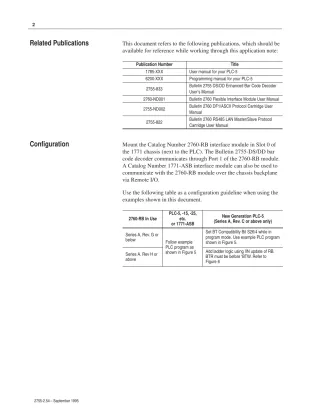
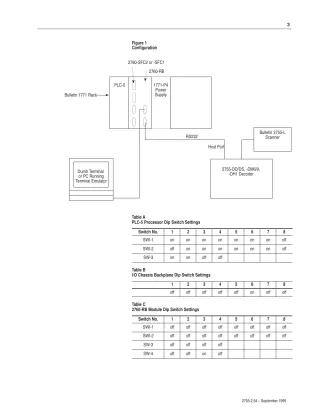
- 2760-RB in Slot 0 of the 1771 chassis, next to the PLC; decoder on Port 1 of the 2760-RB p. 2
- Remote I/O
- A 1771-ASB interface module can reach the 2760-RB over the backplane via Remote I/O p. 2
- 2760-RB settings
- Example screen: 9600 bits per second, 8 bits no parity, XON/XOFF disabled, RS232, modem control disabled p. 6
- Decoder connectors
- Host Port and Auxiliary Port are 25-pin D, male p. 9
- Related manual
- Publication 2755-833, Bulletin 2755 DS/DD Enhanced Bar Code Decoder User's Manual p. 2
What this manual walks you through
- Mounting the 2760-RB and connecting the decoder p. 2
- Setting DIP switches on the PLC-5, chassis backplane and 2760-RB p. 3
- Entering the decoder host communications and message format screens p. 4
- Configuring the 2760-RB module screens p. 4, 5, 6
- Example ladder programs for PLC-5 processors and the 1771-ASB p. 7, 8
- Wiring cables to the terminal, PC and 2760-RB ports p. 9
Good to know
- Reset the 2760-RB to factory defaults with Main Menu Selection 90B before configuring it. p. 4
- Only the done bit shows a completed block transfer; the BRR bit is unreliable for reads. p. 7
- On a New Generation PLC-5, set BT Compatibility Bit S26/4 in program mode. p. 2
- The IIN rung for Revision H or above modules applies only to local racks, not remote racks. p. 8
Questions this manual answers
How do I connect a 2755-DS decoder to a PLC-5?
Through a 2760-RB interface module in the PLC-5's 1771 rack, over RS-232 with a 2760-SFC1 or -SFC2 protocol cartridge. p. 1
What serial settings does the 2760-RB port use for a 2755-DD decoder?
The example uses 9600 bits per second, 8 bits, no parity, XON/XOFF disabled, RS232. p. 6
Which chassis slot does the 2760-RB go in?
Slot 0 of the 1771 chassis, next to the PLC. p. 2
Contents
Chapters and sections
Each line opens the PDF at its page.
The whole text · 2 parts
Read the manual here as text
Its text as extracted from the PDF, unedited, in parts; each page opens the PDF at that page.
The file