Manual · Allen-Bradley
AtomScan+ Bar Code Readers User Manual (Cat. Nos. 2755-LS7-SA, 2755-LS7-SB, 2755-LS7-RA, 2755-LS7-RB, 2755-LS7-SBV, and 2755-LS7-RBV)
Manual141 pagesPDF 914 KB
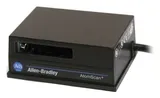
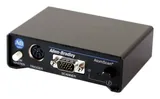
User manual for the Allen-Bradley AtomScan+ 2755-LS7 fixed-mount laser bar code readers, their 2755-LS7-IB1 and -IB2 interface boxes and power supply.
Names · 1 model
The models it names
Filed with · 2 models
Also filed with these models on the old site

Summary
What is in it
User manual for the Allen-Bradley AtomScan+ bar code readers (2755-LS7-SA, -SB, -RA, -RB, -SBV and -RBV) with the 2755-LS7-IB1 and -IB2 interface boxes and the power supply. It explains the hardware, how to design a scanner system (symbol quality, orientation, read range and number of scans), wiring with or without an interface box, menu and serial configuration, operational commands, maintenance and troubleshooting, plus specifications, cable pinouts, multidrop communications and application examples with SLC 5/03, SLC 5/04 and PLC-5 controllers.
Its parts
- Preface
- Introduction to AtomScan Bar Code Readers
- Hardware Features
- Designing Your Scanner System
- Installing Your Hardware
- Configuring Your Reader
- Hardware Operation
- Maintenance and Troubleshooting
- Specifications
- Cable Pinouts
- ASCII Table
- Multidrop Communications
- Application Examples
- European Union Directives
- Glossary
From the manual
Key facts from this manual
Each line names its page in the PDF.
This is the Allen-Bradley user manual for the AtomScan+ fixed-mount laser bar code readers 2755-LS7-SA, 2755-LS7-SB, 2755-LS7-RA, 2755-LS7-RB, 2755-LS7-SBV and 2755-LS7-RBV, with the 2755-LS7-IB1 and 2755-LS7-IB2 interface boxes and the 2755-LS7-PW1 power supply. It walks through system design, mounting, wiring, menu configuration, window cleaning and troubleshooting, and gives specifications and cable pinouts. The 2755-DS is not named in the pages read.
- Device
- Fixed-mount laser bar code reader, single scan line or raster pattern, straight ahead or right angle reading p. 20
- Versions
- 2755-LS7-SA high density single line; 2755-LS7-SB low density single line; 2755-LS7-RA high density raster; 2755-LS7-RB low density raster; 2755-LS7-SBV right angle single line; 2755-LS7-RBV right angle raster p. 20
- Power
- +5V dc ± 4% regulated @ 480 mA, 200 mV p-p maximum ripple p. 106
- Interface boxes
- 2755-LS7-IB1 with RS-232 and RS-485; 2755-LS7-IB2 with RS-232 and RS-422 p. 20
- Power supply
- 2755-LS7-PW1, +5 V output p. 20, 107
- Scan rate
- Approximately 300 to 550 scans per second p. 106
- Symbologies
- UPC-A, UPC-E, EAN 8, EAN 13, Code 39, Code 128, EAN 128, Codabar, Interleaved 2 of 5 p. 18
- Default serial settings
- 9600 baud, even parity, one stop bit, 7 data bits p. 46
- Laser
- 670 nm nominal output wavelength p. 106
- Skew and pitch
- Skew ± 40° and pitch ± 50° from normal p. 106
- Housing
- NEMA 12, IP 64 p. 106
- Operating temperature
- 32° F to 122° F (0° C to 50° C), humidity up to 95% noncondensing p. 106
- Cable distances
- Reader within 3 ft. (0.91 m) of the interface box; power supply within 6 ft. (1.83 m) of it p. 11, 12
- Package detectors
- PHOTOSWITCH photoelectric sensors 42GRP-9000, 42GRU-9000, 42GRU-9200, 42GRC-9000 or 42GRR-9000 on the trigger connector p. 17
What this manual walks you through
- Checking the contents of the shipping boxes p. 10
- Designing the scanner system: scans per symbol, range and reader angle p. 10
- Choosing a reader by minimum bar code width and read range p. 26, 28
- Mounting the reader, interface box and power supply p. 11, 12
- Connecting the reader, power supply, package detect and host p. 12
- Opening the configuration main menu from a terminal program p. 46, 47
- Cleaning the scan window p. 102
- Troubleshooting menus, decode rates, triggering and messages p. 103, 104
- Reader cable and interface box port pinouts p. 108, 111
Good to know
- Do not clean the window with abrasive materials such as disposable wipes or tissue, or with solvents like alcohol or acetone. p. 102
- The readers have no user serviceable parts; opening the scan head could expose laser diode power of up to 5 mW. p. 19
- Do not aim the reader perpendicular to the symbol, to avoid directly reflected laser light. p. 10
- The scan beam must not hit the package sensor's reflector; the glare can blind the reader temporarily. p. 10
- Pulsed infrared object detectors shining into the reader or onto the label can seriously degrade the decode rate. p. 103
Questions this manual answers
What power does the Allen-Bradley 2755-LS7 reader need?
The reader takes +5V dc ± 4% regulated at 480 mA; the 2755-LS7-PW1 power supply is listed for it. p. 20, 106
What is the difference between the 2755-LS7-IB1 and 2755-LS7-IB2 interface boxes?
Both have an RS-232 port; the IB1 adds RS-485 and the IB2 adds RS-422. A mode switch toggles the IB1 host communications between RS-232 and RS-485. p. 17, 20
What are the default communication settings of the AtomScan+ reader?
9600 baud, even parity, one stop bit and 7 data bits. p. 46
How do I restore the factory settings on a 2755-LS7 reader?
Press the default switch on the interface box, which restores the factory configuration settings to the reader. p. 17
Which bar codes can the AtomScan+ reader decode?
UPC-A, UPC-E, EAN 8, EAN 13, Code 39, Code 128, EAN 128, Codabar and Interleaved 2 of 5. p. 18
Contents
Chapters and sections
Each line opens the PDF at its page.
- Front Cover1
- Important User Information2
- Preface7
- 1 - Introduction to AtomScan Bar Code Readers9
- 2 - Hardware Features16
- 3 - Designing Your Scanner System21
- 4 - Installing Your Hardware31
- Installing the System Hardware32
- Connecting System Hardware Together When Using an Interface Box35
- Connecting System Hardware Together When USing an Interface Box with an Auxiliary Monitor38
- Connecting System Hardware Together When Using an Interface Box in a Daisy-Chain Configuration41
- Connecting System Hardware Together When Not Using an Interface Box45
- 5 - Configuring Your Reader46
The whole text · 18 parts
Read the manual here as text
Its text as extracted from the PDF, unedited, in parts; each page opens the PDF at that page.
- Pages 1 to 61-6
- Pages 7 to 157-15
- 2 - Hardware Features16-20
- 3 - Designing Your Scanner System21-30
- 4 - Installing Your Hardware31-45
- 5 - Configuring Your Reader, pages 46 to 5546-55
- 5 - Configuring Your Reader, pages 56 to 6556-65
- 5 - Configuring Your Reader, pages 66 to 7566-75
- 5 - Configuring Your Reader, pages 76 to 8576-85
- 6 - Hardware Operation, pages 86 to 9386-93
- 6 - Hardware Operation, pages 94 to 10194-101
- 7 - Maintenance and Troubleshooting102-104
- A - Specifications105-107
- B - Cable Pinouts108-111
- Pages 112 to 116112-116
- E - Application Examples, pages 117 to 125117-125
- E - Application Examples, pages 126 to 133126-133
- Pages 134 to 141134-141
The file