Manual · Intermec
TRAKKER Antares 2455 Vehicle-Mount Terminal User's Manual
Manual422 pagesPDF 1.4 MB
User's manual for the Intermec TRAKKER Antares 2455 vehicle-mount terminal: installation, configuration, networking and diagnostics.
Covers · 1 model
The models it covers
Summary
What is in it
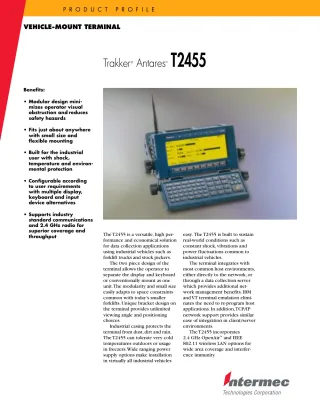
The full user's manual for the Intermec TRAKKER Antares 2455 vehicle-mount terminal. It covers unpacking and mounting the terminal on a vehicle, connecting the antenna, keyboard, DC power supply and scanner, configuring it by menu or by scanning bar codes, serial and RF network communications with the DCS 300, running custom applications, troubleshooting, replacing the backup battery, diagnostics, and full reader and configuration command references.
Its parts
- Introducing the TRAKKER Antares 2455 Terminal
- Installing the Terminal
- Configuring the Terminal
- Operating the Terminal in a Network
- Using Custom Applications
- Troubleshooting
- Running Diagnostics
- Reader Command Reference
- Configuration Command Reference
From the manual
Key facts from this manual
Each line names its page in the PDF.
User's manual for the Intermec TRAKKER Antares 2455 (T2455) vehicle-mount terminal, with chapters on installation, configuration, networking, custom applications, troubleshooting, diagnostics and reader commands. This summary draws on its accessory list, troubleshooting tables, error numbers and the specifications appendix, which gives part numbers and port pin assignments.
- Device
- Vehicle-mount terminal; programmable, or running IBM 3270, IBM 5250 or VT100/220/320 and ANSI terminal emulation p. 30, 365
- Screen
- 25 lines by 80 characters, CGA-compatible, backlit LCD or electroluminescent (EL) p. 365
- Memory
- 2MB flash (750K as a flash drive for applications and files), 1MB battery-backed RAM (512K for user); options for 4MB flash and a 2MB or 4MB SRAM drive p. 366
- Radio
- 2.4 GHz WLI Forum OpenAir compatible frequency hopping radio, 100 mW maximum, 1.6 Mbits per second (800 Kbps fallback); 500 feet (152 meters) or more indoors, 1,500 feet (457 meters) or more outdoors p. 366
- Power
- Vehicle DC kits 10 to 36 VDC (Part No. 067698) or 15 to 96 VDC (Part No. 067699); AC power supply Part No. 065236 with adapter cable 066842 for desktop use p. 30
- Backup battery
- Rechargeable NiCd 700 mA pack, replacement Part No. 066900S-001; full charge in about 14 hours p. 174, 190, 364
- Serial ports
- RS-232C ports COM1 and COM4 (COM4 through the Scanner port); XMODEM/YMODEM; Configurable Serial Protocol, Polling Mode D, Master Polling, Binary p. 31, 366
- Scanners
- 1517, 1518 and 1519 laser scanners; 1550 and 1551 laser scanners; 1552 cordless laser scanner with 9745 base station p. 367
- Scanner cables
- 151X: 6 ft 066845, 25 ft 067540; 1550: 6 ft 067541, 25 ft 067542; 1551: 6 ft 067730, 25 ft 067731; 9745 base station wand emulation cable 067364-016 p. 367
- Other cables
- RS-232 null-modem adapter 066847; COM port adapter 061799 for COM4; Codewriter 4102 printer cable 067642; O’Neil MicroFlash3 printer cable 067643 p. 367
- Keyboard
- Accessory keyboard Part No. 067028 with 55 keys, 5 function keys, ABCD layout; or a PC-AT keyboard with adapter cable 066848 p. 30, 365
- Dimensions
- L 11.2 x H 6.0 x D 4.2 in (28.4 x 15.2 x 10.7 cm), 8.9 lbs (4.04 kg) without keyboard; keyboard 11.2 x 4.1 x 1.7 in, 2.2 lbs (1.0 kg) p. 363, 364
- Symbologies
- Codabar, Code 93, Code One, Code 128, Code 11, Interleaved 2 of 5, Code 16K, MSI, Code 2 of 5, PDF 417, Code 39, Plessey, Code 49, UPC/EAN p. 366
- COM1 pins
- 1 Data Carrier Detect, 2 Received, 3 Transmitted, 4 Data Terminal Ready, 5 Ground, 6 Data Set Ready, 7 Ready to Send, 8 Clear to Send, 9 and 10 Reserved p. 369
What this manual walks you through
- Choosing accessories and their part numbers p. 30, 31
- Three ways to mount the terminal and keyboard p. 31
- Solving problems while operating the terminal p. 173, 174
- Restoring the default configuration p. 173
- Fixing a laser scanner that will not read labels p. 182, 183
- Replacing the backup battery p. 190
- Reading Error Logger error numbers p. 217
- Making serial cables from the port pin assignments p. 368, 369, 370
- Default configuration settings p. 370
Good to know
- The terminal cannot run without an external power supply. p. 173
- Replacing the backup battery loses all data stored in RAM. p. 190
- The 9745 wand emulation cable and the COM port adapter cable do not give an environmentally sealed connection. p. 367
- With several symbologies enabled, the terminal may now and then decode a label in the wrong one; enable only those in use. p. 173
- Do not look into the scanner window or at a reflection of the laser beam while it is scanning. p. 182
Questions this manual answers
Intermec 2455 screen is blank and the Power light is blinking
Make sure the external power supply is connected. The terminal cannot run without one. p. 173
What does error 0x66 mean on the T2455?
On the Error Logger screen, 0x66 means the network is not active or not configured properly. p. 217
What is the part number of the T2455 backup battery?
Part No. 066900S-001, a rechargeable NiCd 700 mA pack. Replacing it erases the data stored in RAM. p. 190, 364
Which cable connects a 1551 scanner to the T2455?
The 1551 laser scanner cable, 6 feet (Part No. 067730) or 25 feet (Part No. 067731). p. 367
The whole text · 43 parts
Read the manual here as text
Its text as extracted from the PDF, unedited, in parts; each page opens the PDF at that page.
- Pages 1 to 101-10
- Pages 11 to 2011-20
- Pages 21 to 3021-30
- Pages 31 to 4031-40
- Pages 41 to 5041-50
- Pages 51 to 6051-60
- Pages 61 to 7061-70
- Pages 71 to 8071-80
- Pages 81 to 9081-90
- Pages 91 to 10091-100
- Pages 101 to 110101-110
- Pages 111 to 120111-120
- Pages 121 to 130121-130
- Pages 131 to 140131-140
- Pages 141 to 150141-150
- Pages 151 to 160151-160
- Pages 161 to 170161-170
- Pages 171 to 180171-180
- Pages 181 to 190181-190
- Pages 191 to 200191-200
- Pages 201 to 210201-210
- Pages 211 to 220211-220
- Pages 221 to 230221-230
- Pages 231 to 240231-240
- Pages 241 to 250241-250
- Pages 251 to 260251-260
- Pages 261 to 270261-270
- Pages 271 to 280271-280
- Pages 281 to 290281-290
- Pages 291 to 300291-300
- Pages 301 to 310301-310
- Pages 311 to 320311-320
- Pages 321 to 330321-330
- Pages 331 to 340331-340
- Pages 341 to 350341-350
- Pages 351 to 360351-360
- Pages 361 to 370361-370
- Pages 371 to 380371-380
- Pages 381 to 390381-390
- Pages 391 to 400391-400
- Pages 401 to 410401-410
- Pages 411 to 420411-420
- Pages 421 to 422421-422
The file