Manual · Microscan
MINI Hawk Xi High Performance Imager User Manual
Manual388 pagesPDF 6.2 MB
User manual for the Microscan MINI Hawk Xi high performance fixed-mount imager: setup, ESP software, communications and symbologies.
Covers · 1 model
The models it covers
Summary
What is in it
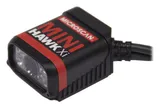
The full user manual for the Microscan MINI Hawk Xi, a compact fixed-mount imager that reads linear and 2D symbols. It starts with an 11-step quick start, then explains setup through the ESP (Easy Setup Program), serial commands and the EZ Button. Later chapters cover communications and Ethernet, calibration, read cycle and triggering, symbologies, I/O parameters, symbol quality grading, matchcode, camera setup, the configuration database, utilities and output formatting, with specifications and EtherNet/IP setup in the appendices.
Its parts
- Quick Start
- Using ESP
- Communications
- Calibration
- Read Cycle
- Symbologies
- I/O Parameters
- Symbol Quality
- Matchcode
- Camera and IP Setup
- Configuration Database
- Terminal
- Utilities
- Output Format
From the manual
Key facts from this manual
Some pages are scans or cannot be read; this says only what the readable text supports. Each line names its page in the PDF.
The Microscan user manual for the MINI Hawk Xi High Performance Imager, an Ethernet imager in WVGA and SXGA versions, and its QX-1 Interface Device. It walks through setup with the EZ Button, ESP software and serial commands, and covers communications, calibration, read cycles, symbologies, I/O, matchcode, camera and IP setup and output format. Appendices give specifications, accessories, wiring, EtherNet/IP and Allen-Bradley PLC setup.
- Device
- Compact imager with X-Mode decoding, Ethernet TCP/IP, M12 cabling, 10-30 VDC and optoisolated I/O; Standard, High and Ultra High Density options p. 8
- Model number key
- FIS-6310-CLSOG: C 1 = Ethernet; L 1 Standard, 2 High, 3 Ultra High Density; S 0 = WVGA, 1 = SXGA; O 0 = Standard, 1 = Custom p. 14
- Resolution
- SXGA: 1280 by 1024 pixels; WVGA: 752 by 480 pixels p. 326
- Interfaces
- RS-232 and Ethernet TCP/IP; EtherNet/IP as a Generic Device, Vendor ID 1095, Product Code 6310 p. 326, 362
- Connector
- Dual cable: 6 ft. industrial Ethernet cable with RJ45 plug and 3 ft. cable with M12 plug p. 326
- Power
- 10-30 VDC, 200 mV p-p max ripple, 132 mA at 24 VDC (typ.); for a UL-listed Class II supply rated 24 VDC at 5 Watts or more p. 9, 333
- Size and weight
- 1" (25.4 mm) high, 1.8" (45.7 mm) wide, 2.1" (53.3 mm) deep; 3.2 oz. (91 g) p. 326
- Focal range
- 1.3 to 9.3” (33 to 236 mm), autofocus; pitch ±30°, skew ±30°, tilt 360° p. 326
- Environment
- Operating 0° to 40°C (32° to 104°F); storage -50° to 75° C; humidity up to 90% non-condensing; enclosure IP54, category 2 p. 326
- Discrete I/O
- Trigger and New Master inputs bi-directional, optoisolated, 4.5-28V rated (10 mA at 28 VDC); outputs 1, 2, 3 optoisolated, 1-28V rated, under 100 mA at 24 VDC p. 326
- Quick start parts
- QX-1 Interface Device 98-000103-02; Power Supply, M12 12-pin Socket, 1.3 m 97-000003-03; Photo Sensor, M12 4-pin Plug, NPN, Dark On, 2 m 99-000020-02 p. 14
- QX-1 Interface Device
- 4-pin trigger connector T, 12-pin plug connectors 1 and 3, 12-pin socket connector 2; Power and Trigger switches route power and trigger p. 334
- Accessories
- M12 cordsets, serial host cables, MS-Connect 210 connectivity boxes, relay modules, photo sensors, mounting arm, brackets, right angle mirror and diffuser kits p. 331, 332
- IP address
- Static, entered in ESP, or DHCP from a DHCP or BOOTP server p. 54
What this manual walks you through
- Connecting the imager standalone, with or without the QX-1 p. 15
- Positioning the imager and symbol p. 16
- Installing ESP p. 17
- Calibrating by EZ Button, ESP or serial command p. 22
- Testing the read rate p. 23
- Choosing static or DHCP IP addressing p. 54
- Read ranges for the WVGA and SXGA models p. 328
- Routing power and trigger through the QX-1 p. 334
- Wiring NPN or PNP outputs and inputs p. 335, 336, 337, 338
- Setting up EtherNet/IP messaging p. 362
Good to know
- The baseplate may exceed 70° C at maximum operating temperature and can cause burns. p. 9
- NPN and PNP cannot be mixed in one system, because the output common is shared by all outputs, and the input common by all inputs. p. 335, 338
- Connect all cables before applying power, and power down before disconnecting any cable. p. 15
- Clean the hard-coated window only with 100% isopropyl alcohol. p. 357
- Do not insulate the stand mount: the bottom panel needs metal-to-metal contact to shed heat. p. 357
Questions this manual answers
What power supply does the Microscan MINI Hawk Xi use?
A UL-listed Class II supply rated 24 VDC at 5 Watts or more; the quick start lists Power Supply, M12 12-pin Socket, 1.3 m, 97-000003-03. p. 9, 14
Does the MINI Hawk Xi support DHCP?
Yes. In DHCP mode it gets its IP address, subnet and gateway from a DHCP or BOOTP server; in static mode it uses the address entered in ESP. p. 54
What is the MINI Hawk Xi EtherNet/IP vendor ID and product code?
Vendor ID 1095, Product Code 6310, device type 0x00 Generic Device. p. 362
How do I calibrate the MINI Hawk Xi?
Hold the EZ Button about two seconds until two short beeps, click Calibrate in ESP, or send <@CAL> from a terminal program. p. 22
What does the MINI Hawk Xi FIS number mean?
In FIS-6310-CLSOG, C is communication (1 Ethernet), L the lens density, S the sensor (0 WVGA, 1 SXGA) and O the option. p. 14
Contents
Chapters and sections
Each line opens the PDF at its page.
- MINI Hawk Xi High Performance Imager User Manual1
- About the MINI Hawk Xi High Performance Imager8
- MINI Hawk Xi Communications8
- Warning and Caution Summary9
- Statement of Agency Compliance10
- Statement of RoHS Compliance11
- 1 Quick Start13
- 2 Using ESP27
- 3 Communications45
- 4 Calibration65
- 5 Read Cycle85
- 6 Symbologies113
- 7 I/O Parameters155
- 8 Symbol Quality203
- 9 Matchcode219
- 10 Camera and IP Setup231
- 11 Configuration Database261
- 12 Terminal279
- 13 Utilities285
- 14 Output Format311
- Appendices325
The whole text · 39 parts
Read the manual here as text
Its text as extracted from the PDF, unedited, in parts; each page opens the PDF at that page.
- Pages 1 to 101-10
- Pages 11 to 2011-20
- Pages 21 to 3021-30
- Pages 31 to 4031-40
- Pages 41 to 5041-50
- Pages 51 to 6051-60
- Pages 61 to 7061-70
- Pages 71 to 8071-80
- Pages 81 to 9081-90
- Pages 91 to 10091-100
- Pages 101 to 110101-110
- Pages 111 to 120111-120
- Pages 121 to 130121-130
- Pages 131 to 140131-140
- Pages 141 to 150141-150
- Pages 151 to 160151-160
- Pages 161 to 170161-170
- Pages 171 to 180171-180
- Pages 181 to 190181-190
- Pages 191 to 200191-200
- Pages 201 to 210201-210
- Pages 211 to 220211-220
- Pages 221 to 230221-230
- Pages 231 to 240231-240
- Pages 241 to 250241-250
- Pages 251 to 260251-260
- Pages 261 to 270261-270
- Pages 271 to 280271-280
- Pages 281 to 290281-290
- Pages 291 to 300291-300
- Pages 301 to 310301-310
- Pages 311 to 320311-320
- Pages 321 to 330321-330
- Pages 331 to 340331-340
- Pages 341 to 350341-350
- Pages 351 to 360351-360
- Pages 361 to 370361-370
- Pages 371 to 380371-380
- Pages 381 to 388381-388
The file