Manual · Psion
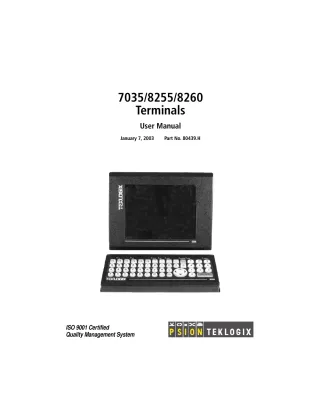
7035/8255/8260 Terminals User Manual
Manual348 pagesPDF 3.8 MB
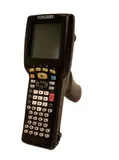
User manual for the Teklogix 7035 hand-held and 8255/8260 vehicle-mount terminals, including the 7942 and 7978 battery chargers.
Covers · 5 models
The models it covers
Summary
What is in it
The user manual for the Teklogix 7035 hand-held terminal and the 8255 and 8260 vehicle-mount terminals. It covers assembly and basic operation, the keyboard layouts, Tekterm, TESS and ANSI emulation, setting parameters and the terminal accessories, including the 7942 in-unit charger and the 7978 gang charger with their charger specifications. Later chapters give the terminal specifications, port pinouts and cable diagrams, radio parameters and parameter trees.
Its parts
- Introduction
- Assembly And Basic Operation
- Keyboards – Operating Instructions
- Tekterm
- TESS Operations
- ANSI Operations
- Setting Parameters
- Terminal Accessories
- Specifications
From the manual
Key facts from this manual
Each line names its page in the PDF.
User manual from January 2003 for the Teklogix 7035 hand-held terminal and the 8255 and 8260 vehicle-mount terminals. It also describes the 7942 in-unit charger and the 7978 gang charger used with 7035 batteries. It walks through setup, keyboards, terminal software and parameters, accessories, specifications and port pinouts.
- What it is
- 7035: DOS hand-held RF terminal (the manual also covers the 8255 and 8260 vehicle-mount terminals) p. 31
- 7942 charger
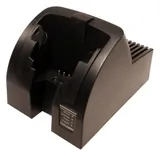
- 7942: single-site in-unit fast charger for Lithium-Ion or Nickel-Metal Hydride batteries; fast charge typically 3.5 to 4 hours p. 229, 231
- 7978 charger
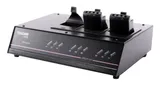
- 7978: gang charger for up to three Lithium-Ion batteries, powered by an external 100-240 volts AC, 50/60 Hz supply p. 235
- Battery
- 7035: battery pack PN 20605-003, 7.4 V nominal, 2200 mAh p. 255
- Battery life
- 7035: 9 hours with TRX7370 radio, 15 hours with TRX7431 radio, at 23˚ C p. 255
- Supported chargers
- 7035 battery: Model 7942 in-unit charger, Model 7967 6-gang charger, Model 7978 3-gang charger p. 229
- CPU and memory
- 7035: 33 MHz 486DX CPU; 8 MB RAM (expandable to 16 MB); 4 MB Flash ROM (expandable to 8 MB) p. 31
- Radio options
- IEEE 802.11b 2.4 GHz PC card radios (TRX7431, TRX7441); TRX7370 narrowband (403-512 MHz); TRX7410 TekLan 902 MHz p. 31
- Keyboards
- 7035: 36-key, 44-key or 56-key p. 31
- Display
- 7035: 62 x 62 mm active area, 0.38 mm dot pitch, automated backlight control p. 255
- Software
- Embedded DOS; built-in ANSI and TESS (IBM 3270, IBM 5250, HP2392) emulation p. 31
- Expansion slots
- Two internal PC Card Type II slots: one for the radio, one for a 16 to 128 MB flash disk (not available with a TRX7370 or TRX7410 radio) p. 32
- Dimensions
- 7035: 93 x 63 x 241 mm without integrated scanner; 93 x 73 x 241 mm with it p. 254
- 7942 indicators
- 7942: Power, Charge, Fault and Ready LEDs p. 230
What this manual walks you through
- Charging a 7035 in the 7942 in-unit charger p. 230, 231
- Reading the 7942 charger LEDs and fault conditions p. 230, 231, 232
- Mounting the 7942 charger with the optional bracket p. 229, 230
- Charging batteries in the 7967 gang charger p. 233
- Charging batteries in the 7978 gang charger and reading its fault LEDs p. 235, 236
- Lithium-Ion battery safety and disposal p. 227, 228
- Swapping a 7035 battery without losing work p. 226
Good to know
- The work-in-progress backup during a battery swap lasts up to 10 minutes and only works if the terminal is turned off first. p. 226
- The 7035 cannot be switched on while it sits in the 7942 charger; it is switched off automatically. p. 229
- The 7942 rejects a battery whose temperature is outside 10˚ C to 30˚ C. p. 231
- On the 7035, COM1 is shared with the IrDA port, so only one of them can be active at a time. p. 259
- The battery electrolyte freezes below -30˚ C, which damages battery life and capacity. p. 254
Questions this manual answers
What battery does the Teklogix 7035 use?
Battery pack PN 20605-003, a 7.4 V nominal, 2200 mAh pack. p. 255
How long does the 7942 charger take to charge a 7035?
A fast charge typically takes 3.5 to 4 hours; the green Ready LED comes on when it is done. p. 231
What does a solid red Fault LED on the 7942 charger mean?
The battery was rejected: the charger cannot read it, it is not compatible, it is set to inhibit charge, it is defective, or it is outside 10˚ C to 30˚ C. p. 230, 231
How many batteries does the 7978 gang charger hold?
Up to three Lithium-Ion batteries at one time. p. 235
Which chargers work with the 7035 battery?
The Model 7942 in-unit charger, the Model 7967 6-gang charger and the Model 7978 3-gang charger. p. 229
Contents
Chapters and sections
Each line opens the PDF at its page.
- 7035/8255/8260 Terminals1
- Program License Agreements15
- Approvals and Safety Summary21
- Introduction 127
- Assembly And Basic Operation 241
- 2.1 Preparing Terminals For Operation43
- 2.2 Preparing The 7035 For Operation43
- 2.3 Installing 8255/8260 Vehicle-Mount Terminals46
- 2.4 Turning The Terminals On And Off52
- 2.5 Resetting Terminals53
- 2.6 Working With The Startup “Display Menu”54
- 2.7 The Keyboard55
- 2.8 Terminal Indicators56
- 2.9 The Display61
- 2.10 The Integrated Scanner Option – 7035 Only63
- 2.11 Infrared (IrDA) Port – 7035 Only65
- 2.12 Low Temperature, Freezer and Outdoor Terminals66
- 2.13 Maintenance69
- Keyboards – Operating Instructions 373
- Tekterm 4109
- TESS Operations 5119
83 more lines, from page 121 on
- 5.2 Working With Multiple Sessions121
- ANSI Operations 6129
- Setting Parameters 7135
- 7.1 Using The Parameter Manager139
- 7.2 Exiting Tekterm And Accessing The Display Menu139
- 7.3 Working With Menus141
- 7.4 Terminal Parameters146
- 7.5 System148
- 7.6 Scanner158
- 7.7 Applications174
- 7.8 View Manager200
- 7.9 GPS – Global Positioning System Receiver202
- 7.10 Ports– Serial 1 And Console 2203
- 7.11 Global Macros208
- 7.12 Network211
- 7.13 SNMP216
- 7.14 Radio219
- 7.15 Sound219
- 7.16 Security221
- 7.17 ANSI FK Remap222
- Terminal Accessories 8223
- 8.1 External Bar Code Readers225
- 8.2 The 7035 Battery226
- 8.3 The 7942 In-Unit Charger229
- 8.4 The 7967 Gang Charger233
- 8.5 7978 Gang Charger235
- 8.6 Important Charger Safety Instructions237
- 8.7 Antenna Types238
- 8.8 The 7035 Picker Cradle238
- 8.9 GPS Unit246
- 8.10 Active Transient Filter Power Supply246
- 8.11 Accessories List248
- Specifications 9249
- 9.1 Radio Specifications251
- 9.2 7035 Hand-Held Terminal Specifications254
- 9.3 8255/8260 Vehicle-Mount Terminal Specifications256
- 9.4 Peripheral Ports259
- 9.5 Memory Expansion Board260
- 9.6 IrDA Port (7035 Only)260
- 9.7 Wireless Communication Options260
- 9.8 GPS Unit260
- 9.9 Bar Code Scanning261
- 9.10 Internal Scanner Specifications (7035 Only)262
- 9.11 Power Management (7035 Only)266
- 9.12 Lithium-Ion Battery Pack (7035 Only)267
- Support Services And Worldwide Offices269
- Company Headquarters And Canadian Service Centre271
- International Subsidiaries271
- North American Headquarters And U.S. Service Centre271
- Port Pinouts And Cable Diagrams273
- B.1 7035 Peripheral Port I/O Connector (28-Pin PCR)273
- B.2 8255/60 Peripheral Port I/O Connector (28-Pin PCR)274
- B.3 8255/60 - Expansion Port I/O Connector (36-Pin PCR)276
- B.4 Internal Scanner Connector278
- B.5 Flash Serial Download Cable278
- B.6 28-Pin PCR To 8-Pin DIN Connector – PN 19726279
- B.7 28-Pin PCR To 7-Pin DIN Connector – PN 19727279
- B.8 Flash Serial Download Cable – PN 20075280
- B.9 Scanner Wand Adaptor Cable – PN 30092280
- ASCII Character Table281
- Radio Parameters285
- AirFortress™ Secure Client307
- Parameter Trees313
- INDEX323
The whole text · 41 parts
Read the manual here as text
Its text as extracted from the PDF, unedited, in parts; each page opens the PDF at that page.
- 7035/8255/8260 Terminals1-4
- TABLE OF CONTENTS5-14
- Program License Agreements15-20
- Approvals and Safety Summary21-26
- Introduction 127-40
- Assembly And Basic Operation 2, pages 41 to 4841-48
- Assembly And Basic Operation 2, pages 49 to 5649-56
- Assembly And Basic Operation 2, pages 57 to 6457-64
- Assembly And Basic Operation 2, pages 65 to 7265-72
- Keyboards – Operating Instructions 3, pages 73 to 8173-81
- Keyboards – Operating Instructions 3, pages 82 to 9082-90
- Keyboards – Operating Instructions 3, pages 91 to 9991-99
- Keyboards – Operating Instructions 3, pages 100 to 108100-108
- Tekterm 4109-118
- TESS Operations 5119-128
- ANSI Operations 6129-134
- Setting Parameters 7, pages 135 to 144135-144
- Setting Parameters 7, pages 145 to 154145-154
- Setting Parameters 7, pages 155 to 164155-164
- Setting Parameters 7, pages 165 to 174165-174
- Setting Parameters 7, pages 175 to 184175-184
- Setting Parameters 7, pages 185 to 194185-194
- Setting Parameters 7, pages 195 to 204195-204
- Setting Parameters 7, pages 205 to 214205-214
- Setting Parameters 7, pages 215 to 222215-222
- Terminal Accessories 8, pages 223 to 231223-231
- Terminal Accessories 8, pages 232 to 240232-240
- Terminal Accessories 8, pages 241 to 248241-248
- Specifications 9, pages 249 to 258249-258
- Specifications 9, pages 259 to 268259-268
- Pages 269 to 272269-272
- Port Pinouts And Cable Diagrams273-280
- ASCII Character Table281-284
- Radio Parameters, pages 285 to 292285-292
- Radio Parameters, pages 293 to 300293-300
- Radio Parameters, pages 301 to 306301-306
- AirFortress™ Secure Client307-312
- Parameter Trees313-322
- INDEX, pages 323 to 331323-331
- INDEX, pages 332 to 340332-340
- INDEX, pages 341 to 348341-348
The file