Manual · Datalogic
Magellan 2200VS and 2300HS Product Reference Guide
Manual388 pagesPDF 6.4 MB
Product reference guide for the Datalogic Magellan 2200VS and 2300HS scanners: installation, operation, troubleshooting and programming.
What this file really is
The old site listed this file as a manual for the Datalogic M2360. The file is named for the M2360, but the guide covers the Magellan 2200VS and 2300HS and does not mention an M2360.
Filed with · 1 model
Also filed with these models on the old site
Summary
What is in it
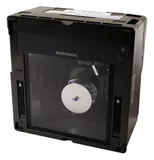
Product reference guide for the Datalogic Magellan 2200VS and 2300HS countertop bar code scanners. It covers specifications, safety and regulatory information, counter preparation and installation for each model, scanning and maintenance, diagnostic modes, error codes and troubleshooting flowcharts, and a long programming chapter with bar code labels for general features, RS-232, keyboard wedge and USB interfaces, and each supported symbology.
Its parts
- Introduction
- Site Preparation and Installation
- Operation and Maintenance
- Problem Isolation
- Programming
From the manual
Key facts from this manual
Each line names its page in the PDF.
This is the Datalogic Product Reference Guide for the Magellan 2200VS and 2300HS scanners; it does not name the M2360. It covers specifications, installing both models, operation and cleaning, error codes and troubleshooting flowcharts, programming the scanner with bar code labels, and cable pinouts.
- Device
- Magellan scanners: 2200VS freestanding or mounted on a counter or wall; 2300HS mounted flush with the countertop p. 27, 30
- Ports
- Scanner host (POS terminal), auxiliary port for an RS-232 handheld scanner, power (DC brick input), optional EAS connection p. 14
- Host cables
- RS-232, IBM and IBM USB, each on an RJ45 10-position connector p. 336, 337, 338
- Symbologies
- UPC A and E, EAN and JAN 8 and 13, RSS-14 and RSS expanded, UCC/EAN 128, Code 39, Code 128, Code 93, Interleaved 2 of 5, Codabar, Standard 2 of 5, MSI/Plessey and more p. 23
- Laser
- Two embedded Class 3R visible laser diodes at 650.0 or 670.0 nm p. 18
- Power
- AC/DC adapter; the scanner turns on and off by connecting or disconnecting it p. 15, 17
- Operating temperature
- 10 to +40 C (50 to +104 F); storage -40 to +70 C (-40 to +158 F) p. 16
- Humidity
- 5 - 95% non-condensing p. 16
- Ambient light
- Artificial light 450 foot-candles; sunlight 0-8,000 foot-candles p. 16
- Error beeps
- 1 configuration error, 2 interface board, 3 motor, 4 laser, 6 digital board, 10 button module p. 43
- Cable length
- Should not exceed 15 feet; RJ-45 standard wire, 28-26 AWG p. 335
- Auxiliary port power
- +5V out, 500mA max (pin 8) p. 339
- Volume and tone
- Four volume levels and three tones, set with the Volume/Tone Push Button p. 332
- Sleep mode
- Green light blinks at a 2-second rate; wake with the button, a hand wave or an auxiliary scanner p. 38
What this manual walks you through
- Unpacking and checking the scanner before installation p. 25, 26, 27
- Installing the 2200VS freestanding or on a counter or wall p. 27, 28
- Installing the 2300HS in a countertop opening p. 30, 31
- Entering Scanner Diagnostic Mode p. 39
- Resetting the scanner p. 40
- Cleaning the scan window p. 40
- Reading error codes and following the problem isolation flowcharts p. 43, 44
- Changing volume and tone p. 331, 332
- Making interface cables from the pinouts p. 335, 336, 337, 338, 339
Good to know
- If a stationary laser beam is ever emitted, disconnect the unit from power until a qualified technician repairs it. p. 19
- There are no user-serviceable parts inside; do not remove the protective housing. p. 18
- Without a host the scanner may read and store only two labels, then stop until power is cycled. p. 39
- Volume set with the push button is lost at power-down. p. 331
- The scanner needs properly grounded electrical outlets. p. 17
Questions this manual answers
How do I reset a Magellan 2300HS scanner?
Press and hold the Volume/Tone Push Button for about eight seconds; rapid beeps confirm the reset and the scanner reruns its Selftest. p. 40
What does 3 beeps mean on a Magellan 2200VS or 2300HS?
Error code 3 points to the motor. p. 43
Why does my Magellan scanner stop reading after one or two bar codes?
When it is not connected to a host it stores up to two labels and then stops reading until power is cycled; this is normal. p. 27, 39
How do I wake the Magellan scanner from sleep mode?
Press the Volume/Tone Push Button, wave your hand in front of the scan window, or scan with an attached auxiliary scanner. p. 38
How long can the Magellan scanner interface cable be?
Cable length should not exceed 15 feet. p. 335
Contents
Chapters and sections
Each line opens the PDF at its page.
- Introduction11
- Site Preparation and Installation25
- Operation and Maintenance33
- Problem Isolation41
- Programming49
- Introduction to Label Programming49
- Understanding the Basics49
- Integrating the Scanner With Your Host System49
- Programming Overview51
- LED and Beeper Indicators57
- If You Make a Mistake...57
- General Scanner Features59
- Interface Related Features85
- IBM Features105
- RS-232 Features107
- Single Cable RS-232 Options137
- PC Keyboard Wedge and USB Keyboard Interfaces147
- Symbology Programming171
- UPC-A Enable171
27 more lines, from page 180 on
- UPC-E Enable180
- EAN-13 Enable189
- EAN-8 Enable199
- Other UPC/EAN Options209
- GTIN Enable220
- RSS-14 Enable225
- RSS Expanded Enable231
- Code 39 Enable241
- Pharmacode 39 Enable254
- Code 128 Enable258
- EAN-128 Enable269
- Interleaved 2 of 5 (I 2 OF 5) Enable272
- Codabar Enable283
- Code 93 Enable298
- MSI/Plessey Enable307
- Standard 2 of 5 Enable319
- LED/Beeper Indications & Controls331
- Cable Information335
- Keypad341
- Host Commands349
- Factory Defaults351
- Handheld Data Format Requirements369
The whole text · 41 parts
Read the manual here as text
Its text as extracted from the PDF, unedited, in parts; each page opens the PDF at that page.
- Pages 1 to 101-10
- Introduction11-24
- Site Preparation and Installation25-32
- Operation and Maintenance33-40
- Problem Isolation41-48
- Programming, pages 49 to 5849-58
- Programming, pages 59 to 6859-68
- Programming, pages 69 to 7869-78
- Programming, pages 79 to 8879-88
- Programming, pages 89 to 9889-98
- Programming, pages 99 to 10899-108
- Programming, pages 109 to 118109-118
- Programming, pages 119 to 128119-128
- Programming, pages 129 to 138129-138
- Programming, pages 139 to 148139-148
- Programming, pages 149 to 158149-158
- Programming, pages 159 to 168159-168
- Programming, pages 169 to 178169-178
- Programming, pages 179 to 188179-188
- Programming, pages 189 to 198189-198
- Programming, pages 199 to 208199-208
- Programming, pages 209 to 218209-218
- Programming, pages 219 to 228219-228
- Programming, pages 229 to 238229-238
- Programming, pages 239 to 248239-248
- Programming, pages 249 to 258249-258
- Programming, pages 259 to 268259-268
- Programming, pages 269 to 278269-278
- Programming, pages 279 to 288279-288
- Programming, pages 289 to 298289-298
- Programming, pages 299 to 308299-308
- Programming, pages 309 to 318309-318
- Programming, pages 319 to 328319-328
- Programming, pages 329 to 330329-330
- LED/Beeper Indications & Controls331-334
- Cable Information335-340
- Keypad341-348
- Pages 349 to 358349-358
- Pages 359 to 368359-368
- Handheld Data Format Requirements, pages 369 to 378369-378
- Handheld Data Format Requirements, pages 379 to 388379-388
The file