Manual · Symbol
MiniScan MS XX07 Series Integration Guide
Manual406 pagesPDF 4.8 MB
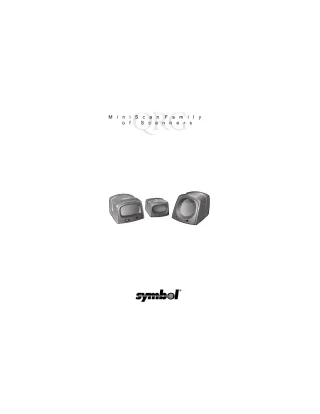
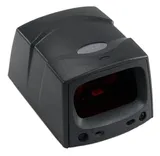
Integration guide for the Symbol MiniScan MS 1207FZY, MS 1207WA, MS 2207, MS 2207VHD and MS 3207 fixed-mount scanners.
Covers · 1 model
The models it covers
Summary
What is in it
Symbol's integration guide for the MiniScan MS XX07 Series of industrial fixed-mount laser scanners, including the MS 1207FZY and MS 1207WA. It explains mounting and connection, scan patterns and trigger options, and gives the electrical interface, mechanical drawings, technical specifications and decode zones for each model. It also covers maintenance and troubleshooting, the parameter bar code menus, RS-232 and USB setup, Advanced Data Formatting and mounting templates.
Its parts
- About This Manual
- Introduction
- Installation
- Scanning
- MS 1207FZY Specifications
- MS 1207WA Specifications
- MS 2207 Specifications
- MS 2207VHD Specifications
- MS 3207 Specifications
- Maintenance and Troubleshooting
- Parameter Menus
- RS-232 Interface
- USB Interface
- Advanced Data Formatting (ADF)
- Mounting Template
From the manual
Key facts from this manual
Each line names its page in the PDF.
The integration guide for Symbol MiniScan MS XX07 Series fixed-mount scanners: the MS 1207FZY, MS 1207WA, MS 2207, MS 2207VHD and MS 3207. It covers mounting, connecting and programming them, with specifications for each model, beeper and LED signals, troubleshooting and the RS-232 and USB settings.
- Type
- Fixed-mount scanner for standalone or OEM applications such as kiosks; MS 1207FZY and MS 1207WA read 1D bar codes only p. 19, 21
- Scan angle
- MS 1207FZY: 42° (default) or 30°; MS 1207WA: 60° p. 55, 66
- Interfaces
- MS 1207WA: USB, Synapse or RS-232, detected from the host cable; MS 1207FZY: serial TXD/RXD with RTS/CTS p. 23, 52, 62
- Power
- 5.0 VDC ± 10% on connector pin 6 p. 52, 62
- Laser
- MS 1207FZY: 1.0 mW, 650 nm nominal; MS 1207WA: 0.48 mW, 670 nm nominal p. 55, 66
- Scan rate
- 36 (± 5) scans/sec (bidirectional), single scan line p. 55, 66
- Size and weight
- 1.60 in. high x 2.28 in. wide x 2.94 in. deep; 4.45 oz. (126 gm) p. 56, 67
- Operating temperature
- MS 1207FZY: -4° to 122°F (-20° to 50°C); MS 1207WA: 32° to 104°F (0° to 40°C) p. 56, 67
- Sealing
- IP54 housing with integrated beeper p. 21, 56, 66
- Decode range
- MS 1207FZY, 13 mil 100% UPC: typical 2.20 in. to 25.75 in. p. 59
- Power supplies
- 110V US 50-14000-008; 220V Europe 50-14000-009; 100V Asia 50-14000-010; DC line cord 50-16002-009 p. 40
- RS-232 cables
- TTL to true RS-232 conversion 25-62186-XX; DB9 to RS-232 host 25-58918-XX (straight) or 25-58919-XX (right angle) p. 40
- USB and Synapse cables
- DB9 to USB 25-58926-XX (straight), 25-58923-XX (right angle), 25-58925-XX (trigger jack and beeper); Synapse 25-58921-XX p. 40
- Trigger and mounting
- Push button trigger cable 25-04950-XX; photo sensor trigger cable 25-13176-XX; fixed-mount stand 20-60136-XX; bracket KT-65578-01 p. 41
What this manual walks you through
- Connecting the scanner to the host, an optional trigger and an optional beeper p. 32, 33
- Choosing between TTL RS-232 and the conversion cable p. 42
- Reading the beeper and LED signals p. 50
- Connector pin functions of the MS 1207FZY and MS 1207WA p. 52, 62, 63
- Decode zones and working distances by bar code density p. 58, 59, 69, 70
- Cleaning the window and troubleshooting scan failures p. 107, 108
- Setting up the RS-232 interface and its defaults p. 243, 244
- Connecting to USB hosts and the USB defaults p. 268, 269
Good to know
- Some USB hosts reset or lock up in high ESD or electrical fast transient areas; a self-powered USB hub near the host may help. p. 42
- TTL level RS-232 works with most standard RS-232 hosts on cables of six feet or less. p. 42
- An opto-mechanical analysis by an engineer is recommended before integration. p. 13
- Clean the window with a damp cloth and, if needed, a non-ammonia detergent; keep abrasives off it. p. 107
- One long high beep means thermal shutdown; remove the scanner from the heat and let it cool. p. 50, 108
Questions this manual answers
What power does the Symbol MS 1207 need?
5.0 VDC ± 10%, supplied on pin 6 of the connector. p. 52, 62
What are the MiniScan RS-232 default settings?
9600 baud, no parity, 1 stop bit, 8 data bits, and no hardware or software handshaking. p. 244
Which cable converts the MiniScan TTL RS-232 output to standard RS-232?
The host adapter cable p/n 25-62186-xx. p. 23
My MiniScan is set for USB and does not scan. What do I do?
Unplug it from the USB host, present the Continuous trigger mode bar code and plug it back in; it then switches to continuous trigger mode. p. 108
Which operating systems support the MiniScan over USB?
Windows 98, 2000, ME and XP, MacOS 8.5 and above, and IBM 4690 OS. p. 268
Contents
Chapters and sections
Each line opens the PDF at its page.
- About This Manual13
- Chapter 1 Introduction19
- Chapter 2 Installation25
- Chapter 3 Scanning43
- Chapter 4 MS 1207FZY Specifications51
- Chapter 5 MS 1207WA Specifications61
- Chapter 6 MS 2207 Specifications71
63 more lines, from page 83 on
- Chapter 7 MS 2207VHD Specifications83
- Chapter 8 MS 3207 Specifications95
- Chapter 9 Maintenance and Troubleshooting107
- Chapter 10 Parameter Menus109
- Operational Parameters109
- Default Table109
- Set Default Parameter118
- Scanning Options119
- UPC/EAN136
- Code 128159
- Code 39164
- Code 93175
- Code 11178
- Interleaved 2 of 5183
- Discrete 2 of 5189
- Codabar192
- MSI Plessey197
- PDF417/MicroPDF417203
- RSS Codes207
- Composite211
- Data Options215
- Event Reporting221
- Macro PDF Features225
- Transmit Macro PDF User-Selected Fields231
- Numeric Bar Codes240
- Chapter 11 RS-232 Interface243
- Chapter 12 USB Interface267
- Chapter 13 Advanced Data Formatting281
- Chapter 14 Mounting Template371
- Appendix A ASCII Character Sets373
- Glossary391
- Index397
The whole text · 44 parts
Read the manual here as text
Its text as extracted from the PDF, unedited, in parts; each page opens the PDF at that page.
- Pages 1 to 41-4
- Contents, pages 5 to 115-11
- Contents, page 1212
- About This Manual13-18
- Chapter 1 Introduction19-24
- Chapter 2 Installation, pages 25 to 3325-33
- Chapter 2 Installation, pages 34 to 4234-42
- Chapter 3 Scanning43-50
- Chapter 4 MS 1207FZY Specifications51-60
- Chapter 5 MS 1207WA Specifications61-70
- Chapter 6 MS 2207 Specifications71-82
- Chapter 7 MS 2207VHD Specifications83-94
- Chapter 8 MS 3207 Specifications95-106
- Pages 107 to 116107-116
- Pages 117 to 126117-126
- Pages 127 to 136127-136
- Pages 137 to 146137-146
- Pages 147 to 156147-156
- Pages 157 to 166157-166
- Pages 167 to 176167-176
- Pages 177 to 186177-186
- Pages 187 to 196187-196
- Pages 197 to 206197-206
- Pages 207 to 216207-216
- Pages 217 to 226217-226
- Pages 227 to 236227-236
- Pages 237 to 242237-242
- Chapter 11 RS-232 Interface, pages 243 to 250243-250
- Chapter 11 RS-232 Interface, pages 251 to 258251-258
- Chapter 11 RS-232 Interface, pages 259 to 266259-266
- Chapter 12 USB Interface267-280
- Chapter 13 Advanced Data Formatting, pages 281 to 290281-290
- Chapter 13 Advanced Data Formatting, pages 291 to 300291-300
- Chapter 13 Advanced Data Formatting, pages 301 to 310301-310
- Chapter 13 Advanced Data Formatting, pages 311 to 320311-320
- Chapter 13 Advanced Data Formatting, pages 321 to 330321-330
- Chapter 13 Advanced Data Formatting, pages 331 to 340331-340
- Chapter 13 Advanced Data Formatting, pages 341 to 350341-350
- Chapter 13 Advanced Data Formatting, pages 351 to 360351-360
- Chapter 13 Advanced Data Formatting, pages 361 to 370361-370
- Pages 371 to 380371-380
- Pages 381 to 390381-390
- Glossary391-396
- Index397-406
The file