Manual · Symbol
MiniScan Family of Scanners Quick Reference
Manual24 pagesPDF 444 KB
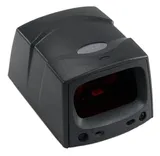
Quick reference for the Symbol MiniScan family of fixed-mount scanners (MS-80x, MS-90xHS, MS-120x, MS-220x, MS-320x).
Filed with · 1 model
Also filed with these models on the old site
Summary
What is in it
A quick reference for the Symbol MiniScan family of industrial fixed-mount and embedded bar code scanners, including the MS-80x, MS-90xHS, MS-320x, MS-220x, MS-120xFZY and MS-120xWA. It lists the power and data cable accessories with part numbers, explains connecting the scanner, scanning and aiming, the level, pulse, continuous and host triggering options with programming bar codes, beeper and LED indications, laser patterns, troubleshooting, regulatory information and warranty.
Its parts
- Introduction
- Accessories
- Connecting the MiniScan
- Scanning
- Aiming Tips
- Triggering Options
- Beeper Indications
- LED Indicators
- Laser Patterns
- Bar Codes
- Troubleshooting
- Regulatory Information
- Warranty
From the manual · read page by page
Key facts from this manual
Each line names its page in the PDF.
A quick reference for the Symbol MiniScan family of fixed-mount scanners: MS-80x, MS-90xHS, MS-320x, MS-220x, MS-120xFZY and MS-120xWA. It covers accessories and their part numbers, connecting the scanner, trigger modes, beeper and LED signals, laser patterns and troubleshooting.
- Type
- Industrial fixed-mount or embedded scanners with decoder, exit window and interfaces including USB p. 3
- MS-120x models
- MS-120xFZY: fuzzy logic for 1-D and RSS codes; MS-120xWA: 60° scan angle for large codes at close range p. 4
- Scan line
- MS-120x, MS-90x and MS-80x: 1-D scanners with a single scan line p. 15
- Power supplies
- 110V US 50-14000-008; 220V Europe 50-14000-009; 100V Asia 50-14000-010; output 5.2Vdc, minimum 0.650A p. 5, 20
- RS-232 cables
- Female DB9 to RS-232 host: 25-58918-01 (straight), 25-58919-01 (right angle) p. 5
- USB cables
- Female DB9 to USB Type A: 25-58923-01 (right angle), 25-58925-01 (straight, trigger jack and beeper) p. 5
- Synapse cable
- 25-58921-01 (6 ft. straight) p. 6
- Trigger cables
- Push button trigger and cable 25-04950-01; photo sensor trigger and cable 25-13176-01 p. 5, 6
- Stand and software
- Fixed mount stand 20-60136-01; Software Developer's Kit SW-60371-01 p. 6
- Trigger modes
- Level, pulse, continuous, or host trigger by SSI Start Decode message p. 8, 9, 10
- Indicators
- Red LED: on; green LED: good decode; 1 beep: decoded; 4 beeps: transmission error; fast warble: parameter entered p. 11, 12
What this manual walks you through
- Connecting the scanner, trigger cable, power supply and host p. 6, 7
- Scanning and aiming the laser across the whole bar code p. 7, 8
- Choosing level, pulse, continuous or host triggering p. 8, 9, 10
- Reading the beeper and LED signals p. 11, 12
- The five laser patterns and which models emit them p. 12, 13, 14, 15
- Bar codes for Set All Defaults and the scan patterns p. 15, 16, 17
- Troubleshooting power, reading and USB problems p. 17, 18
Good to know
- Use only the Symbol-approved power supplies 50-14000-008, 50-14000-009 or 50-14000-010. p. 20
- USB and Synapse cables need no power supply. p. 7
- The scanner must be used with a properly shielded cable as the integration guide specifies. p. 22
- Avoid staring directly into the beam of a Class 2 laser scanner. p. 19
Questions this manual answers
How do I connect a MiniScan scanner?
Plug the 9-pin D-connector marked TO SCANNER into the scanner, add the trigger cable if used, plug the power supply into the cable near the host end, then plug into the host port. p. 6, 7
What power supply does the MiniScan use?
A Symbol-approved supply rated 5.2Vdc and at least 0.650A: 50-14000-008 (110V US), 50-14000-009 (220V Europe) or 50-14000-010 (100V Asia). p. 5, 20
My MiniScan is set for USB and does not scan. What do I do?
Unplug it from the USB host, present the Continuous Scan Mode bar code and plug it back in; it then switches to continuous trigger mode. p. 18
What do 4 beeps mean on a MiniScan?
A transmission error: the host did not receive the bar code data. p. 11
Contents
Chapters and sections
Each line opens the PDF at its page.
- Introduction3
- Accessories5
- Connecting the MiniScan6
- Scanning7
- Aiming Tips8
- Triggering Options8
- Beeper Indications11
- LED Indicators12
- Laser Patterns12
- Bar Codes15
- Troubleshooting17
- Regulatory Information19
- Laser Devices19
- Power Supply20
- Radio Frequency Interference Requirements21
- Radio Frequency Interference Requirements - Canada22
- Marking and European Economic Area (EEA)22
- Warranty23
The whole text · 3 parts
Read the manual here as text
Its text as extracted from the PDF, unedited, in parts; each page opens the PDF at that page.
The file