Manual · Microscan
MS-3 CCD Reader User's Manual
Manual106 pagesPDF 1.3 MB
User's manual for the Microscan MS-3 CCD compact embedded bar code reader: setup, communications, read cycle and symbologies.
Covers · 1 model
The models it covers
Summary
What is in it
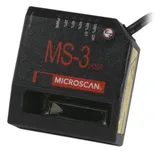
Microscan's user's manual for the MS-3 CCD, a compact embedded bar code reader for OEM instruments. It starts with a six-step quick start using the IC-332 converter, IB-131 interface box and the ESP (Easy Setup Program), then covers host communications, read cycle and trigger settings, the supported symbologies from Code 39 to RSS-14, utilities, firmware updates and terminal mode. Every setting is shown both as an ESP menu and as a serial command. Appendices give general and electrical specifications, connectivity, the serial command list and operational tips.
Its parts
- Quick Start
- Communications
- Read Cycle
- Symbologies
- Utilities
- Terminal Mode
- Appendices
From the manual
Key facts from this manual
Each line names its page in the PDF.
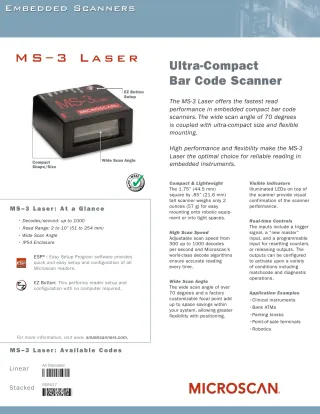
The user's manual for the Microscan MS-3 CCD Reader, the CCD version of the compact MS-3 embedded bar code reader. It covers connecting the reader through the IC-332 converter and IB-131 interface box, setting it up with the ESP software or serial commands, choosing symbologies, updating firmware, and the connector pinouts and specifications.
- Device
- MS-3 CCD: ultra-compact CCD bar code reader made to be embedded in OEM instruments p. 7
- Scan rate
- MS-3 CCD: 270 scans per second (decoded mode), auto-adaptive p. 78
- Communications
- RS-232 TTL, wedge p. 78
- Connector
- MS-3 CCD: 3 ft. (914 mm) cable ending in a 15-pin D-sub socket p. 78
- Power
- +5 VDC at the reader; the IC-332 converter turns 10 to 28 VDC into 5 VDC p. 80, 81
- Depth of field
- MS-3 CCD: 0 to 49.2 cm (19.4 in.) p. 78
- Smallest bar width
- Down to 0.05 mm (2 mil) on Code 39 p. 78
- Scan angles
- 48° nominal scan width; pitch ±50°, skew ±40° p. 78
- Size and weight
- Height 0.85 in. (21.6 mm), width and depth 1.75 in. (44.5 mm); 2.0 oz. (57 g) p. 78
- Operating temperature
- -30° to 60° C (-22° to 140° F); humidity up to 90% non-condensing p. 78
- Symbologies
- Code 39, Code 128/EAN, Interleaved 2 of 5, Codabar, UPC/EAN, Code 93, Industrial 2 of 5, MSI, Plessey, RSS Expanded, RSS Limited, RSS-14 p. 4
- Default serial settings
- 9600 baud, even parity, one stop bit, seven data bits, no flow control p. 17
- Interface parts
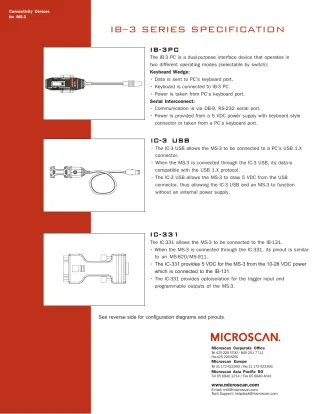
- IC-332 interface converter FIS-0001-0035G; IB-131 interface box P/N 99-000018-01; optional object detector P/N 99-000017-01 p. 81
- Cables
- RS-232 null modem cable 61-300026-03 (DB-25 plug to DB-9 socket, 6 ft.); multidrop cable 61-100030-03; daisy chain cable 61-100029-03 p. 81, 85
What this manual walks you through
- Connecting the reader, IC-332 and IB-131 to a host computer and power p. 10, 81
- Installing the ESP setup program and connecting to the reader p. 11, 12, 13
- Positioning the symbol and reader to avoid glare p. 14
- Sending and saving settings to the reader p. 15
- Setting host communication parameters p. 17
- Updating the reader firmware with a .mot file p. 67
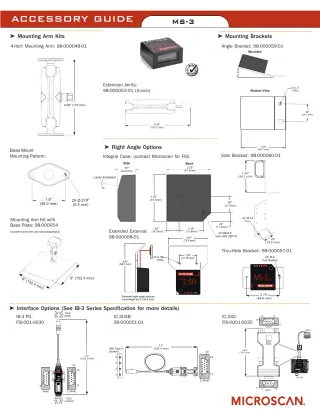
- Pin assignments of the reader and IB-131 connectors p. 80, 84
- Wiring NPN or PNP trigger inputs p. 83, 84
- Mounting and day-to-day operating tips, including cleaning the window p. 96
Good to know
- Connect all cables before applying power, and power down before disconnecting any cable. p. 10
- Do not interrupt power or unplug the host cable during a firmware download. p. 67
- Do not connect the reader chassis and the host to different ground potentials. p. 96
Questions this manual answers
What voltage does the Microscan MS-3 CCD need?
The reader itself runs on +5 VDC. In the standard setup the IC-332 converter turns an incoming 10 to 28 VDC into 5 VDC for it. p. 80, 81
What are the MS-3 CCD default baud rate and parity?
9600 baud, even parity, seven data bits, one stop bit and no flow control. p. 17
How far away can the MS-3 CCD read a bar code?
The specifications give a depth of field of 0 to 49.2 cm (19.4 in.). p. 78
Which bar code is enabled by default on the MS-3 CCD?
Code 39. To read other types, the manual suggests the Auto Discriminate macro in Terminal mode, which enables all codes. p. 14
How do I update MS-3 CCD firmware?
In ESP, choose App Code in the Firmware Update pulldown, open the *.mot file and allow a minute or so for the download. p. 67
Contents
Chapters and sections
Each line opens the PDF at its page.
The whole text · 11 parts
Read the manual here as text
Its text as extracted from the PDF, unedited, in parts; each page opens the PDF at that page.
The file