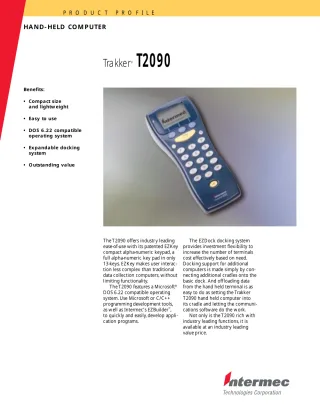
Manual · Intermec
TRAKKER T2090 Batch Hand-Held Computer User's Manual
Manual246 pagesPDF 737 KB
User's manual for the Intermec TRAKKER T2090 batch hand-held computer: setup, DOS programming, commands and hardware specifications.
Covers · 1 model
The models it covers
Summary
What is in it
Intermec's user's manual for the TRAKKER T2090, a pocket-size DOS-compatible batch computer with an integrated bar code scanner. It covers charging, scanning, the EZ Dock docking system and file transfer, the setup screens and system files, application development with Intermec's C function library, reader and configuration commands, BIOS support, and hardware specifications for the T2090 and EZ Dock, with demo software and ASCII charts in the appendices.
Its parts
- Getting Started
- User Interface
- Application Development
- Application Functions
- Reader Command Reference
- Configuration Command Reference
- BIOS Support
- Hardware Specifications
From the manual
Key facts from this manual
Each line names its page in the PDF.
This is the user's manual for the Intermec TRAKKER T2090, a pocket-size batch hand-held computer with a built-in bar code scanner and a DOS-compatible operating system. It covers charging, data entry and scanning, file transfer through the EZ Dock, application development and configuration commands, and the hardware specifications of the unit and its dock.
- Device
- Pocket-size DOS-compatible batch computer with integrated bar code scanner p. 21
- Display
- 8 line by 20 character Film Supertwist LCD with backlight p. 207
- Keypad
- 13 alphanumeric keys plus 3 function keys (22 keys in all) p. 24, 207
- Scanner
- Laser scanner, 1 to 36 inches, CDRH Class II p. 25, 208
- Processor and OS
- NEC V30, 32 MHz; DOS 6.22 compatible p. 208
- Memory
- 2 MB RAM; 2 MB flash ROM, upgradable to 4 MB p. 208
- Battery
- Rechargeable NiMH, 2.4v @ 1,200 mAh p. 207
- Battery life
- 10 to 20 hours typical, including 600 bar code scans p. 207
- Charging
- 8vDC @450mA; less than 4 hours in the docking station p. 207
- Dock
- EZ Dock: Power Module with 2-Slot Cradle, two RJ45 data ports, RS-232 or RS-485; up to 10 slots p. 27, 209
- Host cables
- 590819 RS-232 to PC (9F pin, 12’); 590818 RS-232 to PC or modem (25 pin, 12’); 590816, 598485, 598486 RS-485 to PC (8’, 50’, 100’) p. 211
- Power supplies
- 590822 (9v 1.9A, one or two cradles); 590817 (9v 5.0A, three to five cradles); 100 to 250 volts AC input p. 27, 211
- Size and weight
- 3.16” W x 7.38” L x 1.68” H; 10 oz. with batteries p. 207
- Operating temperature
- -4° to +122° F (-20° to +50° C) p. 208
What this manual walks you through
- Charging the battery in the EZ Dock p. 23
- Entering letters and numbers on the EZ Key keypad p. 24, 25
- Scanning bar codes and reading the LED feedback p. 26, 27
- Transferring files by XMODEM with XFER p. 27, 28
- Sharing the unit's flash drive with a PC through REMDISK p. 28, 29
- Downloading and uploading files with the FileCopy utility p. 29, 30, 31
- Managing files from a PC over a CTTY session p. 32
- Wiring the cradle for multidrop or dedicated RS-232 and RS-485 links p. 210
- Developing applications with the Intermec function library p. 7
- Setting options with configuration commands p. 10
Good to know
- The scanner cannot be used while the serial port is in use or while the unit sits in the dock. p. 26
- The charger works normally between 50° F and 104° F (10° C and 40° C); outside that range the battery may not charge properly. p. 23
- Drive A is not writable; it holds only the preloaded utilities. p. 32
- REMDISK must be run in DOS mode, not from a DOS window under Windows. p. 29
- The host cables must be shielded to comply with FCC regulations. p. 211
Questions this manual answers
What battery does the Intermec T2090 use?
A rechargeable NiMH pack rated 2.4v @ 1,200 mAh. Replacement is described in a separate instruction sheet, part number 067378. p. 23, 207
How long does the T2090 take to charge?
Four hours or less in the EZ Dock. The LED blinks red while charging and shows steady green once charged. p. 23
How many T2090 units can one power supply charge?
Up to four more 2-Slot Cradles can be added to the Power Module, for 10 slots. One or two cradles use power supply 590822; three to five use 590817. p. 27
How do I connect a T2090 to a PC?
Place the unit in the EZ Dock and run a cable from the Power Module's RJ45 port to the PC, such as 590819 for a 9-pin RS-232 port. p. 27, 211
What is the scan range of the T2090?
Hold the unit 1 to 36 inches from the bar code. p. 26
The whole text · 25 parts
Read the manual here as text
Its text as extracted from the PDF, unedited, in parts; each page opens the PDF at that page.
- Pages 1 to 101-10
- Pages 11 to 2011-20
- Pages 21 to 3021-30
- Pages 31 to 4031-40
- Pages 41 to 5041-50
- Pages 51 to 6051-60
- Pages 61 to 7061-70
- Pages 71 to 8071-80
- Pages 81 to 9081-90
- Pages 91 to 10091-100
- Pages 101 to 110101-110
- Pages 111 to 120111-120
- Pages 121 to 130121-130
- Pages 131 to 140131-140
- Pages 141 to 150141-150
- Pages 151 to 160151-160
- Pages 161 to 170161-170
- Pages 171 to 180171-180
- Pages 181 to 190181-190
- Pages 191 to 200191-200
- Pages 201 to 210201-210
- Pages 211 to 220211-220
- Pages 221 to 230221-230
- Pages 231 to 240231-240
- Pages 241 to 246241-246
The file