Manual · Intermec
TRAKKER T2090 Batch Hand-Held Computer Getting Started Guide
Manual11 pagesPDF 60 KB
Getting started guide for the Intermec TRAKKER T2090 batch hand-held computer: charging, keypad, scanning and docking.
Covers · 1 model
The models it covers
Summary
What is in it
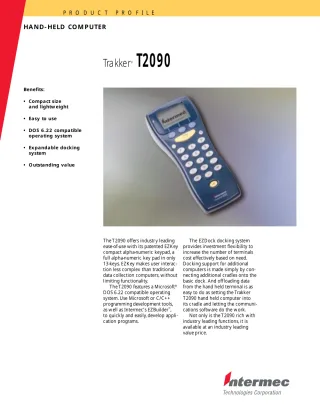
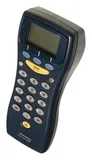
Intermec's short getting started guide for the TRAKKER T2090, a lightweight, pocket-sized batch computer and bar code scanner for one-hand data collection such as inventory, route sales and asset tracking. It covers safety, charging the battery in the EZDock Docking System, the EZKey keypad and its alpha and numeric modes, entering data, scanning bar codes, sending data to a host by placing the unit in the dock, and basic care.
From the manual · read page by page
Key facts from this manual
Each line names its page in the PDF.
Intermec's getting started guide (P/N 067215-001, 1998) for the TRAKKER T2090 Batch Hand-Held Computer and its EZDock Docking System. It shows how to charge the battery, use the EZKey keypad, enter data, scan bar codes, send data to a host through the dock and clean the unit.
- Device
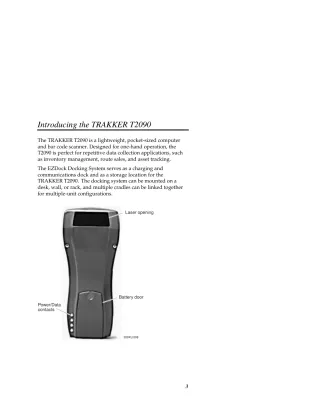
- Lightweight, pocket-sized batch computer and bar code scanner for one-hand use p. 3
- Dock
- EZDock Docking System: charging and communications dock, mounts on a desk, wall or rack; cradles link together p. 3
- Charge time
- Four hours or less for a full charge p. 5
- Run time
- 10 -20 hours on a single charge, depending on the application p. 5
- Keypad
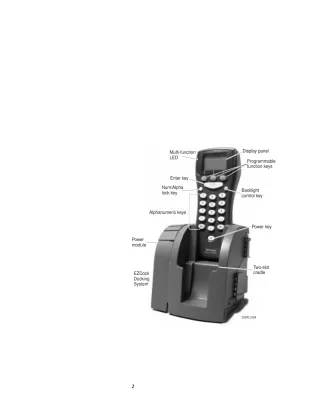
- EZKey keypad with 22 keys, 13 of them for letters and numbers; three unlabeled programmable function keys below the display p. 6
- Scan distance
- 1-20 inches from the label (integrated scanner models) p. 9
- Related documents
- User's Manual 067212; Battery Replacement Instruction Sheet 067378 p. 4, 5
What this manual walks you through
- Charging the battery in the EZDock p. 5
- Using the EZKey keypad, power, backlight and alpha or numeric mode p. 6, 7
- Entering numbers and letters p. 8
- Scanning a bar code p. 9
- Sending collected data to a host through the dock p. 10
- Cleaning and storing the unit p. 10
Good to know
- Charge the battery fully before first use, a full four hours the first time. p. 5
- Clean the case only with a damp (water only) chamois or cloth; no alcohol or ammonia-based cleaners. p. 10
- The scanning section applies only to units with an integrated bar code scanner. p. 9
Questions this manual answers
How long does the TRAKKER T2090 battery take to charge?
Four hours or less in the EZDock; let it charge a full four hours the first time. p. 5
What do the T2090 LED colors mean while charging?
Red while the battery charges; steady green once it is charged and trickle charging in the dock. p. 5
How do I switch the T2090 keypad between letters and numbers?
Press the up-arrow key; the display shows 123 in numeric mode and abc in alpha mode. p. 6
How do I send data from the T2090 to the host?
Place the T2090 in the EZDock Docking System; the LED lights up and the data is sent. p. 10
How far from the label should I hold the T2090 to scan?
Between 1 and 20 inches, holding the ENTER key with the red beam across the whole bar code. p. 9
The whole text · 2 parts
Read the manual here as text
Its text as extracted from the PDF, unedited, in parts; each page opens the PDF at that page.
The file