Manual · Intermec
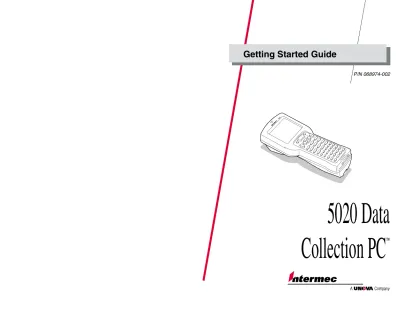
5020 Data Collection PC User's Manual
Manual144 pagesPDF 2.0 MB
User's manual for the Intermec 5020 Data Collection PC: setup, keypad, batteries, configuration, network connection and troubleshooting.
Covers · 1 model
The models it covers
Summary
What is in it
Intermec's user's manual for the 5020 Data Collection PC, in batch and RF versions. It explains the screen, keypad, Start menu and Task Manager, the main and bridge batteries, PC and Compact Flash cards, tethered scanners and bar code scanning. Later chapters cover configuring the 5020 with Fast Config, the Configuration application, bar code labels or remotely, connecting to a network or by serial and IrDA, troubleshooting and maintenance, and physical and environmental specifications.
Its parts
- Before You Begin
- Learning About the 5020
- Configuring the 5020
- Connecting the 5020
- Troubleshooting and Maintenance
From the manual
Key facts from this manual
Each line names its page in the PDF.
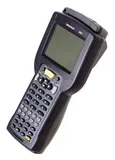
Intermec's user's manual for the 5020 Data Collection PC, a hand-held Windows CE computer with bar code scanning, made in batch and RF versions. It explains the screen, keypad, batteries, memory cards and scanning, how to configure and connect the 5020, how to troubleshoot and maintain it, and it lists the specifications.
- Device
- Hand-held computer with wireless LAN, bar code scanning and power management; ships with Windows CE 3.0 p. 17, 18
- Hardware
- Hitachi SH3 processor; 16MB RAM; 32MB Flash; PC card slot for radio, serial, modem and memory cards; compact flash card slot p. 128
- Display
- Backlit 320 x 240 pixel grayscale screen, 5.1 x 6.73 cm (2 in x 2.65 in), 8.4 cm (3.3 in) diagonal, graphics capable p. 17, 128
- Battery
- Rechargeable lithium-ion 1500 mAh main pack (Part No. 068537); 90 mAh manganese-dioxide lithium bridge battery p. 43, 128
- Radio
- RF 5020: WLI-Forum 2.4 GHz OpenAir frequency hopping (1.6 / 0.8 Mbits per second) or IEEE 802.11b HR direct sequence (11 Mbits per second); 100 mW; coverage > 80 m (262.4 ft) p. 18, 129
- Size and weight
- Width 10.2 cm (4.0 in) at the screen; length 22.9 cm (9.0 in); depth 7.1 cm (2.8 in) maximum; batch 703.1 g (24.8 oz), RF 748.4 g (26.4 oz) with batteries and handstrap p. 127
- Electrical rating
- 7.4 to 12V; 750mA peak p. 128
- Environment
- Operating -20°C to 50°C (-4°F to 122°F); 0 to 95% relative humidity non-condensing; batteries charge only between 0°C and 40°C (32°F and 104°F) p. 47, 128
- Keypad
- Full alphanumeric (except Euro2) or standard multifunction keypad; overlays English, Euro1, Euro2 p. 128
- Scanner options
- Integrated laser scanner: standard-range (670 nm), long-range (650 nm), high-density (675 nm) or high-visibility (675 nm); or 10-pin modular port for tethered input devices p. 130
- Bar codes
- Codabar, Code 93/93i, Code 11, Code 128, Code 16K, Interleaved 2 of 5, Code 2 of 5, MSI, Code 39, Plessey, Code 49, UPC/EAN; PDF 417 only with the tethered scanner option and Intermec 1470 scanner p. 130
- Tethered devices
- 151X, 1545 and 1550 laser scanners; 126X, 127X and 128X wands; Metrologic MS941; PSC 53001P70 with cable (CTP01576XX); Symbol LS3200ER; RS-232 scanners through adapter cable Part No. 064438 p. 132
- Serial cables
- 5-wire 9-pin to 9-pin null-modem (Part No. 070268); 3-wire 9-pin to 25-pin null-modem (Part No. 047569); 9-pin to 10-pin RS-232 adapter (Part No. 064438) p. 132
- Accessories
- Z2400 Battery Charger (four packs); D5020 dock; L5020 Serial Communications Adapter with power supply (Part No. 065236); Vehicle Mount Bracket (070407) or powered (070780); holster (069237); handle (067802); CF5020 compact flash cards p. 19
What this manual walks you through
- Getting to know the 5020 parts, screen and keypad p. 17
- Getting the 5020 configured and connected, step by step p. 20
- Caring for the main and bridge batteries p. 42, 43
- Charging the main battery pack in the Z2400, the D5020 or with the L5020 p. 46, 47
- Managing power in cold environments p. 52
- Running the 5020 from an external power supply p. 52
- Solving problems while operating the 5020, including low battery messages p. 110, 111
- Solving network and radio connection problems p. 112
- Specifications, scanner depth of field and tethered input devices p. 127, 128, 129, 130, 131, 132
Good to know
- The lithium-ion pack may be a fire or chemical burn hazard if mistreated: do not disassemble, heat above 100°C (212°F) or incinerate. p. 42
- Replace the main battery pack only with Part No. 068537; another pack may present a risk of fire or explosion. p. 43
- Turn the 5020 off before removing the main battery pack, or data may be lost. p. 43
- The bridge battery keeps the configuration only while the main pack is changed; it is not meant to retain data for long. p. 47
- There are no user-serviceable parts inside; opening the unit may damage internal components. p. 109
Questions this manual answers
How long does the Intermec 5020 battery take to charge?
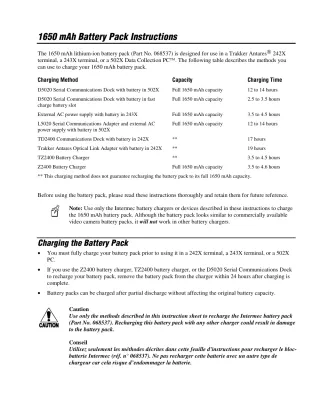
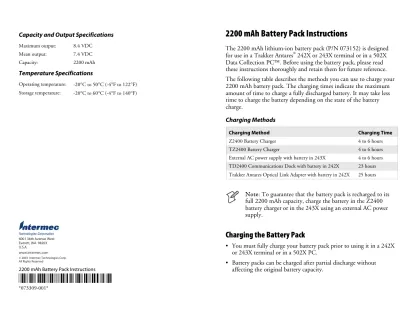
About 4 hours in the Z2400 charger, about 3 hours in the D5020 fast charge slot, and about 15 hours inside the 5020 in a D5020 dock or with an L5020 adapter. p. 46, 47
What scanners can I plug into the 5020 tethered scanner port?
151X, 1545 and 1550 laser scanners, 126X, 127X and 128X wands, Metrologic MS941, PSC 53001P70 with its cable, Symbol LS3200ER, and RS-232 scanners through adapter cable 064438. p. 132
Which cable do I need for ActiveSync over a serial connection on the 5020?
Part No. 070268, used with a D5020B or higher dock or an L5020B or higher serial adapter. p. 132
What is the operating temperature of the Intermec 5020?
-20°C to 50°C (-4°F to 122°F); the batteries charge only between 0°C and 40°C. p. 47, 128
What should I do when the 5020 shows Bridge Battery Very Low?
Apply AC power; the bridge battery charges fully in about 72 hours. Do not remove the main pack until it shows at least 50% charge. p. 111
Contents
Chapters and sections
Each line opens the PDF at its page.
- Before You Begin9
- Chapter 1: Learning About the 502015
- What Is the 5020 Data Collection PC?17
- Turning On the 502021
- Using the 5020 Screen22
- Understanding the System and Application Icons24
- Understanding the Audio Signals26
- Using the Keypad27
- Using the Start Menu39
- Switching Between Applications With Task Manager41
- Learning About the Batteries42
- Using PC and Compact Flash Memory Cards53
- Connecting a Tethered Scanning Device58
- Scanning a Bar Code Label60
- Where Do You Go From Here?63
- Chapter 2: Configuring the 502065
- Chapter 3: Connecting the 502089
- Chapter 4: Troubleshooting and Maintenance107
- Appendix A: 5020 Specifications125
- Index133
The whole text · 16 parts
Read the manual here as text
Its text as extracted from the PDF, unedited, in parts; each page opens the PDF at that page.
- Pages 1 to 41-4
- Contents5-14
- Chapter 1: Learning About the 5020, pages 15 to 2415-24
- Chapter 1: Learning About the 5020, pages 25 to 3425-34
- Chapter 1: Learning About the 5020, pages 35 to 4435-44
- Chapter 1: Learning About the 5020, pages 45 to 5445-54
- Chapter 1: Learning About the 5020, pages 55 to 6455-64
- Chapter 2: Configuring the 5020, pages 65 to 7265-72
- Chapter 2: Configuring the 5020, pages 73 to 8073-80
- Chapter 2: Configuring the 5020, pages 81 to 8881-88
- Chapter 3: Connecting the 5020, pages 89 to 9789-97
- Chapter 3: Connecting the 5020, pages 98 to 10698-106
- Chapter 4: Troubleshooting and Maintenance, pages 107 to 115107-115
- Chapter 4: Troubleshooting and Maintenance, pages 116 to 124116-124
- Appendix A: 5020 Specifications125-132
- Index133-144
The file