Manual · Microscan
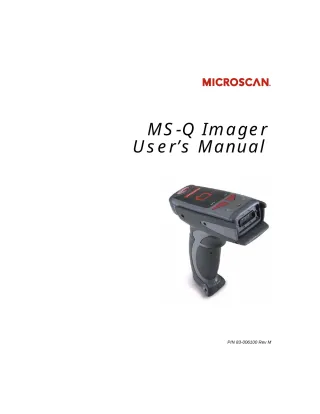
MS-Q Imager User's Manual
Manual250 pagesPDF 4.7 MB
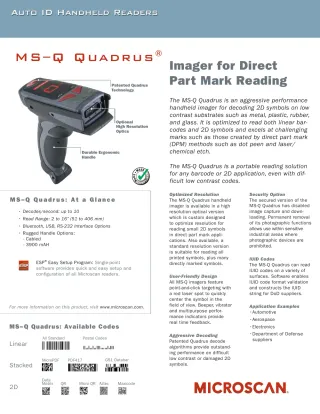
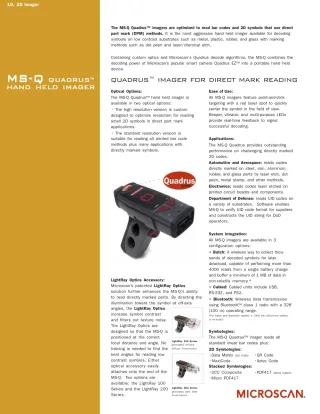
User's manual for the Microscan MS-Q hand-held imager (Quadrus and Basic models) for 1D and 2D symbols, with cabled, batch and Bluetooth options.
Covers · 1 model
The models it covers
Summary
What is in it
The full user's manual for the Microscan MS-Q Imager, a hand-held reader for 1D and 2D symbols in USB, RS-232, PS/2, Batch and Bluetooth versions. It covers assembly and quick start, the ESP setup software, basic operations, communications, symbologies, I/O parameters, advanced operations such as dual optics and trigger optimization, the terminal, utilities and Unique Item Identifiers. Appendices give general and electrical specifications, configuration symbols, battery charger, Bluetooth modem and maintenance.
Its parts
- Quick Start
- Using ESP
- Basic Operations
- Communications
- Symbologies
- I/O Parameters
- Advanced Operations
- Terminal
- Utilities
- Unique Item Identifiers
From the manual
Key facts from this manual
Some pages are scans or cannot be read; this says only what the readable text supports. Each line names its page in the PDF.
The Microscan MS-Q Imager User's Manual (P/N 83-006100 Rev M) for the MS-Q Quadrus and MS-Q Basic handheld imagers, Rev 5 and Rev 6 hardware. It covers assembly, setup by USB, PS/2, RS-232, Bluetooth or batch battery, configuration with ESP or setup symbols, and gives specifications, part numbers, charger and Bluetooth modem setup, and maintenance.
- What it is
- Handheld imager for 1D and 2D symbols with a 1.3 million pixel CMOS sensor and 400 MHz processor; Quadrus and Basic models p. 7
- Interfaces
- USB standard; RS-232, Bluetooth Class 1 radio at 328' (100m) or PS/2 optional p. 172
- Power
- 5 VDC; 140 mA typical, 310 mA peak, 3 mA sleep p. 174
- Battery life
- 3900 mAH: 8,000 read/transmits per charge with 16 hours standby; 1950 mAH (Rev 5 only): 4,000 with 8 hours p. 174
- Batch memory
- 3.8MB for user data p. 174
- Part number prefix
- Quadrus: FIS-6100-XXXXG; Basic: FIS-6150-XXXXG p. 20
- Handles
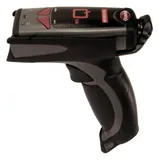
- H1 original handle, H2 cabled handle, BH1 1950 mAH battery handle (Rev 5 and earlier), BH2 3900 mAH battery handle p. 14
- Imager size and weight
- 1.3 in (33 mm) high, 1.8 in (46 mm) wide, 4.3 in (109 mm) deep; 4 oz. (113 g) without cable p. 172
- Operating temperature
- 0° to 50°C (32° to 122°F) p. 172
- Read parameters
- Focal range 1 to 20 in (25 to 508 mm); pitch ±60°, skew ±60° p. 172
- RS-232 kit
- 98-000074-04 (U.S.), -05 (Europe), -06 (UK), with cable and power supply p. 20
- Battery charger kits
- 2-bay chargers for H1 batteries, cable chargers and charging bays for the battery handle, part numbers 98-000075-04 through 98-000075-13 p. 234
- Protective jacket
- 20-000925-01, for imagers with the original H1 handle only p. 232
What this manual walks you through
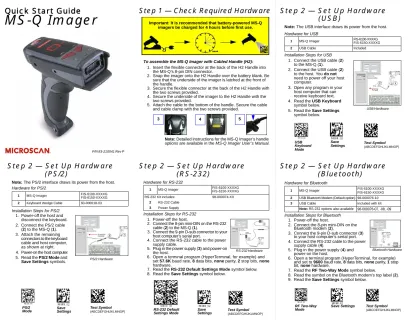
- Assembling the imager on the H2, battery and H1 handles p. 15, 16, 17
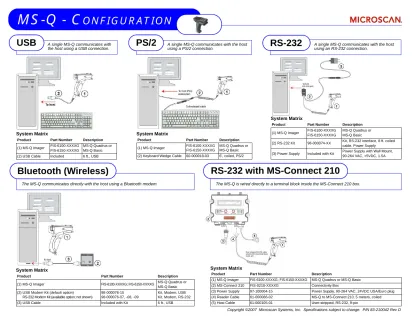
- Setting up the imager by USB, PS/2, RS-232 or Bluetooth p. 18, 19, 20, 21
- Batch mode: Send and Log or Send and Buffer p. 22
- Reading the LED colors and beeps p. 111
- Pinout of the imager's 8-pin connector p. 174
- Hardware default and manual battery recharge for the H1 handle p. 228, 229, 230
- Installing and mounting the battery charger p. 233, 234
- Installing the Bluetooth modem with a USB, PS/2 or RS-232 cable p. 235, 236, 237
- Cleaning the window and housing p. 238
Good to know
- With a battery installed, a USB host fails to recognize the imager for about 60 seconds; a battery blank avoids the delay. p. 18
- ESP does not support the Batch/Battery interface. p. 22
- In Send and Buffer mode a data collection program must be open before connecting, or all buffered data is lost. p. 22
- The Image Lock function of the MS-Q Quadrus Secure (FIS-6100-0046G, FIS-6100-0053G) cannot be turned off. p. 231
- Do not use bleach to clean the imager; disinfectants should be isopropyl or denatured ethyl alcohol. p. 238
Questions this manual answers
How do I reset an MS-Q with the H1 handle to factory defaults?
Remove the imager, cable and battery, then hold the left and right top buttons while reinserting the battery and the cable, releasing them when the left LED switches off. p. 228, 229
Why does my MS-Q vibrate continuously and not read?
On the original H1 setup, a lithium ion battery that loses all charge locks the imager in a vibration cycle. The manual gives a manual recharge procedure, followed by a hardware default. p. 228, 230
How many scans does an MS-Q battery give per charge?
The 3900 mAH battery supports 8,000 read/transmits per charge; the 1950 mAH battery (Rev 5 only) supports 4,000. p. 174
What is the part number of the MS-Q RS-232 kit?
98-000074-04 for the U.S., -05 for Europe and -06 for the UK. p. 20
What serial settings does the MS-Q Bluetooth modem use on RS-232?
By default: baud rate 9600, 8 data bits, parity none, 1 stop bit, hardware none. p. 237
Contents
Chapters and sections
Each line opens the PDF at its page.
- MS-Q Imager User's Manual1
- About the MS-Q Imager7
- About This Manual7
- Highlighting7
- Product Labels8
- Statement of Agency Compliance9
- Statement of RoHS Compliance10
- Warning and Caution Summary11
- 1 Quick Start13
- 2 Using ESP27
- 3 Basic Operations43
- 4 Communications51
- 5 Symbologies79
- 6 I/O Parameters107
- 7 Advanced Operations121
- 8 Terminal147
- 9 Utilities155
- 10 Unique Item Identifiers163
- Appendices171
- Index239
The whole text · 25 parts
Read the manual here as text
Its text as extracted from the PDF, unedited, in parts; each page opens the PDF at that page.
- Pages 1 to 101-10
- Pages 11 to 2011-20
- Pages 21 to 3021-30
- Pages 31 to 4031-40
- Pages 41 to 5041-50
- Pages 51 to 6051-60
- Pages 61 to 7061-70
- Pages 71 to 8071-80
- Pages 81 to 9081-90
- Pages 91 to 10091-100
- Pages 101 to 110101-110
- Pages 111 to 120111-120
- Pages 121 to 130121-130
- Pages 131 to 140131-140
- Pages 141 to 150141-150
- Pages 151 to 160151-160
- Pages 161 to 170161-170
- Pages 171 to 180171-180
- Pages 181 to 190181-190
- Pages 191 to 200191-200
- Pages 201 to 210201-210
- Pages 211 to 220211-220
- Pages 221 to 230221-230
- Pages 231 to 240231-240
- Pages 241 to 250241-250
The file