Manual · Microscan
Microscan MS-Q Configuration
Manual1 pagePDF 99 KB
The page is below, with its text.
Covers · 1 model
The models it covers
From the manual · read page by page
Key facts from this manual
Each line names its page in the PDF.
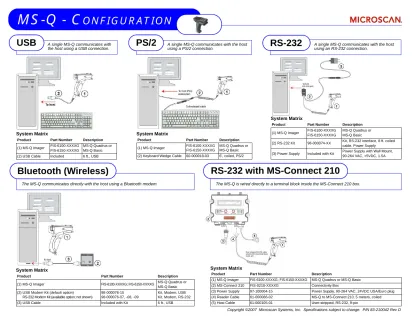
A one-page Microscan configuration sheet for the MS-Q imager (MS-Q Quadrus or MS-Q Basic). It shows the five ways to connect an MS-Q to a host and lists the part numbers of the cables, kits and power supplies each setup uses.
- Host connections
- USB, PS/2 keyboard wedge, RS-232, RS-232 through an MS-Connect 210 box, or Bluetooth wireless p. 1
- Imager part numbers
- FIS-6100-XXXXG or FIS-6150-XXXXG (MS-Q Quadrus or MS-Q Basic) p. 1
- USB cable
- 6 ft. USB cable, included p. 1
- Keyboard wedge cable
- 60-000018-03, 6 ft. coiled, PS/2 p. 1
- RS-232 kit
- 98-000074-XX: RS-232 interface, 8 ft. coiled cable and power supply p. 1
- RS-232 kit power supply
- Wall mount, 90-264 VAC in, +5VDC, 1.5A out p. 1
- MS-Connect 210
- Connectivity box FIS-0210-XXXXG; the MS-Q is wired to a terminal block inside it p. 1
- Reader cable
- 61-000066-02, MS-Q to MS-Connect 210, 5 meters, coiled p. 1
- Host cable
- 61-000105-01, user-stripped, RS-232, 9-pin p. 1
- Bluetooth modem kits
- USB modem kit (default) or RS-232 modem kit; part numbers 98-000076-10 and 98-000076-07, -08, -09 p. 1
What this manual walks you through
- Connecting one MS-Q to a host by USB, PS/2 or RS-232 p. 1
- Wiring the MS-Q to an MS-Connect 210 box for RS-232 p. 1
- Connecting the MS-Q by Bluetooth through a modem kit p. 1
Questions this manual answers
What cable connects the MS-Q to a PS/2 keyboard port?
Keyboard wedge cable 60-000018-03, a 6 ft. coiled PS/2 cable. p. 1
Which kit do I need to use the MS-Q over RS-232?
RS-232 Kit 98-000074-XX, which has the RS-232 interface, an 8 ft. coiled cable and a power supply. p. 1
Can the MS-Q work wirelessly?
Yes. It can talk to the host through a Bluetooth modem, using a USB or RS-232 modem kit. p. 1
Is a USB cable included with the MS-Q?
For the USB setup, the sheet lists a 6 ft. USB cable as included. p. 1
The file
Size and text
Every page · 1
Read it here
Each page as it is printed, and its words beside it, so a phone can search and copy them.
Page1of 1
Open in the PDF
The text of page 1, from the PDF itself
MS-Q - CONFIGURATION USB
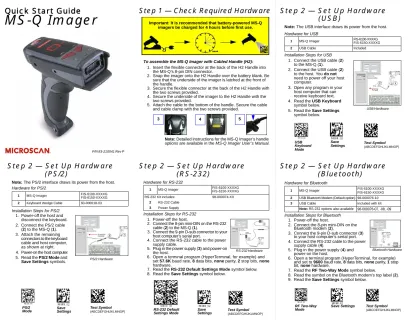
A single MS-Q communicates with the host using a USB connection.
PS/2
A single MS-Q communicates with the host using a PS/2 connection.
RS-232
A single MS-Q communicates with the host using an RS-232 connection.
System Matrix System Matrix
System Matrix ProductPart NumberDescriptionProductPart NumberDescription(1) MS-Q Imager
FIS-6100-XXXXG FIS-6150-XXXXG
MS-Q Quadrus or MS-Q Basic
(1) MS-Q Imager
FIS-6100-XXXXG FIS-6150-XXXXG
MS-Q Quadrus or MS-Q Basic
(2) USB CableIncluded6 ft., USB
(2) Keyboard Wedge Cable
60-000018-036’, coiled, PS/2Part NumberDescription(1) MS-Q Imager
FIS-6100-XXXXG FIS-6150-XXXXG
MS-Q Quadrus or MS-Q Basic
(2) RS-232 Kit
98-000074-XX
Kit, RS-232 interface, 8 ft. coiled cable, Power Supply
(3) Power Supply
Included with Kit
Power Supply with Wall Mount, 90-264 VAC, +5VDC, 1.5A
RS-232 with MS-Connect 210
Bluetooth (Wireless) The MS-Q communicates directly with the host using a Bluetooth modem.
The MS-Q is wired directly to a terminal block inside the MS-Connect 210 box.
System MatrixSystem Matrix ProductProductPart NumberDescriptionProductPart Number(1) MS-Q Imager
FIS-6100-XXXXG; FIS-6150-XXXXG
Description MS-Q Quadrus or MS-Q Basic
(2) MS-Connect 210
FIS-0210-XXXXG
Connectivity Box Power Supply, 90-264 VAC, 24VDC USA/Euro plug
(1) MS-Q Imager
FIS-6100-XXXXG; FIS-6150-XXXXG
MS-Q Quadrus or MS-Q Basic
(2) USB Modem Kit (default option) RS-232 Modem Kit (available option; not shown)
98-000076-10 98-000076-07, -08, -09
Kit, Modem, USB Kit, Modem, RS-232
(3) Power Supply97-100004-15(4) Reader Cable61-000066-02
MS-Q to MS-Connect 210, 5 meters, coiled
(3) USB CableIncluded with Kit6 ft., USB(5) Host Cable61-000105-01
User-stripped, RS-232, 9-pin
Copyright ©2007 Microscan Systems, Inc. Specifications subject to change. P/N 83-210042 Rev D