Manual · Intermec
TE 2000 VT/ANSI Terminal Emulation Programmer's Guide
Manual456 pagesPDF 3.1 MB
Programmer's guide for the Intermec TE 2000 VT/ANSI terminal emulation application on 2425, 248X and other Intermec terminals.
Names · 1 model
The models it names

Filed with · 4 models
Also filed with these models on the old site
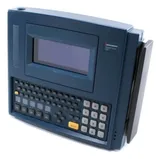 Intermec 2480Stationary data collection terminal for data entry from$1,275.003 in stock
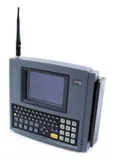 Intermec 2486Stationary data collection terminal for data entry from$1,795.001 in stock
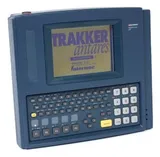 Intermec 2481Stationary data collection terminal for data entry Call for availability Intermec 2485Stationary data collection terminal for data entry Call for availability
Summary
What is in it
This Intermec programmer's guide covers the TE 2000 VT/ANSI terminal emulation application: how to install, configure, operate, maintain and troubleshoot it. It explains the emulation keypads, printing and serial scanning, and the keyboard of each supported terminal, including the 2415, 2425, 2435A, 2455, 2475 and 248X, plus the 6400, 5020, 5055, 59XX, 17XX, 11XX, 700 Series, CK30, CK31 and CV60. Later chapters cover the setup menus, customizing the configuration, programming and extended commands, with bar code scanning appendices.
Its parts
- Before You Begin
- Getting Started
- Using Terminal Emulation Applications
- Using the Terminal's Keyboard
- Using the Terminal Emulation Menus
- Customizing Your Configuration
- Programming
- Extended Commands
From the manual
Key facts from this manual
Each line names its page in the PDF.
The TE 2000 VT/ANSI Terminal Emulation Programmer's Guide (revision J, 03/2005, for TE 2000 version 8.00 or greater), which explains how to install, configure and program Intermec's VT/ANSI terminal emulation software. It covers many Intermec terminals as printed: the Trakker Antares 2415, 2425, 2435A, 2455, 2475 and 248X, plus the 6400, 5020, 5055, 59XX, 17XX, 11XX, 700 Series, CK30, CK31 and CV60.
- Software
- TE 2000 VT/ANSI terminal emulation application; this revision is for version 8.00 or greater p. 3
- Network protocols
- UDP Plus, TCP/IP or WTP over the Enterprise Wireless LAN p. 26
- Radio options
- Trakker Antares terminals: 2.4 GHz OpenAir or 802.11, with WTP, UDP Plus or IP p. 30
- Not supported
- SST (Spread Spectrum Transmission) and regular UHF p. 30
- Default data stream
- 3270 on the 2415, 2425, 2435A, 2455, 2475 and 248X; Native on the 6400, 5055, 59XX, 17XX and 11XX p. 28
- Extended commands
- Off by default; send and receive data on the RS-232 port or collect data p. 28
- File download (Trakker Antares)
- LOADER.EXE, T24FCOPY.EXE over serial, the Application Server Download Server (UDP Plus), or TFTP (TCP/IP) p. 287
- Saved settings
- The application restarts with the configuration saved in CONFIG.DAT p. 287
- 2425 manual
- TRAKKER Antares 2420 and 2425 Hand-Held Terminal User's Manual, P/N 064024 p. 47
- Ethernet model
- The 2480/2481 has an Ethernet NIC instead of a radio p. 26
- Version query
- The #V extended command returns the TE program name and version to the host p. 356
What this manual walks you through
- Setting up the terminal and network before running TE 2000 p. 26
- Performing a quick configuration for VT/ANSI p. 28
- Picking the program name for each terminal and radio p. 30
- Using the 2425 keyboard for VT/ANSI keys, function keys and control characters p. 47, 48, 49, 50, 51
- Restarting terminal emulation with the Reset Firmware bar code or Cold Start p. 216, 217
- Downloading files to Trakker Antares terminals p. 287
- Updating 6400 and 5055 flash memory over INTERLNK p. 288
- Asking the terminal for its TE version from the host p. 356
Good to know
- On the Trakker Antares terminals, several older commands are gone, including Reshow, Status and dual sessions on UDP Plus or TCP units. p. 29
- Intermec Application Servers do not support the F5 (Break) key. p. 50
- The Reset Firmware bar code does not work on the 5020, 59XX, 17XX, 11XX, 700 Series, CK30, CK31 or CV60; use cold start instead. p. 216
- Restarting TE also clears the saved auto-login information. p. 216
- Keep terminals on charge while setting up, reprogramming or reflashing. p. 288
Questions this manual answers
How do I switch a Trakker Antares 2425 from 3270 to VT/ANSI?
Open the TE menus, choose Set-up Parms, enter the password, then Protocol Opts, Data Stream, VT/ANSI, and save the parameters. p. 28
How do I restart terminal emulation on a 2425?
Scan the Reset Firmware bar code or choose 6) Cold Start from the TE Main Menu; it restarts with the settings in CONFIG.DAT. p. 217
How do I load files onto a Trakker Antares terminal?
Use LOADER.EXE, T24FCOPY.EXE over a serial link, the Application Server Download Server for UDP Plus, or TFTP for TCP/IP units. p. 287
Does TE 2000 work with Spread Spectrum (SST) radios?
No. The guide says TE 2000 does not support SST or regular UHF. p. 30
Contents
Chapters and sections
Each line opens the PDF at its page.
- Legal Information2
- Document Change Record3
- Before You Begin21
- Chapter 1: Getting Started25
- Understanding Network Protocol Options26
- Setting Up the Terminal and the Network26
- Starting the TE 2000 Application27
- Becoming Familiar With VT/ANSI Terminal Emulation27
- Performing a Quick Configuration28
- Configuring the TE 2000 Application29
- Using Advanced Features29
- Unsupported Commands and Functions29
- Program Names30
- VT/ANSI Standard Terminal Keyboard31
- Chapter 2: Using Terminal Emulation Applications33
- Chapter 3: Using the Terminal’s Keyboard41
92 more lines, from page 99 on
- 11XX Terminal99
- Chapter 4: Using the Terminal Emulation Menus129
- Chapter 5: Customizing Your Configuration221
- Chapter 6: Programming293
- Character Encoding294
- Character Sets294
- Received Codes303
- Select C1 Controls303
- Terminal Modes304
- Cursor Positioning306
- Tab Stops307
- Character Rendition and Attributes308
- Line Attributes310
- Erasure Mode311
- Editing312
- Erasing313
- Scrolling Margins (Top and Bottom)314
- Printing314
- User-Defined Keys (DECUDK)315
- Down-Line Loadable Character Set319
- Reports320
- Terminal Reset322
- Tests and Adjustments323
- VT52 Mode Escape Sequence324
- Define Area Qualification324
- Private Sequences324
- Proprietary Sequences325
- VT340 Applications326
- IBM 330X Applications329
- ANSI Mode Sequences330
- Transmitted Keyboard Codes331
- Transmitted Keyboard Keys332
- Local Edit Mode335
- Chapter 7: Extended Commands341
- Appendix A: Bar Code Scanning377
- Appendix B: Bar Code Symbologies405
- Appendix C: Full ASCII Table415
- Index419
The whole text · 52 parts
Read the manual here as text
Its text as extracted from the PDF, unedited, in parts; each page opens the PDF at that page.
- Pages 1 to 41-4
- Contents, pages 5 to 115-11
- Contents, pages 12 to 1812-18
- Contents, pages 19 to 2019-20
- Before You Begin21-24
- Chapter 1: Getting Started25-32
- Chapter 2: Using Terminal Emulation Applications33-40
- Chapter 3: Using the Terminal’s Keyboard, pages 41 to 5041-50
- Chapter 3: Using the Terminal’s Keyboard, pages 51 to 6051-60
- Chapter 3: Using the Terminal’s Keyboard, pages 61 to 7061-70
- Chapter 3: Using the Terminal’s Keyboard, pages 71 to 8071-80
- Chapter 3: Using the Terminal’s Keyboard, pages 81 to 9081-90
- Chapter 3: Using the Terminal’s Keyboard, pages 91 to 10091-100
- Chapter 3: Using the Terminal’s Keyboard, pages 101 to 110101-110
- Chapter 3: Using the Terminal’s Keyboard, pages 111 to 120111-120
- Chapter 3: Using the Terminal’s Keyboard, pages 121 to 128121-128
- Chapter 4: Using the Terminal Emulation Menus, pages 129 to 138129-138
- Chapter 4: Using the Terminal Emulation Menus, pages 139 to 148139-148
- Chapter 4: Using the Terminal Emulation Menus, pages 149 to 158149-158
- Chapter 4: Using the Terminal Emulation Menus, pages 159 to 168159-168
- Chapter 4: Using the Terminal Emulation Menus, pages 169 to 178169-178
- Chapter 4: Using the Terminal Emulation Menus, pages 179 to 188179-188
- Chapter 4: Using the Terminal Emulation Menus, pages 189 to 198189-198
- Chapter 4: Using the Terminal Emulation Menus, pages 199 to 208199-208
- Chapter 4: Using the Terminal Emulation Menus, pages 209 to 218209-218
- Chapter 4: Using the Terminal Emulation Menus, pages 219 to 220219-220
- Chapter 5: Customizing Your Configuration, pages 221 to 229221-229
- Chapter 5: Customizing Your Configuration, pages 230 to 238230-238
- Chapter 5: Customizing Your Configuration, pages 239 to 247239-247
- Chapter 5: Customizing Your Configuration, pages 248 to 256248-256
- Chapter 5: Customizing Your Configuration, pages 257 to 265257-265
- Chapter 5: Customizing Your Configuration, pages 266 to 274266-274
- Chapter 5: Customizing Your Configuration, pages 275 to 283275-283
- Chapter 5: Customizing Your Configuration, pages 284 to 292284-292
- Chapter 6: Programming, pages 293 to 302293-302
- Chapter 6: Programming, pages 303 to 312303-312
- Chapter 6: Programming, pages 313 to 322313-322
- Chapter 6: Programming, pages 323 to 332323-332
- Chapter 6: Programming, pages 333 to 340333-340
- Chapter 7: Extended Commands, pages 341 to 349341-349
- Chapter 7: Extended Commands, pages 350 to 358350-358
- Chapter 7: Extended Commands, pages 359 to 367359-367
- Chapter 7: Extended Commands, pages 368 to 376368-376
- Appendix A: Bar Code Scanning, pages 377 to 386377-386
- Appendix A: Bar Code Scanning, pages 387 to 396387-396
- Appendix A: Bar Code Scanning, pages 397 to 404397-404
- Appendix B: Bar Code Symbologies405-414
- Appendix C: Full ASCII Table415-418
- Index, pages 419 to 428419-428
- Index, pages 429 to 438429-438
- Index, pages 439 to 448439-448
- Index, pages 449 to 456449-456
The file