Manual · Allen-Bradley
StrataSet Programming Software Programming Guide (Cat. No. 2755-LHS-1)
Manual49 pagesPDF 345 KB
Programming guide for Allen-Bradley StrataSet (2755-LHS-1), DOS software that configures StrataScan 2755-LHR bar code readers from a PC.
What this file really is
The old site listed this file as “23” for the Allen-Bradley 2755-DS. This is the StrataSet software guide for the StrataScan 2755-LHR bar code readers; it does not mention the 2755-DS.
Filed with · 1 model
Also filed with these models on the old site

Summary
What is in it
Allen-Bradley's programming guide for StrataSet, the DOS-based software (Cat. No. 2755-LHS-1) that programs StrataScan bar code readers from a PC over an RS-232 cable instead of scanning setup bar codes. It explains starting the program, its menus and function keys, entering and leaving Program Mode, uploading, saving and downloading reader settings, and each configuration option: interface format, code types, supplementals, package detect, scan range, RS232 and wand emulation formats, data formatting, beeper and LED, and the hand-held port.
Its parts
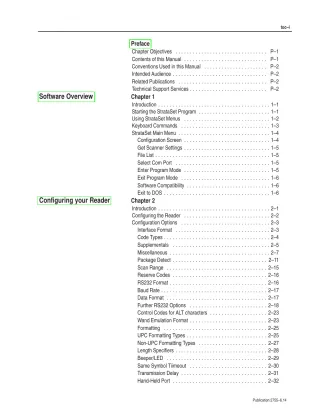
- Preface
- Software Overview
- Configuring your Reader
From the manual
Key facts from this manual
Some pages are scans or cannot be read; this says only what the readable text supports. Each line names its page in the PDF.
Programming guide for StrataSet, the Allen-Bradley DOS-based software 2755-LHS-1 that configures the StrataScan bar code readers 2755-LHR-5B, 2755-LHR-3C, 2755-LHR-5C and 2755-LHR-5BX1 from a PC over a serial cable. It shows how to start the program, put a reader into Program Mode, upload or download its settings and save them to files. It also explains the configuration options, from bar code types and supplementals to package detect, output and serial format.
- What it is
- DOS-based programming software for StrataScan bar code readers, 2755-LHS-1 p. 1, 6
- Readers supported
- 2755-LHR-5B, 2755-LHR-3C, 2755-LHR-5C and 2755-LHR-5BX1 p. 13
- Cable
- RS-232 cable 2755-LHC-11 or -12 to the PC serial port, COM 1 or COM 2 p. 6, 7
- PC requirements
- Windows 95 or Windows NT, MS-DOS, IBM PC XT, AT or PS/2 compatible (386 or greater recommended); free RS-232C serial port p. 6
- Software version
- STRATCFG Programming Software version 4.19 or later p. 13
- Reader interfaces
- RS232/RS422 or wand emulation p. 14
- Baud rates
- 300, 600, 1200, 2400, 4800, 9600, 19200 or 38400 p. 28
- Data format
- Odd, even, mark, space or no parity; 7 or 8 data bits; 1 or 2 stop bits; 10 or 11 bit words in total p. 29
- Bar code types
- UPC/EAN, Code 39, Full ASCII Code 39, Code 93, Code 128, Codabar, I2 of 5, Paraf p. 15
- Package detect I/O
- Up to 2 Package Detect inputs and an Output/Alarm Output, hardware in the 2755-LHB-1 Interface Box and reader p. 22
- Configuration files
- .TRK files; a .set text file lists the enabled options p. 12
- No read message
- Programmable, up to 10 characters, ASCII 20h to 7fh p. 25
- Good scans required
- 1 to 8 p. 20
- Lost communication
- Optional timeout after 2 seconds, with 3 beeps, razz tone or 5 retries p. 19
What this manual walks you through
- Installing and starting StrataSet p. 6, 7
- Entering and exiting Program Mode p. 10, 11
- Uploading a reader's current settings p. 10
- Downloading a configuration to the reader p. 12
- Saving configurations and printing the enabled options p. 12
- Checking the reader firmware for compatibility p. 11
- Choosing bar code types and supplementals p. 15, 17
- Setting up package detect, output and read and match p. 23, 24, 25
- Setting baud rate, parity, data bits and stop bits p. 28, 29
- Beeper, timeout and host command options p. 19, 20, 21
Good to know
- Using controls or procedures other than those described may cause hazardous laser light exposure. p. 5
- Do not power up the reader until the communication cable is secured to the host. p. 6
- Not every option on the Configuration Screen is supported by the reader. p. 12
- Reserve codes must not be enabled unless a company representative says so. p. 27
- After a motor on command, the lasers wait until the motor reaches full speed, about 45 to 50 seconds. p. 21
Questions this manual answers
What cable connects a StrataScan reader to a PC for StrataSet?
An RS-232 cable, 2755-LHC-11 or -12, plugged into the PC serial port COM 1 or COM 2. p. 6, 7
Which readers can StrataSet program?
The StrataScan bar code readers 2755-LHR-5B, 2755-LHR-3C, 2755-LHR-5C and 2755-LHR-5BX1. p. 5
How do I know the reader has entered Program Mode?
The reader beeps and its green LED begins to flash. p. 12
What baud rates does a StrataScan reader support?
300, 600, 1200, 2400, 4800, 9600, 19200 or 38400 baud. p. 28
What file extension do StrataSet configuration files use?
Saved configurations get a .TRK extension; pressing F3 on a file in the File List makes a .set text file of its enabled options. p. 12
Contents
Chapters and sections
Each line opens the PDF at its page.
The whole text · 7 parts
Read the manual here as text
Its text as extracted from the PDF, unedited, in parts; each page opens the PDF at that page.
The file