Manual · Symbol
CRD 1500 Modem/Charging Cradle Programmer's Guide
Manual84 pagesPDF 717 KB
Programmer's guide to the modem AT commands and S-registers of the Symbol CRD 1500 modem/charging cradle for the SPT 1500/1550.
Names · 1 model
The models it names
Filed with · 1 model
Also filed with these models on the old site

Summary
What is in it
Symbol's programmer's guide for the CRD 1500 Modem/Charging Cradle, written for developers of applications for the SPT 1500 and SPT 1550 terminals. It documents the internal modem used in the CRD1500-1000MC and CRD1500-1000EU: the full AT command set (basic, AT&, AT%, AT\ and AT+ commands, with parameters and result codes), followed by the factory defaults and definitions of every S-register.
Its parts
- About This Guide
- AT Command Set
- S-Registers
From the manual
Key facts from this manual
Each line names its page in the PDF.
The programmer's guide (72E-52775-01, Revision A, May 2001) for the Symbol CRD 1500 modem/charging cradle used with the SPT 1500 and SPT 1550 terminals. It documents the AT command set and S-registers of the built-in modem in the CRD1500-1000MC and CRD1500-1000EU, so a developer can control dialing, answering, error correction, compression and country settings from an application.
- Device
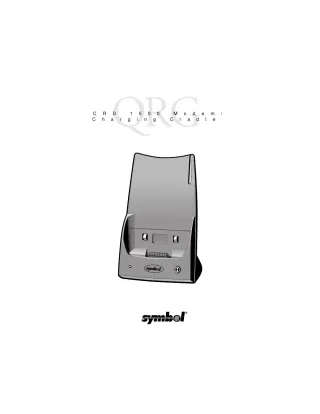
- Modem/charging cradle for the SPT 1500 and SPT 1550 terminals p. 9
- Modem
- 14.400kbps (V32bis) Symbol MCDA Modem Card inside p. 15
- Compression
- MNP5 and V42bis p. 15
- Error correction
- MNP4 and V42 p. 15
- Cradle versions
- CRD1500-1000MC and CRD1500-1000EU (EU for Europe) p. 15, 48
- Country setting
- +GCI=xx with ITU T.35 codes; USA B5 is the default p. 47
- User profiles
- Two stored profiles; &W saves, Zn loads, &Fn restores factory p. 53
- Call failure codes
- Register S86 records why a NO CARRIER happened p. 76
- Document
- Programmer's Guide 72E-52775-01, Revision A, May 2001 p. 2
What this manual walks you through
- Sending AT commands to the cradle modem p. 15, 16, 17
- Reading and writing S-registers p. 16
- Setting the country code for the modem p. 47, 48
- Selecting modulation and connection rates with +MS p. 48
- Restoring factory defaults and choosing the default profile p. 53
- Looking up S-register ranges and default values p. 54, 55
- Finding why a call failed (S86 cause codes) p. 76
Good to know
- Use the CRD1500-1000EU in Europe; European-specific hardware is needed to avoid damage. p. 48
- A new country code only takes effect after the next reset. p. 47
- Some S-registers cannot be written because of country-specific PTT limits. p. 16
- All bit-mapped S-registers are read-only; change them with the matching AT command. p. 53
- If the modem gives trouble in Europe, the guide suggests trying the specific country setting. p. 48
Questions this manual answers
What speed is the CRD1500 cradle modem?
It is a 14.400kbps (V32bis) modem with MNP5 and V42bis compression and MNP4 and V42 error correction. p. 15
Which CRD1500 should I use in Europe?
The guide says European-specific hardware is required and to use the CRD1500-1000EU in Europe to avoid damage. p. 48
How do I change the CRD1500 modem country code?
Send +GCI=xx with the ITU T.35 code (USA is B5, the default); the older *NCyy form also works. The change applies after the next reset. p. 47
What does S86=4 mean on the CRD1500 modem?
S86 holds the reason for a NO CARRIER result; a value of 4 means loss of carrier. p. 76
How do I reset the CRD1500 modem to factory settings?
Enter the &Fn command to load the factory default values; ATZn loads a stored profile. p. 53
Contents
Chapters and sections
Each line opens the PDF at its page.
The whole text · 11 parts
Read the manual here as text
Its text as extracted from the PDF, unedited, in parts; each page opens the PDF at that page.
- Pages 1 to 41-4
- Contents5-8
- About This Guide9-14
- Chapter 1 AT Command Set, pages 15 to 2415-24
- Chapter 1 AT Command Set, pages 25 to 3425-34
- Chapter 1 AT Command Set, pages 35 to 4435-44
- Chapter 1 AT Command Set, pages 45 to 5245-52
- Chapter 2 S-Registers, pages 53 to 6153-61
- Chapter 2 S-Registers, pages 62 to 7062-70
- Chapter 2 S-Registers, pages 71 to 7871-78
- Index79-84
The file