Manual · Datalogic
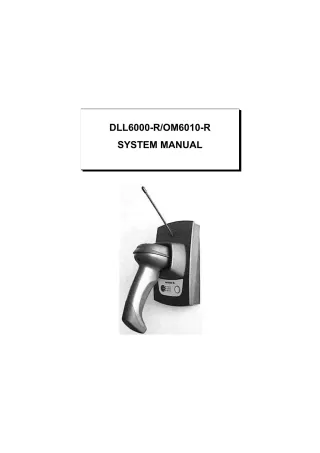
DLL6000-R/OM6010-R System Manual
Manual117 pagesPDF 3.8 MB
System manual for the Datalogic DLL6000-R cordless laser scanners and OM6010-R cradle: mounting, connections, configuration, specs.
Covers · 1 model
The models it covers
Summary
What is in it
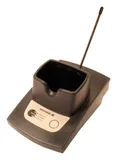
The Datalogic system manual for the cordless reading system made of DLL6000-R series hand-held laser scanners and OM6010-R cradles that talk over a low power radio, with the C6010 cradle shown as well. It covers cradle mounting and system layouts, battery care, system start-up and configuration of RS232, wedge and pen emulation interfaces, cradle, network, reading and decoding parameters, host to gun messages and display control, and technical features, with configuration string and hex table appendices.
Its parts
- Introduction
- Mounting and System Connections
- System Configuration
- References
- Communication and Message Formatting
- Technical Features
From the manual
Key facts from this manual
Some pages are scans or cannot be read; this says only what the readable text supports. Each line names its page in the PDF.
The Datalogic DLL6000-R/OM6010-R System Manual (Rev. C, 1999, for software version 1.05 and later) for the cordless reading system made of DLL6000-R series hand-held laser scanners and the OM6010-R radio cradle, with the optional C6010 charger-only cradle and LA6010 multidrop module. It explains how to mount and connect the cradle, build a multidrop network of cradles, charge and recondition scanner batteries, and set the system up by scanning configuration bar codes.
- Device
- OM6010-R: radio cradle linking one or more DLL6000-R scanners to a host computer and recharging their batteries p. 13
- Host interface
- Multistandard host connector: RS232, Wedge or Pen emulation cable p. 20
- Radio
- Low-power radio at 433.92 MHz or 910 MHz by model; range 50 m open air p. 10, 102
- Power
- Draws 8W regardless of supply voltage; maximum cradle input voltage 28V p. 28
- Recharge time
- NiMh or NiCd batteries 2 hours; Li-Ion batteries 5 hours p. 101
- Size and weight
- 185 x 115 x 104 mm without antenna; about 600 g with mounting support; IP40 p. 101
- Indicators
- Three LEDs: red while charging, green when the battery is fully charged, yellow for power p. 13, 29
- Multidrop network
- LA6010 module in each cradle; Echelon bus on category 5 UTP cable with RJ45 connectors; up to 64 cradles, 127 devices, 1300 meters p. 24, 27, 102
- Power over network
- Cable pins 1 to 4 can carry power: 14 cascaded cradles at 28V or 6 at 12V; connectors 4 amps max p. 27, 28
- C6010 charger
- Charger-only version of the cradle, to charge more scanners at once p. 13
- Software version
- Manual applies to software version 1.05 and later p. 3
- Scanner batteries
- DLL6000-R gun: 2 AA NiMh, NiCd or alkaline batteries, or 1 Lithium-Ion Sanyo UR-110 battery, by model p. 28, 100
- Scanner laser
- DLL6000-R gun: VLD 670 nm laser, 0.8 mW typical, 42° scan angle p. 100
- Scanner body
- DLL6000-R gun: about 340 g with batteries; 203 x 117 x 69 mm; works at -10 °C to + 40 °C p. 100
What this manual walks you through
- Mounting the cradle on a desk or a wall p. 14, 15, 16, 17
- Lining up several cradles with the alignment plate p. 18
- Connecting and disconnecting the host interface cable p. 20
- Installing the LA6010 multidrop module p. 25, 26
- Wiring and terminating a multidrop network p. 27, 28
- Charging and reconditioning scanner batteries p. 29
- Replacing the DLL6000-R batteries p. 29, 30
- Starting up the system: date, time, gun address, bind and interface p. 32, 33, 34, 35
- Using several scanners with one cradle p. 36
- Gun default settings p. 37
Good to know
- Make all connections with the power off. p. 20
- A cradle not bound to a gun takes a random address that can conflict with other cradles in range. p. 36
- All guns used in the same area must have different addresses. p. 33
- Reconditioning only affects NiCd and NiMh batteries, not Li-Ion. p. 29
- Lithium batteries must not be taken apart, modified, heated or burned. p. 30
Questions this manual answers
How long does the OM6010-R take to charge a scanner battery?
About 2 hours for NiMh or NiCd batteries and 5 hours for Li-Ion batteries. p. 101
What is the difference between the OM6010-R and the C6010?
The OM6010-R has a radio and links scanners to a host as well as charging them; the C6010 is the charger-only version. p. 13
How do I connect several OM6010-R cradles to one host?
Fit an LA6010 multidrop module in each cradle and chain them in a Master/Slave network; the Master connects to the host and bridges data from the Slaves. p. 24, 25
What does the battery-reconditioning button on the OM6010-R do?
It fully discharges the scanner battery and then recharges it automatically, to overcome the memory effect of NiCd and NiMh batteries. p. 29
The whole text · 12 parts
Read the manual here as text
Its text as extracted from the PDF, unedited, in parts; each page opens the PDF at that page.
The file