Manual · Symbol
PPT 4300 Series Product Reference Guide
Manual326 pagesPDF 3.8 MB
Product reference guide for the Symbol PPT 4300 Series pen terminals, including the wireless PPT 4340: setup, configuration and support.
Covers · 1 model
The models it covers
Summary
What is in it
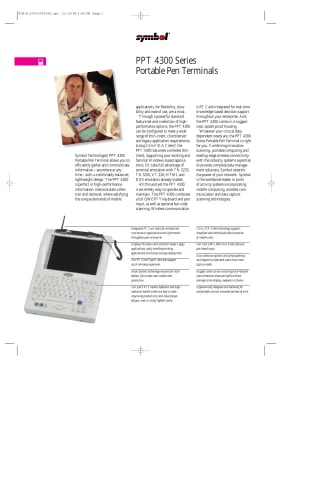
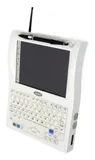
Symbol's reference guide for the PPT 4300 Series pen-based DOS terminals, written for system administrators and support staff. It covers the software environment and memory, installing software from the Utilities PC card, network and stand-alone configuration, daily operation, batteries and scanning, the Control Panel, the terminal emulators and the Citrix ICA Client for DOS, maintenance, troubleshooting and diagnostic tests. PPT 4340 versions carry a Spectrum24 wireless LAN card. Appendices give specifications, key maps, pinouts and the SE 1223 scan engine.
Its parts
- About This Manual
- Getting Started
- Software Environment
- Software Installation
- Standard Terminal Configuration
- Operation
- The Control Panel
- The Terminal Emulators
- Citrix ICA Client for DOS
- Maintenance
- Troubleshooting
- Diagnostic Tests
From the manual
Key facts from this manual
Each line names its page in the PDF.
Product Reference Guide for the Symbol PPT 4300 Series pen terminals, written for system administrators and support staff. It covers the radio-equipped PPT 4340 versions and the PPT 4300-S0E integrated scanner models, with installation, configuration, operation, maintenance, troubleshooting and full specifications.
- Device
- Portable pen terminal for stand-alone or network applications; PPT 4340 versions carry a Symbol Spectrum24 wireless LAN card p. 17
- Processor and memory
- AMD Elan SC310 at 33 MHz; RAM 4 MB standard, expandable to 16 MB; flash file system 2 MB, expandable to 16 MB p. 229
- Display
- 7.2 inch DSTN VGA color LCD, 640 x 480, 256 colors, CCFT backlit p. 230
- Radio
- Spectrum 24 wireless LAN in one PCMCIA slot; 1 Mbps (Spring Protocol) and 2 Mbps (802.11) radios; TCP/IP p. 229
- Battery
- Field-replaceable NiMH pack, 2100 mAH (nominal) at 12.0v; a new pack gives 4 - 5 hours of continuous use p. 23, 230
- Ports and slots
- Custom 9-pin RS232 serial port, IrDA port, external keyboard port, external DC port; two PCMCIA Type II slots p. 22, 24, 229
- Size and weight
- 10.75 x 8.1 x 1.25 - 2.5 in. (27.3 x 20.57 x 3.18-6.35 cm); 2.86 lbs without battery; battery 1.0 lb p. 229
- Environment
- 0°C to 40°C operating, -20°C to 60°C non-operating; 10 to 85% humidity non-condensing; 1 meter drop p. 232
- Keypad
- Integral 78-key backlit elastomeric keypad with 12 function keys and embedded numeric keypad; spill resistant p. 22, 231
- Software
- Datalight ROM-DOS 6.22; TN3270, TN5250 and VT220 emulators over TCP/IP; Citrix ICA Client for DOS (manual written for V4.00.606, BIOS V2.43) p. 11, 17, 23
- Digitizer
- PPT 4300-00E and PPT 4300-S0E: electromagnetic, 1000 dpi minimum, electromagnetic pen only; PPT 4300-00R: resistive, 150 dpi minimum, stylus or touch p. 230
- Power accessories
- 18V DC wall adapter (North America only); four-slot and single-slot battery chargers with adapter p. 18, 19
- Other accessories
- Serial to RS232 adapter cable; serial adapter cable for a bar code scanner such as the LS1820; 12 inch or 60 inch strap; PPT 4300 Utilities PC card p. 18, 24
- Integrated scanner
- PPT 4300-S0E only: SE 1223 scan engine, 42° ± 2° scan angle, depth of field 3-5 inches (5 mil) to 36 inches (55 mil) p. 231
What this manual walks you through
- Unpacking the terminal and checking standard and optional accessories p. 18, 19
- How the terminal talks to the host through a Spectrum24 Access Point p. 19
- Preparing a terminal for first use: access points, power and the Run/Ship switch p. 25
- Starting a terminal that will not power on, with the Force On, Master Reset and CMOS battery switches p. 189, 190
- Resetting the CMOS with the System Configuration Utility p. 191
- Troubleshooting table of symptoms, causes and actions p. 193, 194, 195
- External keyboard and serial port connector pin-outs p. 260
- SE 1223 scan engine specifications and decode zone p. 291, 292
Good to know
- In North America use only a Symbol-approved 18V DC adapter, and leave the battery pack in place. p. 261
- Leave the Run/Ship switch on Run unless the terminal is shipped or stored without a battery for over a week. p. 22
- CMOS settings can be lost if the terminal is stored with no battery for longer than 30 days. p. 195
- The integrated scanner interrupts radio transmission for up to three seconds without affecting the host session. p. 291
- Using the wrong DC adapter may damage the terminal's circuitry. p. 23
Questions this manual answers
PPT 4300 will not power on
Set the Run/Ship switch to Run, fit a charged battery or DC adapter and hold the pen on the Power icon for a second; then try the Force On switch, then the Master Reset switch under the left rubber foot. p. 189, 190
What does WARNING - CMOS FAILURE - RUN SCU mean on a PPT 4300?
The CMOS is corrupt or uninitialized. Press Ctrl-Alt-S to open the System Configuration Utility, change nothing, then press Esc and Enter to reboot. p. 191
PPT 4300 screen is black or white with no text
Hold Fn and press F9 to darken or F10 to lighten; it may take 50 or more presses before text appears. p. 191
How much memory does the PPT 4340 have?
4 MB of RAM as standard, expandable to 16 MB, and a 2 MB flash file system expandable to 16 MB. p. 229
Contents
Chapters and sections
Each line opens the PDF at its page.
- About This Manual11
- Chapter 1 Getting Started15
- Chapter 2 Software Environment27
- Chapter 3 Software Installation43
- Chapter 4 Standard Terminal Configuration77
- Chapter 5 Operation95
74 more lines, from page 114 on
- Scanning114
- Chapter 6 The Control Panel119
- Chapter 7 The Terminal Emulators143
- Chapter 8 Citrix ICA Client for DOS167
- Chapter 9 Maintenance179
- Chapter 10 Troubleshooting187
- Chapter 11 Diagnostic Tests215
- Appendix A Specifications227
- Appendix B Key Mapping for Terminal Emulators233
- Appendix C Hardware Components257
- Appendix D PPT 4300 Software Files267
- Appendix E PPT 4300 with Integrated Scanner (PPT4300-SOE)289
- Appendix F International Keypads299
- Glossary313
The whole text · 37 parts
Read the manual here as text
Its text as extracted from the PDF, unedited, in parts; each page opens the PDF at that page.
- Pages 1 to 101-10
- About This Manual11-14
- Chapter 1 Getting Started15-26
- Chapter 2 Software Environment, pages 27 to 3427-34
- Chapter 2 Software Environment, pages 35 to 4235-42
- Chapter 3 Software Installation, pages 43 to 5143-51
- Chapter 3 Software Installation, pages 52 to 6052-60
- Chapter 3 Software Installation, pages 61 to 6961-69
- Chapter 3 Software Installation, pages 70 to 7670-76
- Chapter 4 Standard Terminal Configuration, pages 77 to 8577-85
- Chapter 4 Standard Terminal Configuration, pages 86 to 9486-94
- Chapter 5 Operation, pages 95 to 10295-102
- Chapter 5 Operation, pages 103 to 110103-110
- Chapter 5 Operation, pages 111 to 118111-118
- Chapter 6 The Control Panel, pages 119 to 126119-126
- Chapter 6 The Control Panel, pages 127 to 134127-134
- Chapter 6 The Control Panel, pages 135 to 142135-142
- Chapter 7 The Terminal Emulators, pages 143 to 150143-150
- Chapter 7 The Terminal Emulators, pages 151 to 158151-158
- Chapter 7 The Terminal Emulators, pages 159 to 166159-166
- Chapter 8 Citrix ICA Client for DOS167-178
- Chapter 9 Maintenance179-186
- Chapter 10 Troubleshooting, pages 187 to 196187-196
- Chapter 10 Troubleshooting, pages 197 to 206197-206
- Chapter 10 Troubleshooting, pages 207 to 214207-214
- Chapter 11 Diagnostic Tests215-226
- Appendix A Specifications227-232
- Appendix B Key Mapping for Terminal Emulators, pages 233 to 240233-240
- Appendix B Key Mapping for Terminal Emulators, pages 241 to 248241-248
- Appendix B Key Mapping for Terminal Emulators, pages 249 to 256249-256
- Appendix C Hardware Components257-266
- Appendix D PPT 4300 Software Files, pages 267 to 274267-274
- Appendix D PPT 4300 Software Files, pages 275 to 282275-282
- Appendix D PPT 4300 Software Files, pages 283 to 288283-288
- Appendix E PPT 4300 with Integrated Scanner (PPT4300-SOE)289-298
- Appendix F International Keypads299-312
- Glossary313-326
The file