Manual · Symbol
LS 5700/LS 5800 Product Reference Guide
Manual352 pagesPDF 2.2 MB
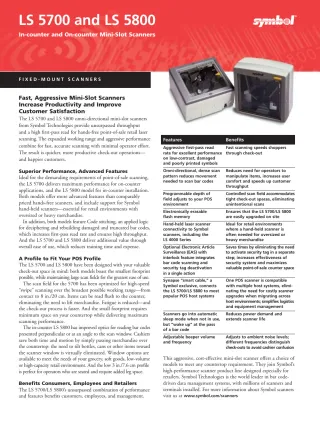
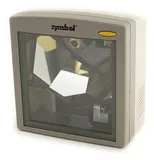
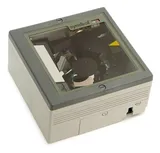
Product reference guide for the Symbol LS 5700 on-counter and LS 5800 in-counter omni-directional bar code scanners.
Covers · 2 models
The models it covers
Summary
What is in it
Product reference guide for the Symbol LS 5700 and LS 5800 omni-directional scanners for point-of-sale use. It covers unpacking, the input/output ports, connecting to IBM 468x/469x terminals and RS-232C hosts, adding a hand-held laser scanner, electronic article surveillance (EAS), mounting, scanning, maintenance and technical specifications, followed by the full set of parameter bar code menus for host types, RS-232C options, code types, custom tailoring, decode options and data formats.
Its parts
- About This Manual
- The LS 5700/5800 Scanner
- Set Up
- Scanning
- Maintenance and Specifications
- Parameter Menus
From the manual
Key facts from this manual
Some pages are scans or cannot be read; this says only what the readable text supports. Each line names its page in the PDF.
The Product Reference Guide (70-16692-03, Revision A, May 2003) for the Symbol LS 5700 and LS 5800 omni-directional point-of-sale scanners. It covers setup, host connections, mounting, maintenance, technical specifications and the bar code parameter menus used to program the scanners.
- Device
- Omni-directional point-of-sale bar code scanner; LS 5700 sits on the counter, LS 5800 mounts in the counter; the two are identical electrically p. 23
- Power
- +5.0 VDC ± 5%, 3.5 watts nominal p. 58
- Power In port
- 5 V @ 550 mA nominal, current draw not to exceed 1.2 A p. 26
- Ports
- Power In; Host port (6-pin modular); Hand-Held Laser Scanner port (6-pin modular); RS-232C port (10-pin modular) p. 26, 27
- Host connections
- IBM 468x/469x terminal Port 9E, Port 17 or Port 5B; RS-232C host; dual-port RS-232C p. 5
- Symbologies
- UPC/EAN, UPC/EAN Supplementals, Code 39, Code 39 Full ASCII, I 2 of 5, Code 128, Codabar; also UCC 128 Coupon Code, Bookland EAN-13, ITF-14 p. 24
- Operating temperature
- 32° to 104°F (0° to 40°C); humidity 5% to 95% non-condensing p. 59
- Hand-held scanner port
- Synapse-compatible scanners such as the LS 4004, LS 3603MX or LS 3203ER; current draw not to exceed 200 mA p. 27
- Cable part numbers
- Synapse Power Regulator Y-cable p/n 25-17086-01; Synapse Adapter cable p/n 25-17072-01 p. 28, 29
- EAS antenna kit
- External-antenna models LS-5800-I21xSN and LS-5800-I21xDN use kit KT-19430-01 p. 35
- LS 5800 buckets
- LS 5800: Standard 12-17206-xx; LS 5000 Replacement 12-17207-xx; Spectra-Physics Freedom Adaptor 12-17208-xx p. 61
- Print contrast
- 25% minimum absolute dark/light reflectance differential, measured at 675 nm p. 58
- Serial defaults
- 9600 baud, even parity, one stop bit, 8-bit ASCII p. 70
- Rest mode
- Reduced power after 30 minutes without scanning by default; LS 5700 also has a Sleep option that turns off laser and motor p. 48
What this manual walks you through
- Connecting the scanner to an IBM 468x/469x terminal p. 28, 29
- Connecting to an RS-232C host, single or dual port p. 30, 31
- Adding a hand-held laser scanner and choosing which scanner to program p. 32, 33
- EAS options and the EAS interlock p. 34, 35
- Mounting the LS 5700 in its stand p. 36
- What to check when the scanner does nothing p. 49
- Programming the scanner by scanning parameter bar codes p. 50, 51
- Cleaning and changing the exit window p. 55, 56
- Reading the beeper codes p. 62, 63
- Factory default settings p. 70, 71, 72, 73, 74
Good to know
- The EAS interlock is to be fitted only by a Symbol qualified technician. p. 34
- Decode range depends on the contrast, density, orientation and quality of the bar code. p. 59
- A dirty or scratched exit window may affect scanning. p. 55
- A host type must be selected for the scanner to talk to the host terminal. p. 51
Questions this manual answers
What is the difference between the LS 5700 and the LS 5800?
The LS 5700 sits on top of the counter and the LS 5800 mounts in the counter for slide-through scanning; the two are identical electrically. p. 23
What power does the LS 5700/LS 5800 need?
+5.0 VDC ± 5% at 3.5 watts nominal; some host terminals such as the IBM 46xx Series can power it so no external supply is needed. p. 26, 58
Can I plug a hand-held scanner into the LS 5800?
Yes, a Synapse-compatible scanner such as the LS 4004 plugs into the 6-pin Hand-Held Laser Scanner port and adapts to the main scanner's decode settings. p. 27
What do 4 long high beeps mean on the LS 5700?
A format or transmission error was found in the serial data or a scanned symbol and the data is ignored; check the option settings. p. 62
What is the default baud rate of the LS 5700?
9600 baud with even parity. p. 70
Contents
Chapters and sections
Each line opens the PDF at its page.
- About This Manual13
- Chapter 1 The LS 5700/5800 Scanner23
- Chapter 2 Set Up25
- Chapter 3 Scanning47
- Chapter 4 Maintenance and Specifications55
- Chapter 5 Parameter Menus65
- Appendix329
3 more lines, from page 329 on
The whole text · 36 parts
Read the manual here as text
Its text as extracted from the PDF, unedited, in parts; each page opens the PDF at that page.
- Pages 1 to 121-12
- About This Manual13-22
- Pages 23 to 3023-30
- Pages 31 to 3831-38
- Pages 39 to 4639-46
- Chapter 3 Scanning47-54
- Chapter 4 Maintenance and Specifications55-64
- Chapter 5 Parameter Menus, pages 65 to 7465-74
- Chapter 5 Parameter Menus, pages 75 to 8475-84
- Chapter 5 Parameter Menus, pages 85 to 9485-94
- Chapter 5 Parameter Menus, pages 95 to 10495-104
- Chapter 5 Parameter Menus, pages 105 to 114105-114
- Chapter 5 Parameter Menus, pages 115 to 124115-124
- Chapter 5 Parameter Menus, pages 125 to 134125-134
- Chapter 5 Parameter Menus, pages 135 to 144135-144
- Chapter 5 Parameter Menus, pages 145 to 154145-154
- Chapter 5 Parameter Menus, pages 155 to 164155-164
- Chapter 5 Parameter Menus, pages 165 to 174165-174
- Chapter 5 Parameter Menus, pages 175 to 184175-184
- Chapter 5 Parameter Menus, pages 185 to 194185-194
- Chapter 5 Parameter Menus, pages 195 to 204195-204
- Chapter 5 Parameter Menus, pages 205 to 214205-214
- Chapter 5 Parameter Menus, pages 215 to 224215-224
- Chapter 5 Parameter Menus, pages 225 to 234225-234
- Chapter 5 Parameter Menus, pages 235 to 244235-244
- Chapter 5 Parameter Menus, pages 245 to 254245-254
- Chapter 5 Parameter Menus, pages 255 to 264255-264
- Chapter 5 Parameter Menus, pages 265 to 274265-274
- Chapter 5 Parameter Menus, pages 275 to 284275-284
- Chapter 5 Parameter Menus, pages 285 to 294285-294
- Chapter 5 Parameter Menus, pages 295 to 304295-304
- Chapter 5 Parameter Menus, pages 305 to 314305-314
- Chapter 5 Parameter Menus, pages 315 to 324315-324
- Chapter 5 Parameter Menus, pages 325 to 328325-328
- Appendix329-342
- Index343-352
The file