Manual · Norand
6710 Mobile Bridge User's Guide
Manual236 pagesPDF 1.5 MB
User's guide for the Norand 6710 Mobile Bridge, which links an Ethernet LAN host to PEN*KEY computers on an RS-485 LAN.
Covers · 1 model
The models it covers
Summary
What is in it
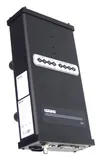
Intermec's user's guide for the 6710 Mobile Bridge, a 3-port translating bridge between a host on an Ethernet LAN and PEN*KEY 6100, 6110 or 6210 computers on an RS-485 LAN. It explains the bridging and management functions, installation (mounting, multidock and 10BASE2, 10BASE5 and 10BASE-T Ethernet connections), configuration through the DIAG port, Telnet or a web browser, software download with TFTP and scripts, and the indicator lights. Appendices give specifications, port and cable pin-outs and the MIB.
Its parts
- Introduction
- Features and Functional Overview
- Installation
- Configuration
- Software Download
- Indicator Lights
From the manual
Key facts from this manual
Each line names its page in the PDF.
This is the user's guide for the Norand 6710 Mobile Bridge, a 3-port translating bridge that links a host on an Ethernet LAN with PEN*KEY 6100, 6110, or 6210 Computers on an RS-485 LAN. It covers installation, configuration through the DIAG port, Telnet, or a Web browser, software download, and reading the indicator lights. Appendixes give specifications and port and cable pin-outs.
- Device
- 3-port translating bridge between an Ethernet LAN host and PEN*KEY 6100, 6110, or 6210 Computers on an RS-485 LAN p. 19, 20
- Ethernet ports
- 10BASE2 (BNC), 10BASE-T (RJ45), and AUI (15-pin D-sub) for 10BASE5 p. 32
- RS-485 ports
- Two RS-485 PC card slots with 9-pin D-sub female connectors p. 31, 147
- DIAG port
- 9-pin D-sub at RS-232 levels, for configuration, software download, and statistics p. 33
- Processor and memory
- AMD 29200 RISC; 4 MB RAM, 2 MB FLASH ROM p. 147
- Operating temperature
- -22 F to 122 F (-30 C to 50 C) p. 148
- Size and weight
- 3.75 in x 6.88 in x 14.5 in (9.5 cm x 17.5 cm x 36 cm); 3.75 lbs (1.70 kg) p. 148
- Power input
- IEC three-prong AC input to an autosensing internal power supply p. 32
- DIAG cables
- P/N 226-106-001 null modem cable for a 9-pin PC COM port; P/N 321-355-001 for a 25-pin port p. 57
- RS-485 LAN cable
- Nonpowered, P/N 226-103-0XX, 1.5 to 1000 feet; the 6 foot cable is 226-103-004 p. 36, 37
- Multidocks
- PEN*KEY 6100 Series Multidock (6100, 6110) or 4960 Multidock (6210), which needs an external power supply and Y-cable P/N 226-151-001 p. 36
- Power cords
- United States 321-054-001; United Kingdom 321-474-001; Europe 321-473-001 p. 33
- Mounting
- Tabletop or wall; Industrial Locking Mounting Bracket P/N 203-386-001 p. 33, 147
- Firmware covered
- FLASH version 1.31 or greater, ROM version 1.14 or greater p. 15
What this manual walks you through
- Mounting the bridge on a tabletop, wall, or post p. 42
- Connecting to PEN*KEY computer multidocks over RS-485 p. 36
- Connecting to 10BASE2, 10BASE-T, or 10BASE5 Ethernet p. 37
- Reaching the configuration menus locally or by Telnet or Web browser p. 40
- Starting a local session from a PC with terminal emulation p. 57
- Downloading new software to the bridge p. 16
- Reading the indicator lights and error codes to isolate a faulty unit p. 139, 141
- DIAG, RS-485, and AUI port and cable pin-outs p. 149
Good to know
- After a hardware error 1, 2, or 3 the bridge no longer functions; the manual says to contact the Customer Response Center. p. 142
- After a failed serial, AUI, or 10BASE-T loopback self-test the unit usually keeps working, but the fault remains. p. 142
- A power outlet should be within 6 feet, and an uninterruptable power supply is recommended where ac power is unreliable. p. 42
- The guide leaves Ethernet run lengths and node limits to a cabling reference. p. 37
Questions this manual answers
What computers does the Norand 6710 Mobile Bridge work with?
It connects PEN*KEY 6100, 6110, or 6210 Computers on an RS-485 LAN to a host on an Ethernet LAN. p. 19
What cable connects a PC to the 6710 DIAG port?
P/N 226-106-001, a standard null modem cable, for a 9-pin PC COM port, or P/N 321-355-001 for a 25-pin port. p. 57
What does the STATUS light on the 6710 mean?
Off means normal operation; on means error mode, and lights 4 through 8 then show a binary error code from 1 to 31. p. 141
How much memory does the 6710 Mobile Bridge have?
4 MB of RAM and 2 MB of FLASH ROM, with an AMD 29200 RISC processor. p. 147
Which 6710 firmware versions does this guide cover?
FLASH version 1.31 or greater and ROM version 1.14 or greater. p. 15
The whole text · 24 parts
Read the manual here as text
Its text as extracted from the PDF, unedited, in parts; each page opens the PDF at that page.
- Pages 1 to 101-10
- Pages 11 to 2011-20
- Pages 21 to 3021-30
- Pages 31 to 4031-40
- Pages 41 to 5041-50
- Pages 51 to 6051-60
- Pages 61 to 7061-70
- Pages 71 to 8071-80
- Pages 81 to 9081-90
- Pages 91 to 10091-100
- Pages 101 to 110101-110
- Pages 111 to 120111-120
- Pages 121 to 130121-130
- Pages 131 to 140131-140
- Pages 141 to 150141-150
- Pages 151 to 160151-160
- Pages 161 to 170161-170
- Pages 171 to 180171-180
- Pages 181 to 190181-190
- Pages 191 to 200191-200
- Pages 201 to 210201-210
- Pages 211 to 220211-220
- Pages 221 to 230221-230
- Pages 231 to 236231-236
The file