Manual · Intermec
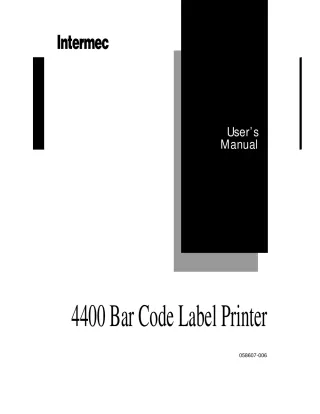
4400 Bar Code Label Printer User's Manual
Manual318 pagesPDF 2.3 MB
User's manual for the Intermec 4400 bar code label printer: setup, operation, label design, printer commands and maintenance.
Covers · 1 model
The models it covers
Summary
What is in it
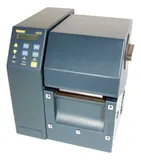
The user's manual for the Intermec 4400 bar code label printer, a direct thermal and thermal transfer label printer. It walks through unpacking, loading media and ribbon, connecting to a PC, network, AS/400 or mainframe, using the control panel, configuring the printer, designing labels, and the full printer command set, then covers special procedures such as security levels and cloning, troubleshooting, routine maintenance and the printer specifications.
Its parts
- Getting Started
- Installing the Printer
- Using the Control Panel
- Operating the Printer
- Configuring the Printer
- Designing Labels and Using Commands
- Printer Commands
- Special Procedures
- Troubleshooting
- Routine Maintenance
From the manual
Key facts from this manual
Each line names its page in the PDF.
Intermec user's manual for the 4400 thermal and thermal transfer bar code label printer. It walks through unpacking, connecting the printer to a PC or host, the control panel, loading media and ribbon, configuration, label design and the printer command set. It also covers troubleshooting with error codes, routine maintenance, the specifications and the printer options.
- Device type
- Direct thermal and thermal transfer bar code label printer for industrial use p. 25, 275
- Interfaces
- Asynchronous RS-232C, RS-422 and RS-485 serial; baud rates 110 to 19200 p. 277
- Serial cables
- 048693 for an IBM PC AT (25-pin printer to 9-pin serial port); 048668 for an IBM PC XT (25-pin to 25-pin null modem) p. 42
- Parallel option
- Centronics parallel interface, field installable option Part No. 056830; cable up to 10 feet, one way only p. 44, 285
- Power
- 90 to 264 VAC, 48 to 62 Hz, auto-ranging supply; typical usage 300 Watts p. 275
- Fuse
- 5A, 250V, Slo-Blo (3AG or 5x20mm) p. 271
- Print speed
- 2.5 to 10 inches (254 mm) per second; 3.0 to 8.5 inches per second with the 6.5 mil printhead p. 275
- Resolution
- 203 dpi (8 dots per mm); 152 dpi with the 6.5 mil printhead p. 276
- Media
- Label width 2.5 inches (64 mm) to 5.1 inches (132 mm); 3 inch (77 mm) core p. 276
- Ribbon
- 18,000 inch (457 m) rolls in 2.5, 3.5 and 4.5 inch widths p. 276
- Size and weight
- 13.0 in high, 12.0 in wide with roll supply, 21.5 in long; 35.0 pounds (15.9 kg) p. 275
- Operating temperature
- 32°F to 104°F (0°C to 40°C); humidity 10% to 95% p. 276
- Options
- Self-Strip, Cutter and Tray, Narrow Media Accessory Kit, Memory Expansion, Twinax, Coax and Centronics Parallel interfaces p. 283, 284
- Fonts
- Nine resident bitmap fonts including OCR A and B, plus one smooth outline font scaleable up to 3 inches p. 277
What this manual walks you through
- Loading media and printing a configuration test label p. 23
- Connecting the printer to a PC serial port p. 42, 43
- Connecting the printer to a PC parallel port p. 44
- Making a parallel interface cable from the connector pin descriptions p. 284, 285
- Reading the error codes the printer sends back p. 251
- Printing stored pages, formats, fonts and graphics as tests p. 252
- Replacing the main power fuse p. 271
- Replacing an 8636/46 printer and printing in emulation mode p. 8
- Sending formats, fonts, pages and graphics from one printer to another p. 13
- Cleaning the printhead, platen roller and sensors p. 15
Good to know
- An interlock stops the printer from running while the ribbon access door is open. p. 26
- The parallel interface is one way: data can be downloaded to the printer but not uploaded from it. p. 285
- The power cord must be disconnected before the fuse is replaced. p. 271
- For best print quality on tag stock, the tear bar may need to be removed. p. 26
- An error code is cleared as soon as it is sent, so a second request returns 00. p. 251
Questions this manual answers
What power does the Intermec 4400 printer need?
It runs on 90 to 264 VAC at 48 to 62 Hz, with an auto-ranging power supply that adjusts itself to the line voltage. p. 275
What are the default serial port settings of the 4400?
9600 baud, even parity, 7 bit word length, XON/XOFF no status response protocol and device address A. p. 43
What fuse does the 4400 printer use?
A 5A, 250V Slo-Blo fuse, either 3AG or 5x20mm. p. 271
Which cable connects the 4400 to an IBM PC AT?
Intermec cable part number 048693, which runs from the 25-pin printer connector to a 9-pin serial port. p. 42
How narrow a label can the 4400 print?
With the narrow media adapter and the narrow roll support accessory, it can use media as narrow as 0.5 inches. p. 283
The whole text · 32 parts
Read the manual here as text
Its text as extracted from the PDF, unedited, in parts; each page opens the PDF at that page.
- Pages 1 to 101-10
- Pages 11 to 2011-20
- Pages 21 to 3021-30
- Pages 31 to 4031-40
- Pages 41 to 5041-50
- Pages 51 to 6051-60
- Pages 61 to 7061-70
- Pages 71 to 8071-80
- Pages 81 to 9081-90
- Pages 91 to 10091-100
- Pages 101 to 110101-110
- Pages 111 to 120111-120
- Pages 121 to 130121-130
- Pages 131 to 140131-140
- Pages 141 to 150141-150
- Pages 151 to 160151-160
- Pages 161 to 170161-170
- Pages 171 to 180171-180
- Pages 181 to 190181-190
- Pages 191 to 200191-200
- Pages 201 to 210201-210
- Pages 211 to 220211-220
- Pages 221 to 230221-230
- Pages 231 to 240231-240
- Pages 241 to 250241-250
- Pages 251 to 260251-260
- Pages 261 to 270261-270
- Pages 271 to 280271-280
- Pages 281 to 290281-290
- Pages 291 to 300291-300
- Pages 301 to 310301-310
- Pages 311 to 318311-318
The file