Manual · Intermec
TRAKKER Antares Terminal Emulation User's Guide
Manual176 pagesPDF 989 KB
User's guide to 3270, 5250 and VT/ANSI terminal emulation on Intermec TRAKKER Antares terminals, including the T2425, T2455 and T248X.
Names · 5 models
The models it names
 Intermec 2425Wireless portable data collection terminal from$995.00271 in stock
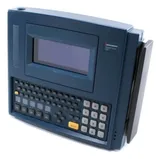 Intermec 2480Stationary data collection terminal for data entry from$1,275.003 in stock
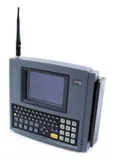 Intermec 2486Stationary data collection terminal for data entry from$1,795.001 in stock
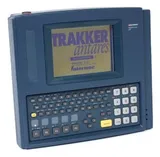 Intermec 2481Stationary data collection terminal for data entry Call for availability Intermec 2485Stationary data collection terminal for data entry Call for availability
Filed with · 1 model
Also filed with these models on the old site

Summary
What is in it
The user's guide to the terminal emulation (TE) applications on Intermec TRAKKER Antares terminals, including the T2425, the T2455 vehicle-mount terminal and the T2480, T2481, T2485 and T2486 stationary terminals. It explains starting TE, using the keypad or keyboard with 3270, 5250 and VT100/220/320 or ANSI emulation, printing, the viewport, customizing the configuration, auto-login scripts, international characters, the full command lists, troubleshooting and VT/ANSI key remapping. It does not cover installing or operating the terminal itself.
Its parts
- Getting Started
- Using Terminal Emulation Applications
- Customizing Your Configuration
- 3270 and 5250 Commands
- VT100/220/320 and ANSI Commands
- Troubleshooting
From the manual
Key facts from this manual
Each line names its page in the PDF.
The TRAKKER Antares Terminal Emulation User's Guide (P/N 066694-003, August 1998) for running IBM 3270, IBM 5250 and VT/ANSI terminal emulation on TRAKKER Antares terminals. It names the T2425 hand-held, the T2455 vehicle-mount and the T2480, T2481, T2485 and T2486 stationary terminals; the 2420 appears only in a manual title. It explains the keypad commands, configuration, auto-login scripts, printing and troubleshooting.
- Document
- User's guide for the TRAKKER Antares terminal emulation (TE) applications p. 9
- Emulations
- IBM 3270 (IBM-3278-2), IBM 5250 (IBM-3179-2), and VT100/220/320 or ANSI p. 17
- Radio network
- 2.4 GHz RF, with UDP Plus or TCP/IP network protocol (one loaded at a time) p. 17
- UDP Plus setup
- Terminal talks to the host through a DCS 300 or Model 200 Controller p. 17
- TCP/IP setup
- Terminal talks through an access point wired to the host on Ethernet or token ring p. 17
- TE version
- TRAKKER Antares TE version 5.0 adds VT/ANSI printing support p. 3
- Firmware needed
- TCP/IP TE applications need TRAKKER Antares firmware 2.20 or later; UDP Plus needs DCS 300 or Model 200 v3.X or later p. 149
- TE program files
- PLX3270.BIN, TCP3270.BIN, PLX5250.BIN, TCP5250.BIN, VTXXX_D.BIN, VTTCP_D.BIN p. 149
- Print modes
- Auto Print, Printer Controller, Print Screen, Print Form Feed, Print Cursor Line p. 40
- T2425 printer link
- TD2400 Communications Dock or Optical Link Adapter with null-modem cable Part No. 047569 or 059167 p. 41
- T2455 printer cable
- RS-232 adapter cable Part No. 066847 on COM1 p. 42
- T248X serial ports
- COM1 9-pin RS-232; COM2 25-pin RS-232/422/485 (enhanced I/O board); COM4 with cable Part No. 067185 p. 43
- Related manuals
- 2420 and 2425 User's Manual 064024; 248X User's Manual 066960; 2455 User's Manual 067358; TD2400 guide 065555 p. 13
- Part number
- P/N 066694-003 p. 1
What this manual walks you through
- Choosing between UDP Plus and TCP/IP radio networks p. 17, 18, 19
- Starting a terminal emulation session p. 20
- Connecting a T2425, T2455 or T248X to a printer p. 40, 41, 42, 43
- Understanding 5250 and 3270 error messages p. 125, 126, 127
- Fixing a terminal that cannot connect to the host p. 128
- Downloading the TE application that matches the network protocol p. 128
- Reaching the TE Configuration menu and setting keypad type p. 129
- Writing auto-login script files p. 150
Good to know
- Each terminal is loaded with only one network protocol at a time; a TE program built for the other protocol will not connect. p. 17, 128
- The TE.SEC security file must be present to open the TE Configuration menu. p. 150
- After changing the keypad type, save the configuration in flash and boot the terminal. p. 129
- The unsupported-functions list in chapter 1 says printing is not supported, while chapter 2 describes VT/ANSI printing in TE version 5.1. p. 22, 40
- Macro keys M1, M2 and M3 are not supported. p. 22
Questions this manual answers
What terminal emulations does the TRAKKER Antares support?
IBM 3270, IBM 5250 and VT100/220/320 or ANSI, each as a separate TE application loaded on the terminal. p. 17
Why does my TRAKKER Antares say 'Unable to connect to controller'?
Check the network settings such as Network Activate and IP addresses; if they are right, the loaded TE program may not match the terminal's protocol. p. 128
How do I connect a 2425 to a serial printer?
Use a TD2400 Communications Dock or an Optical Link Adapter and an RS-232 null-modem cable, Part No. 047569 or 059167. p. 41
What firmware does TCP/IP terminal emulation need?
TRAKKER Antares firmware version 2.20 or later. p. 149
The 3270 keys do nothing on my terminal. What is wrong?
The key mapping file does not match the TE application; download the right one, such as POLX3270.MAP for 3270, to drive C. p. 127
The whole text · 18 parts
Read the manual here as text
Its text as extracted from the PDF, unedited, in parts; each page opens the PDF at that page.
- Pages 1 to 101-10
- Pages 11 to 2011-20
- Pages 21 to 3021-30
- Pages 31 to 4031-40
- Pages 41 to 5041-50
- Pages 51 to 6051-60
- Pages 61 to 7061-70
- Pages 71 to 8071-80
- Pages 81 to 9081-90
- Pages 91 to 10091-100
- Pages 101 to 110101-110
- Pages 111 to 120111-120
- Pages 121 to 130121-130
- Pages 131 to 140131-140
- Pages 141 to 150141-150
- Pages 151 to 160151-160
- Pages 161 to 170161-170
- Pages 171 to 176171-176
The file