Manual · Allen-Bradley
Bulletin 2755 Enhanced Bar Code Decoder Pass-Through Option Application Note
Manual12 pagesPDF 78 KB
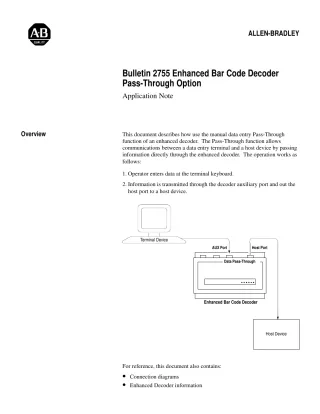
Application note for the Allen-Bradley 2755-DS/DD enhanced bar code decoder pass-through option: manual data entry from a terminal to a host.
Covers · 1 model
The models it covers

Summary
What is in it
An Allen-Bradley application note on the manual data entry Pass-Through function of the Bulletin 2755-DS/DD enhanced bar code decoder, which passes data typed at a terminal on the decoder's AUX port out through its host port. It lists the hardware needed, configuration screens, the internal AUX Terminal jumper that switches to data entry mode, cable pinouts and settings for Lear Siegler, Wyse, DEC VT100, 1784-T45, 1784-T47, 1770-T1/-T2/-T3 and 2708-DH5 terminals, and how to run the application.
Its parts
- Overview
- Hardware Requirements
- Related Publications
- Decoder Configuration
- Switching to Manual Data Entry Mode
- Terminal Setup
- Running the Application
From the manual · read page by page
Key facts from this manual
Each line names its page in the PDF.
This is an Allen-Bradley application note (Publication 2755-2.49, July 1994) on the manual data entry Pass-Through option of the Bulletin 2755 enhanced bar code decoders (2755-DD/DS). It shows how to configure the decoder, set the AUX Terminal jumper, wire and set up several terminals on the AUX port, and send typed data through to a host.
- Pass-Through
- Data typed at a terminal on the decoder AUX port is sent out the HOST port to a host device p. 1
- Decoder needed
- 2755-DD/DS enhanced decoder, Series A, Rev A or later p. 2
- Other hardware
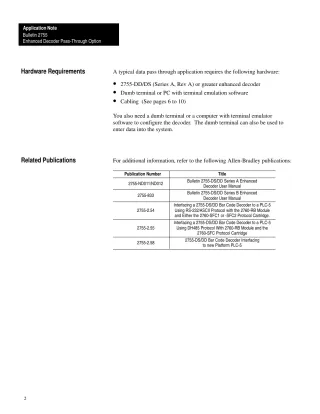
- Dumb terminal or PC with terminal emulation software, plus cabling p. 2
- AUX port
- RS-232 to a standard ASCII terminal p. 5
- AUX Terminal jumper
- On the main logic board: CONFIG (open, factory default) or DATA ENTRY (closed) p. 5
- Terminal settings
- 9600 baud, 8 data bits, no parity, XON/XOFF flow control (Lear Siegler / Wyse setup) p. 6
- Cable
- Belden 8303, Alpha 45123 or equivalent; Transmit Data, Receive Data and Signal Ground wired, shield to both connector shells p. 6
- Terminals covered
- Lear Siegler ADM 3E, Wyse, DEC VT100, 1784-T45, 1784-T47, 2708-DH5 Attended Workstations p. 6, 7, 8, 9, 11
- Decoder setup screens
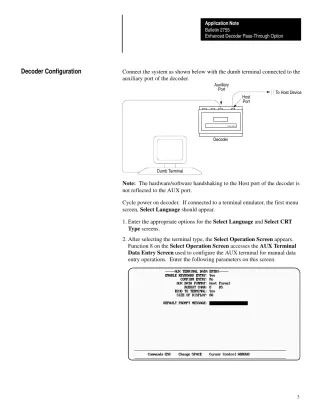
- Function 8 AUX Terminal Data Entry Screen and Function 7 Host Communications Screen; save to EPROM and restart p. 3, 4
- 1784-T45 emulation
- Select Data General DT100 emulation at the Select CRT Type menu p. 8
- PLC-5 notes
- 2755-2.55 (DH485 with 2760-RB module) and 2755-2.58 (new platform PLC-5) p. 2
What this manual walks you through
- Configuring the decoder for pass-through from a terminal on the AUX port p. 3, 4
- Setting the AUX Terminal jumper to manual data entry p. 5
- Wiring and setting up a Lear Siegler or Wyse terminal p. 6
- Wiring and setting up a DEC VT100 p. 7
- Using a 1784-T45 or 1784-T47 programming terminal p. 8, 9
- Using a 2708-DH5 Attended Workstation as a dumb terminal p. 11
- Running the pass-through application p. 12
Good to know
- Hardware or software handshaking on the HOST port is not passed on to the AUX port. p. 3
- With the jumper in DATA ENTRY, the configuration menus and screens are disabled. p. 5
- Turn decoder power off before opening the face cover to reach the jumper. p. 5
- On a 1784-T45 with an internal modem, disable the modem with the MODE command. p. 8
Questions this manual answers
How do I send keyboard data through a 2755 decoder to a PLC?
Use the Pass-Through function: connect a terminal to the AUX port, set the AUX Terminal jumper to DATA ENTRY, and typed data goes out the HOST port. p. 1, 5
Where is the AUX Terminal jumper on the 2755 decoder?
On the main logic board behind the face cover; open is CONFIG (factory default) and closed is DATA ENTRY. p. 5
What terminal settings work with the 2755 decoder AUX port?
The Lear Siegler or Wyse setup uses full duplex, 9600 baud, 8 data bits, no parity and XON/XOFF flow control. p. 6
Which decoders support the pass-through option?
2755-DD/DS enhanced decoders, Series A, Rev A or later. p. 2
Contents
Chapters and sections
Each line opens the PDF at its page.
- Overview1
- Hardware Requirements2
- Related Publications2
- Decoder Configuration3
- Switching to Manual Data Entry Mode5
- Terminal Setup6
- Lear Siegler / Wyse Terminal6
- DEC VT100 Terminal7
- 1784-T45 Programming Terminal8
- 1784-T47 Programming Terminal9
- 1770-T1, -T2, -T3 Terminals10
- 2708-DH5 Attended Workstations11
- Running the Application12
The whole text · 2 parts
Read the manual here as text
Its text as extracted from the PDF, unedited, in parts; each page opens the PDF at that page.
The file