Manual · Videx
TimeWand II Communications & Application Builder for DOS Computers
Manual248 pagesPDF 828 KB
User manual for the Videx TimeWand II bar code reader and its Communications & Application Builder software for DOS computers.
Covers · 1 model
The models it covers
Summary
What is in it
Manual for the Videx TimeWand II bar code reader and the Communications & Application Builder software for DOS. It explains the equipment needed, installing the battery pack, connecting the Recharger/Downloader station, programming the wand, scanning, transferring data to the computer and using the keypad. Further chapters cover the software's screens, building custom applications with match patterns, and TimeWand II memory, clock, read head and maintenance. Appendixes give cable pin-outs, the raw data file format, battery notes and specifications.
Its parts
- Overview
- Chapter 1 Getting Started
- Chapter 2 TimeWand II Communications & Application Builder for DOS Reference
- Chapter 3 Building TimeWand II Applications
- Chapter 4 TimeWand II Reference
From the manual
Key facts from this manual
Each line names its page in the PDF.
The Videx manual for TimeWand II Communications & Application Builder, the DOS software that programs the TimeWand II bar code data collector, builds its applications and transfers its scans to a computer. It also introduces the TimeWand II itself, its battery pack and Recharger/Downloader Stations, and gives troubleshooting steps and the full specifications.
- Device
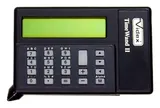
- Portable bar code data collector in a cast-metal case; stamps each scan with date and time p. 13, 14
- Memory
- 64K, 128K, or 320K RAM p. 234
- Display
- 2-line x 16-character LCD, 96 standard ASCII characters p. 234
- Keypad
- 19 keys, numeric or alphanumeric p. 234
- Interface
- Built-in asynchronous RS-232 serial port, 300 to 19.2K baud p. 235
- Battery
- Replaceable NiCad battery pack, Videx Part # TWB-000; up to 3 days per charge p. 17, 235
- Operating temperature
- 32 to 122 F (0 to 50 C) p. 234
- Dimensions and weight
- 4.1" x 2.6" x 0.6" (104 x 66 x 15 mm); 4.9 oz (139 g) p. 234
- Optics
- 700 nm near-visible standard; 820 nm infrared or 655 nm visible optional; read head in a sapphire tip shield p. 234
- Bar codes
- Code 3 of 9, Interleaved 2 of 5, Codabar, Code 128, UPC, EAN; 3 to 30 in. per second; narrow bar 0.0075" minimum p. 235
- Charging
- 12-15 hours from fully drained; pack lasts 2 years or 500 full cycles p. 234, 235
- Serial cables
- TWC-001 (25-pin) or TWC-008 (9-pin), computer to Recharger/Downloader Station p. 12
- Recharger/Downloader
- Single station (1 wand) or multiple station (4 wands); RS232; 12 VDC, 300 mA adapter, 120 V or 220 V input p. 236
- Software needs
- DOS computer with 640K RAM and a hard disk, MS/PC DOS 2.0 or greater p. 12
What this manual walks you through
- Installing the TimeWand II battery pack p. 17, 18
- Resetting and programming a TimeWand II p. 31, 32
- Connecting the Recharger/Downloader Station, scanning and transferring data p. 15
- Saving scans as a text file for database import p. 11
- Finding why a scan gives no good read tone p. 153
- Checking that power reaches the recharger/downloader p. 154
- Checking the cable, serial port and resident software conflicts p. 156
- Judging bar code print quality and contrast p. 157
Good to know
- Removing the battery pack clears the program and the data; transfer data first. p. 17
- A new wand in Monitor Mode left out of the recharger for more than five hours fully discharges its batteries, which may be damaged. p. 18
- Keep the wand below 120 F and out of water. p. 153
- Pressing a key during the baud rate test sets the wand to 9600 baud; reset it again before programming. p. 32
- A low battery eventually erases memory, so transfer data and recharge promptly. p. 155
Questions this manual answers
How do I reset a TimeWand II?
Press a straightened paper clip into the reset hole on the back case until the dome switch clicks; three beeps confirm the reset. p. 31
What is the TimeWand II replacement battery part number?
Videx Part # TWB-000, a replaceable NiCad battery pack. p. 17
How long does a TimeWand II take to charge?
12 to 15 hours when the batteries are fully drained. p. 234
What cable connects the TimeWand II recharger to a PC?
The serial port cable assembly, TWC-001 for a 25-pin port or TWC-008 for a 9-pin port. p. 12
Why won't my TimeWand II beep when I scan?
The manual lists an unreadable symbology, a poor scan, low print quality, a worn battery pack, a fault in the wand or a wrong application. p. 153
The whole text · 25 parts
Read the manual here as text
Its text as extracted from the PDF, unedited, in parts; each page opens the PDF at that page.
- Pages 1 to 101-10
- Pages 11 to 2011-20
- Pages 21 to 3021-30
- Pages 31 to 4031-40
- Pages 41 to 5041-50
- Pages 51 to 6051-60
- Pages 61 to 7061-70
- Pages 71 to 8071-80
- Pages 81 to 9081-90
- Pages 91 to 10091-100
- Pages 101 to 110101-110
- Pages 111 to 120111-120
- Pages 121 to 130121-130
- Pages 131 to 140131-140
- Pages 141 to 150141-150
- Pages 151 to 160151-160
- Pages 161 to 170161-170
- Pages 171 to 180171-180
- Pages 181 to 190181-190
- Pages 191 to 200191-200
- Pages 201 to 210201-210
- Pages 211 to 220211-220
- Pages 221 to 230221-230
- Pages 231 to 240231-240
- Pages 241 to 248241-248
The file