Manual · UBI
MicroBar NX Reference Manual
Manual202 pagesPDF 718 KB
Reference manual for the United Barcode Industries MicroBar NX bar code decoder and interface unit, with its configuration bar codes.
Covers · 1 model
The models it covers
Summary
What is in it
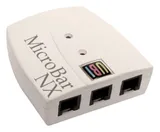
The reference manual for the MicroBar NX, a decoder and interface unit from United Barcode Industries that connects pens, wand emulation devices, laser and CCD scanners, magstripe readers and RS-232 input devices to a host through keyboard wedge or RS-232. Topics are in alphabetical order: configuration modes, interface numbers, delays, preamble and postamble, data reformatting, input device and symbology settings, the full parameter list, test codes and troubleshooting, set by scanning the configuration bar codes printed in the manual.
Its parts
- ASCII character codes
- Beeps and LEDs
- Code mark
- Compose interface number
- Concatenating configuration bar codes
- Configuration modes
- Data reformatting
- Default parameter settings
- Input devices
- Input identification
- Installation procedure
- Inter-character delay
- Inter-message delay
- Interfaces
- Keyboard wedge
From the manual
Key facts from this manual
Each line names its page in the PDF.
Reference manual (preliminary edition, January 1997) for the UBI MicroBar NX decoder and interface unit, with its configuration options arranged alphabetically. It gives the configuration bar codes and data strings for host interfaces, input devices, symbologies, beeps and configuration modes, plus troubleshooting tables.
- What it is
- Decoder and interface unit that links one or more data input devices to a host system p. 56
- Input devices
- Pen barcode readers, laser/CCD readers in wand/laser emulation, undecoded magstripe readers, RS-232 devices such as electronic scales p. 56
- Host interfaces
- Keyboard wedge, RS-232 C / TTL, dual RS-232 C p. 66
- Power
- Optional 5V mains power supply adapter, needed when the host does not supply enough power p. 56
- RS-232 interface numbers
- N° 100 standard RS-232 C (9600, 7, E, 2); N° 101 RS-232 TTL level; N° 102 RS-232 PC Term; N° 105 RS-232 slave mode p. 94
- Keyboard wedge hosts
- Predefined numbers for IBM PC AT, IBM 31xx/32xx/34xx, DEC VT 220/320/420, DEC VT/PC 510, Apple / Macintosh, Hewlett Packard 700/92, Wyse 60, 65, 99GT, 120 p. 93, 94
- Pen connectors
- 1 pen on the DB 9-pin connector; 2 pens on modular plug connectors with the dual pen adaptor p. 57
- Wyse and DEC wedge
- Takes an undecoded pen or a low-power wand emulation device (< 50 mA); external 5V supply connected p. 68
- Indicators
- Red power-up LED and two beeps at power-up; green LED flashes 2 times for RS-232, 7 times for keyboard wedge p. 24
- Good read beep
- One short 80 ms beep by default; 1, 2 or no beeps, duration 0 to 999 ms p. 25, 26
- Error beeps
- Six short beeps: setup error; three long then five short beeps: EEPROM integrity error p. 24, 27
- Laser control
- RS-232 trigger character or CTS level trigger; laser timeout 1, 2 (default), 3 or 8 sec p. 86, 87
- Input identifier
- String of up to 15 characters sent before or after the barcode data to identify the input port p. 58
- Cloning cable
- A special cloning cable on port 3 of each unit copies the configuration from one MicroBar NX to another p. 37
What this manual walks you through
- Reading the power-up, good read and configuration beeps and LEDs p. 24, 25, 26, 27
- Copying a configuration from one unit to another p. 37
- Protecting the configuration with a password p. 38
- Trying new settings in temporary configuration mode p. 39
- Configuring the unit through a ScanPlus reader p. 40
- Adding an input identification string for each port p. 58, 59
- General installation and configuration procedure p. 60
- Connecting the unit as a keyboard wedge p. 67, 68
- Setting the laser trigger, timeout and marker beam p. 86, 87
- Troubleshooting power-up, operating and configuration problems p. 196, 197, 198, 199, 200
Good to know
- Three long beeps then five short beeps at power-up mean an EEPROM integrity error; the manual says to contact a UBI representative. p. 24
- Connect and plug in the external power supply before switching on the host. p. 67
- Configuration codes from the MicroBar LS/PS manual do not work with the MicroBar NX. p. 2
- After a factory reset no interface is selected, so the interface number must be entered again. p. 66
- With the configuration password active, changes are lost at switch-off unless the password code is read. p. 38
Questions this manual answers
What do three long and five short beeps mean on a MicroBar NX?
An EEPROM integrity error. The manual says to contact a UBI representative. p. 24, 197
Why does the MicroBar NX give six short beeps when I scan a setup code?
It is a setup error: the option or interface number is not available, the feature is not implemented, or codes were read out of order. p. 27
How do I copy settings from one MicroBar NX to another?
Join the units with the special cloning cable on port 3, scan Source on the unit to copy from, then Target on the unit to receive the setup. p. 37
Why does my keyboard beep when I connect the MicroBar NX?
The host system was already switched on; the manual says to wait a few seconds for the beeps to stop. p. 197
Why does the MicroBar NX send different data for the same bar code?
It may read part of the label as another symbology; scan Disable All Symbologies and turn on only the ones you need. p. 199
The whole text · 21 parts
Read the manual here as text
Its text as extracted from the PDF, unedited, in parts; each page opens the PDF at that page.
- Pages 1 to 101-10
- Pages 11 to 2011-20
- Pages 21 to 3021-30
- Pages 31 to 4031-40
- Pages 41 to 5041-50
- Pages 51 to 6051-60
- Pages 61 to 7061-70
- Pages 71 to 8071-80
- Pages 81 to 9081-90
- Pages 91 to 10091-100
- Pages 101 to 110101-110
- Pages 111 to 120111-120
- Pages 121 to 130121-130
- Pages 131 to 140131-140
- Pages 141 to 150141-150
- Pages 151 to 160151-160
- Pages 161 to 170161-170
- Pages 171 to 180171-180
- Pages 181 to 190181-190
- Pages 191 to 200191-200
- Pages 201 to 202201-202
The file