Manual · Symbol
VRC 6940 Product Reference Guide
Manual116 pagesPDF 1.3 MB
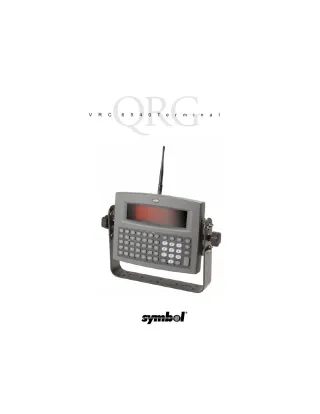
Product reference guide for the Symbol VRC 6940 vehicle-mount radio terminal: installation, setup, operation and troubleshooting.
Names · 1 model
The models it names
Filed with · 1 model
Also filed with these models on the old site
Summary
What is in it
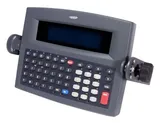
Symbol's product reference guide for the VRC 6940, a rugged terminal that talks by radio to a host computer on Spectrum24 networks. Written for IS and technical support staff, it covers vehicle, wall and workbench installation and power, configuring the Spectrum24 radio card, transferring and installing software, day-to-day operation, troubleshooting and booting, and maintenance. Appendices describe the self tests and DIAG24, CFG24 and flash utilities, the software environment, keyboard layouts, specifications and communications status codes.
Its parts
- About This Manual
- Getting Started
- Installing Hardware
- Configuring Spectrum24
- Installing Software
- Operating a VRC 6940
- Troubleshooting
- Maintenance
From the manual
Key facts from this manual
Some pages are scans or cannot be read; this says only what the readable text supports. Each line names its page in the PDF.
Symbol's Product Reference Guide for the VRC 6940 vehicle-mount terminal, written for the technical staff who install and support it. It covers parts and accessories, Spectrum24 radio setup, operation, troubleshooting and boot recovery, maintenance, self tests, port pinouts and communication status codes.
- Device
- Rugged mobile terminal that talks by radio to a host on Spectrum24 networks; keyboard or scanner input p. 12
- Operating system
- DR-DOS V3.41, compatible with IBM PC-DOS p. 12
- Processor and memory
- NEC V25, 16 bit; 640KB RAM, 1.2MB FLASH p. 99
- Display
- 8 line x 40 character, vacuum fluorescent p. 98
- Keyboard
- 54 keys; keyboard backlight is an order option p. 14, 98
- Power
- 9 - 60 VDC; NiMH backup battery p. 98
- Internal battery
- Keeps session data only: 48 hours to charge fully, holds data up to 72 hours p. 58
- Radio
- Internal PCMCIA Spectrum24 radio card, 2.4 GHz p. 14, 99
- Compatible scanners
- Symbol LS 2000, LS 9100, LS 3000, LT 1700, LS 5000 p. 14
- Compatible printers
- Symbol PS 1000, PS 200 p. 15
- Accessories
- Scanner cable, RS-232 cable, primary antenna, vehicle-mounted antenna, Spectrum24 PCMCIA radio card, AC Universal Power Supply, AC cable, DC cable p. 14
- Null modem cable
- 16-pin male circular connector to 25-pin female D-Connector p. 101
- Size and weight
- 12" x 9" x 3" (310 mm x 234 mm x 81 mm); 6.7 lbs p. 98
- Operating temperature
- With optional internal heater: -22°F to 122°F / -30°C to 50°C p. 99
What this manual walks you through
- Configuring the Spectrum24 radio card with the CFG24 Configurator p. 24, 25
- Attaching an external bar code scanner p. 44
- Booting into Command Mode to run utilities p. 45
- Troubleshooting start-up failures, power faults, a blank display and scanner problems p. 46, 47, 48
- Reading error messages such as Double Key Error and Power Fault p. 48
- Recovering a terminal that stops responding: suspend, warm boot, cold boot p. 49, 50
- Cold booting and reading cold boot failure messages p. 51
- Storing and cleaning the terminal p. 59
- Running the hardware self tests and keyboard test p. 61, 62, 63
- Scanner port, COM1 and null modem pinouts p. 99, 100, 101
Good to know
- A cold boot erases all programs and data on the RAM disk. p. 51
- The internal battery cannot run the terminal; without main power it shuts off until power returns. p. 58
- After a forced suspend, do not restart with the ON/OFF key, since the program resumes the failing operation. p. 50
- Do not spray wax on the terminal; dry it completely after washing if it is used in a freezer. p. 59
- Do not clean the display with paper products or rough towels; they can scratch it. p. 59
Questions this manual answers
How do I cold boot a Symbol VRC 6940?
Suspend it, hold ENTER, F4 and F1, press and release ON/OFF, then release the keys. This erases the RAM disk. p. 51
Which bar code scanners work with the VRC 6940?
Symbol LS 2000, LS 9100, LS 3000, LT 1700 and LS 5000 laser scanners. p. 14
What does communication status code 0800 mean on a VRC 6940?
A receive time-out error. Code 0000 means the transfer succeeded. p. 102
What operating system does the VRC 6940 run?
DR-DOS V3.41, which is compatible with IBM PC-DOS. p. 12
Can a VRC 6940 be hosed down with the vehicle?
Yes. The guide says it is water-resistant and can stay on through a car wash or high-pressure hose, using mild soap. p. 59
Contents
Chapters and sections
Each line opens the PDF at its page.
The whole text · 15 parts
Read the manual here as text
Its text as extracted from the PDF, unedited, in parts; each page opens the PDF at that page.
- Pages 1 to 71-7
- About This Manual8-11
- Chapter 1 Getting Started12-15
- Chapter 2 Installing Hardware16-23
- Chapter 3 Configuring Spectrum2424-29
- Chapter 4 Installing Software30-37
- Chapter 5 Operating a VRC 694038-45
- Chapter 6 Troubleshooting46-57
- Pages 58 to 6558-65
- Pages 66 to 7366-73
- Pages 74 to 8174-81
- Appendix B Software Environment82-89
- Appendix C Keyboard Layouts90-97
- Appendix D Environmental and Technical Specifications98-101
- Pages 102 to 116102-116
The file