Manual · Symbol
Symbol VRC-6940 and VRC-6946 Power Cable Install Manual
Manual2 pagesPDF 41 KB
Both pages are below, each with its text.
Filed with · 2 models
Also filed with these models on the old site
From the manual · read page by page
Key facts from this manual
Each line names its page in the PDF.
A two-page Symbol instruction sheet (72-51383-01, Revision A, March 2001) for the VRC 694x Filtered DC Power Cable, which feeds vehicle DC power to a VRC 69X0 terminal. It explains how to terminate the cable for the vehicle, mount its central block, route it and plug it into the terminal.
- Device
- Filtered DC power cable that powers a VRC 69X0 terminal from a vehicle p. 1
- Fuse
- Red power wire comes with an in-line fuse holder and 5A slow-blow fuse p. 1
- Cable ends
- DC Power connector for the terminal; bare end with black ground and red power wires p. 1
- Mounting Block
- Central block, mounted with #8 screws p. 1
- Termination
- Mating connector, ring terminal (battery post) or blade terminal (fuse panel) p. 1
- Related guide
- VRC 6940 Quick Reference Guide, Symbol p/n 72-37640-XX p. 1
- Sheet part number
- 72-51383-01, Revision A, March 2001 p. 2
What this manual walks you through
- Fitting a connector to the bare cable end for the vehicle p. 1
- Wiring red to vehicle power and black to ground p. 1
- Placing and mounting the Mounting Block p. 1
- Plugging the cable into the terminal with the red dots aligned p. 1
Good to know
- Near a lead acid battery, connect the cable to the battery first and to the terminal last, to keep sparks away. p. 1
- Use bushings and clamping where the cable passes through openings; worn insulation can short and start a fire. p. 1
- Regulatory information is not in this sheet; it points to the VRC 6940 Quick Reference Guide. p. 2
Questions this manual answers
What fuse does the VRC 6940 filtered DC power cable use?
A 5A slow-blow fuse, already fitted in an in-line holder on the red power wire. p. 1
How do I connect the VRC 69X0 power cable to a vehicle battery?
Strip the two wire ends, fit a ring terminal for the battery post, connect red to power and black to ground, then plug into the terminal last. p. 1
What screws mount the power cable's Mounting Block?
#8 screws. p. 1
The file
Size and text
Every page · 2
Read it here
Each page as it is printed, and its words beside it, so a phone can search and copy them.
Page1of 2
Open in the PDF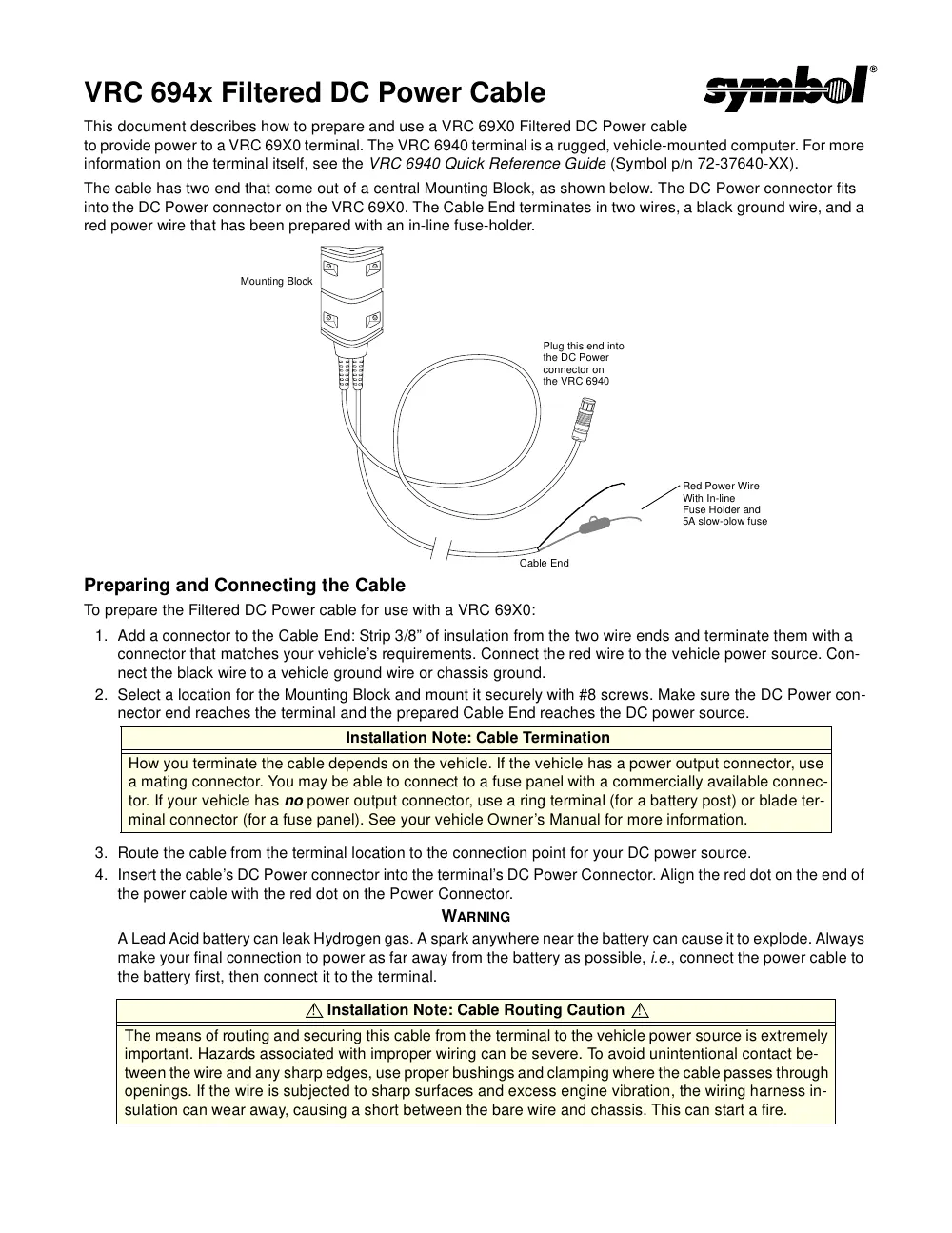
The text of page 1, from the PDF itself
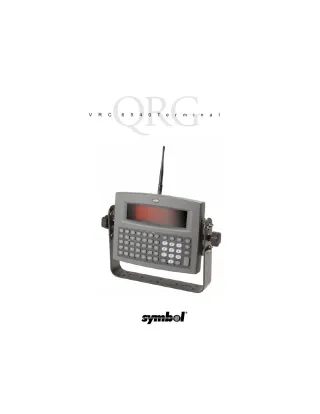
VRC 694x Filtered DC Power Cable This document describes how to prepare and use a VRC 69X0 Filtered DC Power cable to provide power to a VRC 69X0 terminal. The VRC 6940 terminal is a rugged, vehicle-mounted computer. For more information on the terminal itself, see the VRC 6940 Quick Reference Guide (Symbol p/n 72-37640-XX). The cable has two end that come out of a central Mounting Block, as shown below. The DC Power connector fits into the DC Power connector on the VRC 69X0. The Cable End terminates in two wires, a black ground wire, and a red power wire that has been prepared with an in-line fuse-holder.
Mounting Block
Plug this end into the DC Power connector on the VRC 6940
Red Power Wire With In-line Fuse Holder and 5A slow-blow fuse
Cable End
Preparing and Connecting the Cable To prepare the Filtered DC Power cable for use with a VRC 69X0: 1. Add a connector to the Cable End: Strip 3/8” of insulation from the two wire ends and terminate them with a connector that matches your vehicle’s requirements. Connect the red wire to the vehicle power source. Connect the black wire to a vehicle ground wire or chassis ground. 2. Select a location for the Mounting Block and mount it securely with #8 screws. Make sure the DC Power connector end reaches the terminal and the prepared Cable End reaches the DC power source. Installation Note: Cable Termination How you terminate the cable depends on the vehicle. If the vehicle has a power output connector, use a mating connector. You may be able to connect to a fuse panel with a commercially available connector. If your vehicle has no power output connector, use a ring terminal (for a battery post) or blade terminal connector (for a fuse panel). See your vehicle Owner’s Manual for more information. 3. Route the cable from the terminal location to the connection point for your DC power source. 4. Insert the cable’s DC Power connector into the terminal’s DC Power Connector. Align the red dot on the end of the power cable with the red dot on the Power Connector.
WARNING A Lead Acid battery can leak Hydrogen gas. A spark anywhere near the battery can cause it to explode. Always make your final connection to power as far away from the battery as possible, i.e., connect the power cable to the battery first, then connect it to the terminal. ! Installation Note: Cable Routing Caution !
The means of routing and securing this cable from the terminal to the vehicle power source is extremely important. Hazards associated with improper wiring can be severe. To avoid unintentional contact between the wire and any sharp edges, use proper bushings and clamping where the cable passes through openings. If the wire is subjected to sharp surfaces and excess engine vibration, the wiring harness insulation can wear away, causing a short between the bare wire and chassis. This can start a fire.
Page2of 2
Open in the PDF
The text of page 2, from the PDF itself
Regulatory Information For Regulatory Information, please see the VRC 6940 Quick Reference Guide (Symbol p/n 72-37640-XX).
Warranty Symbol Technologies, Inc. (“Symbol”) manufactures its hardware products in accordance with industry-standard practices. Symbol warrants that for a period of twelve (12) months from date of shipment, products will be free from defects in materials and workmanship. This warranty is provided to the original owner only and is not transferable to any third party. It shall not apply to any product (i) which has been repaired or altered unless done or approved by Symbol, (ii) which has not been maintained in accordance with any operating or handling instructions supplied by Symbol, (iii) which has been subjected to unusual physical or electrical stress, misuse, abuse, power shortage, negligence or accident or (iv) which has been used other than in accordance with the product operating and handling instructions. Preventive maintenance is the responsibility of customer and is not covered under this warranty. Wear items and accessories having a Symbol serial number, will carry a 90-day limited warranty. Non-serialized items will carry a 30-day limited warranty.
Warranty Coverage and Procedure During the warranty period, Symbol will repair or replace defective products returned to Symbol’s manufacturing plant in the US. For warranty service in North America, call the Symbol Support Center at 1-800-653-5350. International customers should contact the local Symbol office or support center. If warranty service is required, Symbol will issue a Return Material Authorization Number. Products must be shipped in the original or comparable packaging, shipping and insurance charges prepaid. Symbol will ship the repaired or replacement product freight and insurance prepaid in North America. Shipments from the US or other locations will be made F.O.B. Symbol’s manufacturing plant. Symbol will use new or refurbished parts at its discretion and will own all parts removed from repaired products. Customer will pay for the replacement product in case it does not return the replaced product to Symbol within 3 days of receipt of the replacement product. The process for return and customer’s charges will be in accordance with Symbol’s Exchange Policy in effect at the time of the exchange. Customer accepts full responsibility for its software and data including the appropriate backup thereof. Repair or replacement of a product during warranty will not extend the original warranty term. Symbol’s Customer Service organization offers an array of service plans, such as on-site, depot, or phone support, that can be implemented to meet customer’s special operational requirements and are available at a substantial discount during warranty period.
General Except for the warranties stated above, Symbol disclaims all warranties, express or implied, on products furnished hereunder, including without limitation implied warranties of merchantability and fitness for a particular purpose. The stated express warranties are in lieu of all obligations or liabilities on part of Symbol for damages, including without limitation, special, indirect, or consequential damages arising out of or in connection with the use or performance of the product. Seller’s liability for damages to buyer or others resulting from the use of any product, shall in no way exceed the purchase price of said product, except in instances of injury to persons or property. Some states (or jurisdictions) do not allow the exclusion or limitation of incidental or consequential damages, so the proceeding exclusion or limitation may not apply to you.
© 2001 SYMBOL TECHNOLOGIES, INC. All rights reserved. Symbol reserves the right to make changes to any product to improve reliability, function, or design. Symbol does not assume any product liability arising out of, or in connection with, the application or use of any product, circuit, or application described herein. No license is granted, either expressly or by implication, estoppel, or otherwise under any patent right or patent, covering or relating to any combination, system, apparatus, machine, material, method, or process in which Symbol products might be used. An implied license only exists for equipment, circuits, and subsystems contained in Symbol products. Symbol and the Symbol logo are registered trademarks of Symbol Technologies, Inc. Other product names mentioned in this manual may be trademarks or registered trademarks of their respective companies and are hereby acknowledged. Symbol Technologies, Inc. One Symbol Plaza Holtsville, N.Y. 11742-1300 http://www.symbol.com Patents This product is covered by one or more of the following U.S. and foreign Patents: U.S. Patent No. 4,460,120; 4,496,831; 4,593,186; 4,603,262; 4,607,156; 4,652,750; 4,673,805; 4,736,095; 4,758,717; 4,816,660; 4,845,350; 4,896,026; 4,897,532; 4,923,281; 4,933,538; 4,992,717; 5,015,833; 5,017,765; 5,021,641; 5,029,183; 5,047,617; 5,103,461; 5,113,445; 5,130,520; 5,140,144; 5,142,550; 5,149,950; 5,157,687; 5,168,148; 5,168,149; 5,180,904; 5,216,232; 5,229,591; 5,230,088; 5,235,167; 5,243,655; 5,247,162; 5,250,791; 5,250,792; 5,260,553; 5,262,627; 5,262,628; 5,266,787; 5,278,398; 5,280,162; 5,280,163; 5,280,164; 5,280,498; 5,304,786; 5,304,788; 5,306,900; 5,321,246; 5,324,924; 5,337,361; 5,367,151; 5,373,148; 5,378,882; 5,396,053; 5,396,055; 5,399,846; 5,408,081; 5,410,139; 5,410,140; 5,412,198; 5,418,812; 5,420,411; 5,436,440; 5,444,231; 5,449,891; 5,449,893; 5,468,949; 5,471,042; 5,478,998; 5,479,000; 5,479,002; 5,479,441; 5,504,322; 5,519,577; 5,528,621; 5,532,469; 5,543,610; 5,545,889; 5,552,592; 5,557,093; 5,578,810; 5,581,070; 5,589,679; 5,589,680; 5,608,202; 5,612,531; 5,619,028; 5,627,359; 5,637,852; 5,664,229; 5,668,803; 5,675,139; 5,693,929; 5,698,835; 5,705,800; 5,714,746; 5,723,851; 5,734,152; 5,734,153; 5,742,043; 5,745,794; 5,754,587; 5,762,516; 5,763,863; 5,767,500; 5,789,728; 5,789,731; 5,808,287; 5,811,785; 5,811,787; 5,815,811; 5,821,519; 5,821,520; 5,823,812; 5,828,050; 5,850,078; 5,861,615; 5,874,720; 5,875,415; 5,900,617; 5,902,989; 5,907,146; 5,912,450; 5,914,478; 5,917,173; 5,920,059; 5,923,025; 5,929,420; 5,945,658; 5,945,659; 5,946,194; 5,959,285; 6,002,918; 6,021,947; 6,047,892; 6,050,491; 6,053,413; 6,056,200; 6,065,678; 6,067,297; 6,068,190; 6,082,621; 6,084,528; 6,088,482; 6,092,725; 6,101,483; 6,102,293; 6,104,620; 6,114,712; 6,115,678; 6,119,944; 6,123,265; 6,131,814; 6,138,180; 6,142,379; D305,885; D341,584; D344,501; D359,483; D362,453; D363,700; D363,918; D370,478; D383,124; D391,250; D405,077; D406,581; D414,171; D414,172, D418,500; D419,548; D423,468; D424,035 D431,158; D430,159; D431,562. Invention No. 55,358; 62,539; 69,060; 69,187 (Taiwan); No. 1,601,796; 1,907,875; 1,955,269 (Japan). European Patent 367,299; 414,281; 367,300; 367,298; UK 2,072,832; France 81/03938; Italy 1,138,713. rev. 09/00
72-51383-01 Revision A - March 2001
Symbol Technologies, Inc. One Symbol Plaza Holtsville, NY 11742-1300