Manual · Symbol
LS 6000i Series Product Reference Guide
Manual205 pagesPDF 1.8 MB
Product reference guide for the Symbol LS 6000i series omnidirectional hand-held laser scanners (LS 6004i, LS 6005i, LS 6007i).
Covers · 2 models
The models it covers
Summary
What is in it
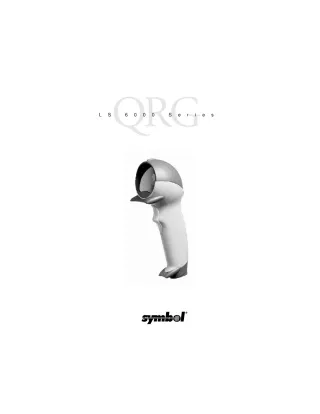
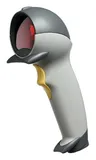
Symbol's product reference guide for the LS 6000i series, a light-weight hand-held omnidirectional scanner that converts to hands-free use with an optional presentation stand. It covers the LS 6004i (RS-232C), LS 6005i (IBM 46XX) and LS 6007i (USB): setup, cables, optional EAS, hand-held and presentation scanning, beeper and LED indications, maintenance, scan zone, technical specifications, troubleshooting, and the programming bar codes for host types and symbologies.
Its parts
- About This Guide
- Introduction
- Setup
- Scanning
- Maintenance and Specifications
- Programming
From the manual
Key facts from this manual
Each line names its page in the PDF.
The Symbol LS 6000i Series Product Reference Guide (72-51596-01, Revision A, July 2001) for the LS 6000i hand-held omnidirectional scanners: the LS 6000i, LS 6004i (RS-232C), LS 6005i (IBM 468X/469X) and LS 6007i (USB). It explains connecting the scanner to a host, scanning by hand or in a stand, indicators, care, specifications and troubleshooting, and holds the bar codes that program it.
- Device
- Light-weight hand-held omnidirectional bar code scanner that converts to hands-free use with an optional presentation stand p. 20
- Versions
- LS 6004i-I000: RS-232C; LS 6004i-I090: RS-232C with EAS; LS 6005i-I000: IBM 468X/469X; LS 6005i-I090: IBM 468X/469X with EAS; LS 6007i: USB p. 20, 21
- Power
- 5.2 VDC +/- 5% @400mA, from the host or an external power supply p. 22, 38
- Scan pattern
- 20-line, 5-direction dynamic cross pattern at 1200 scans per second; single line at 60 scans per second p. 38
- Working range
- Up to 10 in. (25.4 cm) on a 100% UPC/EAN symbol p. 38
- Decodes
- UPC/EAN/JAN with or without supplementals, Code 128, Code 39, Interleaved 2 of 5, Codabar, UCC/EAN 128, Bookland EAN, RSS-14, RSS Limited, RSS Expanded p. 38
- Size and weight
- 7.4 oz. (210 gm); height 7.64 in. (194 mm), width 2.72 in. (69 mm), depth 3.19 in. (81 mm) p. 39
- Environment
- Operating 32° to 104°F (0° to 40°C); storage -40° to 140°F (-40° to 60°C); 5% to 95% humidity, non-condensing p. 38
- Durability
- 4 ft. (1.2 meter) drops to concrete p. 38
- RS-232C defaults
- LS 6004i: 9600 baud, even parity, 1 stop bit, 8-bit ASCII, no hardware or software handshaking p. 43, 44
- Cables
- Modular cable plugs into the bottom of the handle; Synapse Smart Cables let the scanner autodetect the host p. 25, 42
- Trigger modes
- Combination, triggered omnidirectional, or triggered single scan line p. 28, 29
- IBM ports
- LS 6005i: Port 5B, Port 9B or Port 17/9E selected by bar code p. 52, 53
- Ambient light
- Fluorescent, incandescent, mercury vapor and sodium vapor light up to 450 ft.-candles; sunlight up to 9000 ft.-candles p. 39
What this manual walks you through
- Installing and switching the scanner cable p. 24, 25, 26
- Connecting the scanner to a host terminal p. 26, 27
- Scanning by hand and choosing a trigger mode p. 28, 29
- Using the hands-free presentation stand p. 30, 31
- Reading beeper and LED indications p. 33, 34
- Cleaning the scan window p. 36
- Troubleshooting decoding and host transmission problems p. 40, 41
- Restoring defaults and selecting the host type with programming bar codes p. 42, 51, 52
- Setting up for ICL, Fujitsu or Nixdorf RS-232C terminals p. 54, 55, 56
Good to know
- A local Checkpoint representative must install the EAS cable. p. 26
- Apply the cleaning solution to the cloth, not directly to the scan window. p. 36
- Automatic host identification works only if the host is powered up before the scanner is attached. p. 43
- Do not enable the Transmit Code ID feature for ICL, Fujitsu or Nixdorf terminals. p. 56
Questions this manual answers
What power does the Symbol LS 6004i need?
5.2 VDC +/- 5% at 400mA, supplied by the host or an external power supply. p. 22, 38
What is the difference between the LS 6004i and LS 6005i?
The LS 6004i has RS-232C communications for terminals and host systems; the LS 6005i connects to IBM 468X/469X terminals. Both have EAS (-I090) versions. p. 20, 21
What do 4 beeps mean on an LS 6000i?
A transmission error: the host did not receive the bar code data. p. 33
What does fast sequential flashing of the green LED mean?
A scanner malfunction has occurred. p. 34
Contents
Chapters and sections
Each line opens the PDF at its page.
- Chapter Descriptions10
- Chapter 1 Introduction20
- Chapter 2 Setup24
- Chapter 3 Scanning28
- Chapter 4 Maintenance and Specifications36
- Chapter 5 Programming42
- Operational Parameters42
- Set Default Parameter51
- Host Type52
- Trigger Mode95
- Time to Return to Continuous Omnidirectional97
- Beeper Volume98
- Beeper Frequency100
- Time-out Between Decodes, Same Symbol102
- Time-out Between Decodes, Different Symbols103
- Laser On Time104
- Rest Mode Time-out105
- Beep After Good Decode107
- Linear Code Type Security Level108
- UPC/EAN Options112
15 more lines, from page 139 on
The whole text · 24 parts
Read the manual here as text
Its text as extracted from the PDF, unedited, in parts; each page opens the PDF at that page.
- Pages 1 to 31-3
- Contents, pages 4 to 114-11
- Contents, pages 12 to 1912-19
- Chapter 1 Introduction20-23
- Chapter 2 Setup24-27
- Chapter 3 Scanning28-35
- Chapter 4 Maintenance and Specifications36-41
- Chapter 5 Programming, pages 42 to 5142-51
- Chapter 5 Programming, pages 52 to 6152-61
- Chapter 5 Programming, pages 62 to 7162-71
- Chapter 5 Programming, pages 72 to 8172-81
- Chapter 5 Programming, pages 82 to 9182-91
- Chapter 5 Programming, pages 92 to 10192-101
- Chapter 5 Programming, pages 102 to 111102-111
- Chapter 5 Programming, pages 112 to 121112-121
- Chapter 5 Programming, pages 122 to 131122-131
- Chapter 5 Programming, pages 132 to 141132-141
- Chapter 5 Programming, pages 142 to 151142-151
- Chapter 5 Programming, pages 152 to 161152-161
- Chapter 5 Programming, pages 162 to 171162-171
- Chapter 5 Programming, pages 172 to 181172-181
- Chapter 5 Programming, pages 182 to 185182-185
- Appendix A Programming Reference186-199
- Index200-205
The file