Manual · Symbol
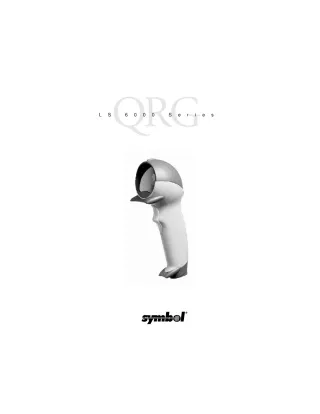
LS 6000 Series Quick Reference
Manual28 pagesPDF 198 KB
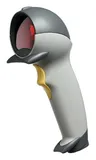
Quick reference guide for the Symbol LS 6000 Series omnidirectional hand-held scanners (LS6004i, LS6005i, LS6007i).
Covers · 2 models
The models it covers
Summary
What is in it
Symbol's quick reference guide for routine use of the LS 6000 Series omnidirectional hand-held laser scanner, in RS-232C (LS6004i), IBM 468X/469X (LS6005i) and USB (LS6007i) models, with or without Checkpoint EAS. It covers installing and switching cables, scanning in hand-held and hands-free presentation mode, beeper volume, LED and beeper indications, programming bar codes for defaults, host type, scanning mode, beeper frequency, prefix and suffix, and data format, plus regulatory and laser information.
Its parts
- Purpose
- Product Description
- Using Your Scanner
- Installing the Scanner Cable
- Switching Cables
- Electronic Article Surveillance (EAS) (Optional)
- Scanning In Hand-Held Mode
- Scanning in Hands-Free (Presentation) Mode
- Selecting Beeper Volume
- LED Indications
- Beeper Indications
- Programming Bar Codes
- Ergonomic Recommendations
- Regulatory Information
From the manual · read page by page
Key facts from this manual
Each line names its page in the PDF.
This is the Symbol LS 6000 Series Quick Reference Guide, revision D of January 2001, for the LS6004i (RS-232C), LS6005i (IBM 468X/469X) and LS6007i (USB) omnidirectional scanners and their EAS versions. It covers everyday use: fitting the cable, hand-held and stand scanning, beeper and LED signals. It also prints frequently used programming bar codes for defaults, host type, scan mode, beeper tone, prefix, suffix and data format.
- Device
- Light hand-held omnidirectional scanner; converts to hands-free use with an optional presentation stand p. 3
- Versions
- LS6004i: RS-232C; LS6005i: IBM 468X/469X; LS6007i: USB; I090 versions add Checkpoint VII EAS p. 3
- Synapse cables
- Accepted by all versions; a Synapse cable autodetects the host, so no host bar codes are needed p. 3, 9
- Hands-free range
- Within 10 in. (25.4 cm) of the window in the presentation stand p. 7
- Scanning modes
- Combination (hand-held only), triggered omnidirectional, or triggered single scan line p. 6, 14
- IBM host ports
- LS 6005: Port 5B, Port 9B, Port 17, 9E p. 10
- RS-232C host types
- LS 6004: Standard, ICL, Nixdorf Mode A, Nixdorf Mode B, Fujitsu p. 12
- USB host types
- LS 6007: IBM Hand-Held USB (default), IBM Table Top USB, HID Keyboard Emulation, Symbol Native USB, Symbol COM Port Emulation p. 13
- RS-232C defaults
- All four RS-232C host types: 9600 baud, one stop bit, 8-bit ASCII p. 11
- Data formats
- Data as is, data with suffix, prefix with data, or prefix, data and suffix p. 20, 21
- Beeper tones
- Low, medium or high frequency p. 15
- Related guides
- LS 6000 Series Product Reference Guide p/n 70-33186-XX; Universal Cable EAS Installation Sheet p/n 70-32824-XX p. 3, 5
- FCC
- The manual states the device complies with the limits for a Class A digital device under FCC Part 15 p. 22
- Document number
- 70-33187-01, Revision D, January 2001 p. 28
What this manual walks you through
- Installing and switching the scanner cable p. 4, 5
- Scanning in hand-held mode p. 6
- Using the hands-free presentation stand p. 7
- Changing the beeper volume p. 7
- Reading the LED and beeper signals p. 8
- Restoring the default settings p. 9
- Selecting an IBM, RS-232C or USB host type p. 9, 10, 11, 12, 13
- Setting a prefix or suffix with numeric bar codes p. 16, 17
- Choosing the scan data transmission format p. 20, 21
- Ergonomic recommendations for scanner users p. 22
Good to know
- The EAS cable must be installed by a local Checkpoint representative. p. 5
- Combination mode is meant for hand-held use only. p. 6
- With IBM 468X/9X terminals, the driver for the port in use must be loaded and enabled. p. 10
- In Nixdorf Mode B, scanning is disabled while CTS is low. p. 11
- The defaults of the selected RS-232C host type take precedence over the standard defaults. p. 11
Questions this manual answers
Which LS 6000 model has a USB interface?
The LS6007i-I000 supports USB; the LS6007i-I090 adds signal lines for Checkpoint VII EAS deactivation. p. 3
How do I reset an LS 6000 scanner to defaults?
Scan the SET DEFAULTS bar code, which sets all parameters to their default values. p. 9
What does fast sequential flashing of the LS 6000 LED mean?
It means a scanner malfunction has occurred. p. 8
Do I need to scan a host type bar code with a Synapse cable?
No. A Synapse cable autodetects the host type, so no host bar codes need to be scanned. p. 9
How do I change the beep volume on the LS 6000?
Hold the trigger down for five seconds; the scanner steps through three volume settings with a 2-beep tone each, and you release after the one you want. p. 7
Contents
Chapters and sections
Each line opens the PDF at its page.
- Purpose3
- Product Description3
- Using Your Scanner3
- Installing the Scanner Cable4
- Switching Cables5
- Electronic Article Surveillance (EAS) (Optional)5
- Scanning In Hand-Held Mode6
- Scanning in Hands-Free (Presentation) Mode7
- Selecting Beeper Volume7
- LED Indications8
- Beeper Indications8
- Programming Bar Codes9
- Set Defaults9
- Host Type9
- IBM 46XX Host Types (LS 6005)10
- USB Host Types (LS 6007)13
- Scanning Mode14
- Beeper Frequency15
- Prefix/Suffix Values16
- Numeric Bar Codes17
- Numeric Bar Codes (Cont’d)18
- Numeric Bar Codes (Cont’d)19
- Scan Data Transmission Format20
- Scan Data Transmission Format (Cont’d)21
- Ergonomic Recommendations22
- Regulatory Information22
- Radio Frequency Interference Requirements22
- Radio Frequency Interference Requirements - Canada23
- CE Marking and European Union Compliance23
- Laser Devices24
The whole text · 3 parts
Read the manual here as text
Its text as extracted from the PDF, unedited, in parts; each page opens the PDF at that page.
The file