Manual · Pasco
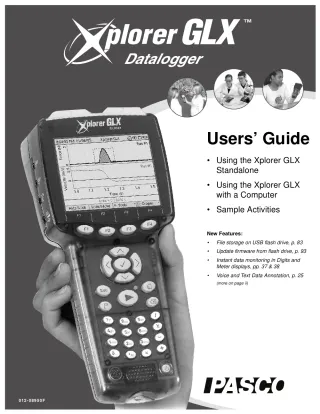
Xplorer GLX Users' Guide
Manual152 pagesPDF 2.9 MB
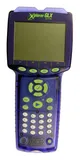
Users' guide for the PASCO Xplorer GLX handheld data collection, graphing and analysis tool, with sample science activities.
Filed with · 1 model
Also filed with these models on the old site
Summary
What is in it
PASCO's users' guide for the Xplorer GLX, a handheld data collection, graphing and analysis tool for science students and educators. Part 1 describes every screen: graph, table, digits and meter displays, output, calculator, notes and stopwatch, sensors, timing, calibration, data files and settings, plus navigation, firmware updates, battery care and use with DataStudio on a computer. Part 2 gives step-by-step sample activities such as calorimetry, Newton's law of cooling and capacitor discharge.
Its parts
- Introduction
- Included Equipment
- Quick Start
- Overview of the GLX
- Chapter 1: Displays
- Chapter 2: Utility Screens
- Chapter 3: Settings and Files
- Chapter 4: Navigation and Input
- Chapter 5: Hardware Maintenance and Operation
- Chapter 6: Using the Xplorer GLX with a Computer
- Part 2: Sample Activities
From the manual
Key facts from this manual
Each line names its page in the PDF.
PASCO's Xplorer GLX Users' Guide (manual 012-08950F, revision F for GLX firmware 1.4x). Part 1 explains the screens, the hardware, battery care, firmware updates and use with a computer running DataStudio; Part 2 gives step-by-step science activities. It does not print the model number PS-2002.
- Device
- Data collection, graphing and analysis tool for science: up to four PASPORT sensors at once, plus two temperature probes and a voltage probe p. 9
- Included
- Xplorer GLX, AC power adapter, two fast-response temperature probes (-10 to 70 °C), voltage probe (-10 to +10 V), USB host-connection cable, users' guide, registration card, CD-ROM, poster p. 10
- Temperature probes
- -10 to +70 °C with fast-response probes, -10 to +135 °C with stainless steel probes p. 12
- Battery
- Nickel metal hydride; replacement PASCO part PS-2527; about 500 charge-discharge cycles p. 101, 102
- Battery life
- About six to seven hours (newer battery, 25 °C, no PASPORT sensors, sound and backlight off); several days with sampling periods of 30 s or more p. 101
- Charging
- About 14 hours for a full charge; charge at no more than 32 °C (90 °F), or 28 °C (82 °F) with four maximum-load sensors p. 99, 100
- AC adapter
- 100 to 240 VAC, depending on location p. 11
- Memory
- RAM folder of about 12 MB; Flash folder that keeps files without power; 4 MB limit per file p. 88
- Data retention
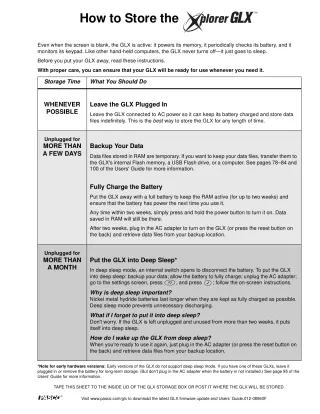
- RAM data kept two weeks when off and unplugged from a full charge; Flash data kept indefinitely p. 100
- Temperature
- Operated and stored between -10 °C and 40 °C p. 103
- Connections
- USB ports for a mouse, keyboard, printer, flash drive or a second GLX; built-in speaker; stereo signal output port p. 9, 13
- Optional accessories
- Mouse PS-2539, USB keyboard PS-2541, PS-2536 Peripheral Cable for both at once p. 13
- Computer use
- DataStudio 1.9.5 or later; Windows 98/2000/ME/XP, Mac OS 9 and Mac OS X p. 105
- Firmware
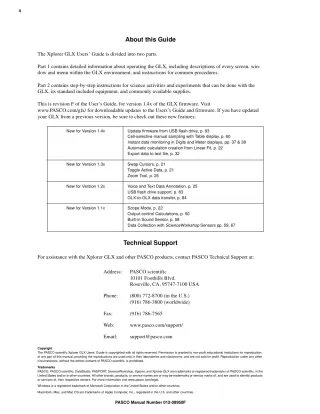
- Guide is for firmware 1.4x; updating from a flash drive needs firmware 1.35 or later p. 2, 99
What this manual walks you through
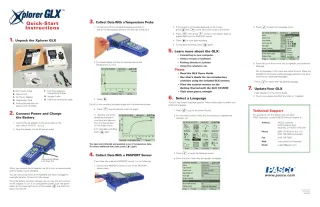
- Quick start: plugging in, connecting a temperature probe and collecting data p. 11, 12
- Shutting down and saving work p. 13
- Storing the GLX so the battery and data survive p. 3, 100
- Updating the firmware from a computer or a USB flash drive p. 99
- Putting the GLX into deep sleep for long storage p. 101
- Reconditioning and replacing the battery p. 102
- Forcing a restart and restoring the factory configuration p. 102, 103
- Connecting the GLX to a computer and launching DataStudio p. 105
- Transferring files with the GLX File Manager p. 106
Good to know
- Connect a voltage source only after the voltage probe is connected to the GLX, and remove it before unplugging the probe. p. 13
- Installing a firmware update may delete files in the RAM and Flash folders; transfer them first. p. 99
- Early units without an internal battery switch (serial number starting below 0626) must not get the AC adapter while the battery is out. p. 101
- Remove the AC adapter before disconnecting the battery. p. 102
- Do not leave the GLX in a parked car or long in direct sunlight. p. 103
Questions this manual answers
What battery does the PASCO Xplorer GLX use?
A rechargeable nickel metal hydride battery; the replacement is PASCO part PS-2527. p. 101, 102
How long does the Xplorer GLX battery last?
About six to seven hours with a newer battery, no PASPORT sensors, and sound and backlight off; several days with sampling periods of 30 s or more. p. 101
How much memory does the Xplorer GLX have?
Its RAM folder holds about 12 MB, with a 4 MB limit per file; files copied to the Flash folder keep without power. p. 88
What software does the GLX need on a computer?
DataStudio version 1.9.5 or later, on Windows 98/2000/ME/XP, Mac OS 9 or Mac OS X. p. 105
Why did my GLX lose the data saved in RAM?
After two weeks unused and unplugged, or when the battery drains to a critical level, it goes into deep sleep: data in RAM is lost, data in Flash is kept. p. 100
Contents
Chapters and sections
Each line opens the PDF at its page.
- Part 1: Users’ Guide7
- Part 2: Sample Activities111
- Activity 1: Calorimetry113
- Activity 2: Melting Point Depression117
- Activity 3: Heat Transfer by Radiation119
- Activity 4: Newton’s Law of Cooling121
- Activity 5: Microclimate Temperature Variation127
- Activity 6: Voltage versus Resistance129
- Activity 7: Induced Electromotive Force133
- Activity 8: Capacitor Discharge137
- Activity 9: Constructive and Destructive Interference141
- Activity 10: Beat Frequency143
- Index147
- Shortcut Summary149
The whole text · 17 parts
Read the manual here as text
Its text as extracted from the PDF, unedited, in parts; each page opens the PDF at that page.
- Pages 1 to 41-4
- Pages 5 to 145-14
- Pages 15 to 2415-24
- Pages 25 to 3425-34
- Pages 35 to 4435-44
- Pages 45 to 5445-54
- Pages 55 to 6455-64
- Pages 65 to 7465-74
- Pages 75 to 8475-84
- Pages 85 to 9485-94
- Pages 95 to 10495-104
- Pages 105 to 110105-110
- Part 2: Sample Activities, pages 111 to 119111-119
- Part 2: Sample Activities, pages 120 to 128120-128
- Part 2: Sample Activities, pages 129 to 137129-137
- Part 2: Sample Activities, pages 138 to 146138-146
- Part 2: Sample Activities, pages 147 to 152147-152
The file