Manual · Keyence
BL-600 Series User's Manual: Laser Bar Code Reader
Manual112 pagesPDF 1.0 MB
Chapters 5 to 8 and appendices of the Keyence BL-600 Series laser bar code reader user's manual: installation, reading functions, serial and PLC link.
What this file really is
The old site listed this file as “Install Manual” for the Keyence BL-600 and BL-601. Linked as an install manual, it is the second half of the BL-600 Series User's Manual (Chapters 5 to 8 and appendices), of which installation is only Chapter 5.
Filed under · 2 models
Filed under these models in the old catalog
Summary
What is in it
Part of Keyence's user's manual for the BL-600 Series fixed-mount laser bar code readers (BL-600, 601, 600HA, 601HA, 650HA and 651HA). It starts at Chapter 5: mounting angle, distance and brackets for each model and installing the BL-U1, BL-U2 and N-42 power supply units. It continues with reading functions and test modes, serial communication, PLC link, and appendices with angle characteristics, PLC program examples and a setup parameter sheet.
Its parts
- Installation
- Functions for Reading Operation
- Serial Communication
- PLC Link
From the manual
Key facts from this manual
Each line names its page in the PDF.
Part of the KEYENCE BL-600 Series manual for laser bar code readers, starting at Chapter 5 (installation) and running through the read functions, serial communication, PLC link and appendices. It covers the BL-600, BL-601, BL-600HA, BL-601HA, BL-650HA and BL-651HA, with the BL-U1, BL-U2 and N-42 power supply units. It shows how to mount the reader and its power supply, and gives specifications, reading ranges and troubleshooting.
- Device
- Laser bar code reader with a visible red semiconductor laser (650 nm), 500 scans/second p. 76
- Power
- 5 V DC±5%, supply capacity 330 mA min., when no optional power supply unit is used p. 92
- Serial interface
- RS-232C, start-stop, ASCII; 600, 1200, 2400, 4800, 9600, 19200, 31250 or 38400 bit/s; 7/8 bits; parity none/even/odd; 1/2 stop bits p. 77
- Input and output
- Trigger input: non-voltage (relay contact, solid state), TTL input also available; OK/NG output: NPN open collector, 24 V DC, 30 mA p. 77
- Bar codes
- CODE39, ITF, Industrial2of5, COOP2of5, Codabar, CODE128, EAN-128, CODE93, EAN / UPC(A•E); 32 digits max. (64 with CODE128 CODE-C) p. 76, 92
- Environment
- IP-65; 0 to 45°C (32 to 113°F); 35 to 85% humidity, no condensation; ambient light sunlight 10000 lx, incandescent lamp 6000 lx p. 76
- Reading range
- BL-600/601: 75 to 330 mm (CODE39, 1.0 mm narrow bar); best at the 120 mm focal length, where the readable label width is 110 mm p. 78
- Raster scan
- BL-601: raster width 7.1 ± 1.8 mm at 120 mm p. 77
- Mounting angle
- BL-600/601/600HA/601HA tilted 15°; BL-650HA/651HA mounted parallel, as its beam leaves at 17° p. 4
- Mounting hardware
- Bracket and M3 screws supplied; M4 screws for the bracket not included; insulating spacers against noise p. 5, 6
- BL-U1 power supply
- 100 to 240 V AC (50/60 Hz); RS-232C, RS-422A, RS-485 multidrop (up to 31 units, 1.2 km); screw or DIN-rail mounting; approx. 615 g p. 11, 12, 82
- High-resolution models
- BL-600HA/601HA: focal length 90 mm; BL-650HA/651HA (side-scanning): focal length 65 mm p. 79, 80
- Read error code
- Sends ERROR by default; can be changed (up to 8 characters) or turned off p. 43
- Settings memory
- Built-in EEPROM, erasable up to 100,000 times p. 76
What this manual walks you through
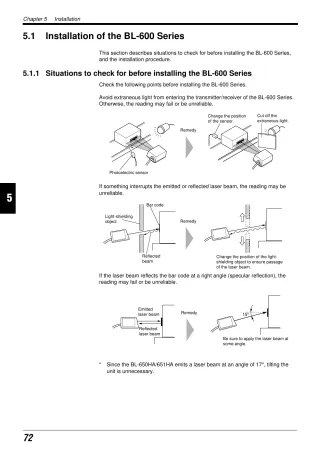
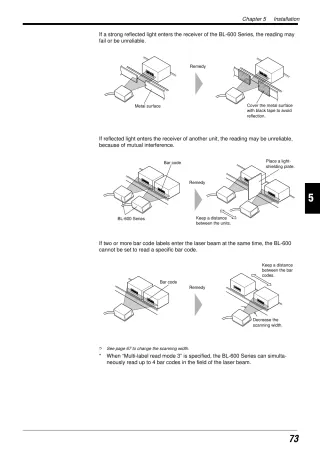
- Checking the site for stray light, reflections and interference before installing p. 2, 3
- Choosing the mounting angle and distance p. 4
- Mounting the BL-600/601/600HA/601HA with the supplied bracket p. 5, 6
- Mounting the BL-650HA/651HA p. 7, 8
- Mounting the reader without the bracket p. 9, 10
- Installing the BL-U1, BL-U2 and N-42 power supply units, including DIN-rail mounting p. 11, 12, 13
- Fixing a reader that will not read bar codes p. 92, 93
- Connecting the setup software to the reader p. 93
- Recovering from a PLC link communication error p. 72
Good to know
- Do not aim the beam at the bar code at a right angle (within 10°): specular reflection makes reading unstable. p. 4
- Connecting the power supply in reverse may damage the reader. p. 92
- A bar code needs left and right margins at least 10 times the narrow bar width. p. 92
- Bar codes printed with dot matrix or ink jet printers are prone to read problems. p. 92
- A power supply unit needs ventilation, and a fan or air conditioner if the panel may fall below 0°C or exceed 50°C. p. 11
Questions this manual answers
What power supply does the Keyence BL-600 need?
5 V DC±5% with at least 330 mA, or one of the BL-U1, BL-U2, N-42 or N-48 power supply units. p. 92
How far from the bar code should a BL-600 be mounted?
The BL-600/601 reads best at 120 mm, tilted 15°. p. 4
Why won't my BL-600 read bar codes?
The manual says to check that the laser is on, the code settings, the mounting distance and angle, the margins, print quality and that the optics are clean. p. 92, 93
What COM port settings does the BL-600 setup software use?
9600 bit/s, 7 data bits, even parity and 1 stop bit, with the reader put in send/receive waiting status by holding TEST for 8 seconds. p. 93
How many BL-600 readers can share one RS-485 line?
Up to 31 units through the BL-U1, with up to 1.2 km of cable. p. 82
The whole text · 12 parts
Read the manual here as text
Its text as extracted from the PDF, unedited, in parts; each page opens the PDF at that page.
The file