Manual · Denso
Bar Code Handy Terminal BHT-7000 User's Manual
Manual175 pagesPDF 934 KB
User's manual for the Denso BHT-7000 bar code handy terminal and its optional CU-7000 communications unit.
Covers · 1 model
The models it covers
Summary
What is in it
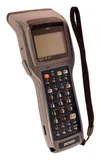
The user's manual for the Denso BHT-7000 Bar Code Handy Terminal. It gives a quick guide to reading bar codes, the keypad and backlight, then explains setting up the terminal (battery cartridge, calendar clock, LCD contrast) and using System Mode to download, upload, test and configure it. Later chapters cover RS-232C and infrared communications with the BHT and BHT-Ir protocols, error messages, and the optional CU-7000 communications unit, with specifications and protocol details in the appendices.
Its parts
- Preface
- Chapter 1 Quick Guide
- Chapter 2 Getting Started the BHT-7000 and System Mode
- Chapter 3 Communications Operations of BHT-7000
- Chapter 4 Error Messages
- Chapter 5 Handling the CU-7000 (Option)
- Appendix A: Specifications
- Appendix B: Communications Protocol Details
- Appendix C: A Typical Basic Operation
From the manual
Key facts from this manual
Each line names its page in the PDF.
Denso's user's manual for the BHT-7000 Bar Code Handy Terminal and its optional CU-7000 optical communications unit (CU-7001 and CU-7002). It covers setup, the keypads, batteries and charging, System Mode, host communications, error messages and full specifications.
- Device
- Handheld laser bar code terminal with keypad entry, running user programs written in BHT-BASIC p. 24, 28, 31
- Power
- Rechargeable lithium-ion battery cartridge (3.6 VDC) or dry battery cartridge with two LR6 alkaline batteries p. 142
- Controller and memory
- 32-bit RISC CPU, 512KB RAM, 4MB flash memory p. 142
- Display
- Dot-matrix FSTN LCD with backlight, 128 x 64 dots p. 143
- Keypad
- 26-key or 32-key pad p. 31
- Interfaces
- Optical interface and RS-232C level direct-connect interface (3-pole mini stereo plug), each up to 115,200 bps p. 25, 146
- Bar codes read
- EAN-13, EAN-8, UPC-A, UPC-E with add-ons, Interleaved 2 of 5, Standard 2 of 5, CODABAR, CODE39, CODE93, CODE128 p. 144
- Size and weight
- 70 x 195 x 51 mm (2.8 x 7.7 x 2.0 in); approx. 210 g with battery cartridge p. 142
- Operating environment
- -5 to 50 C (23 to 122 F), 20% to 80% humidity without condensation p. 142
- Charging
- In the CU-7001 (approx. 4 hours, 600 mA) or the C-700/C-750 charger p. 37, 136, 147
- CU-7000 unit
- CU-7001 exchanges data and charges; CU-7002 exchanges data only; RS-232C Dsub-25 port to the host; 9,600 to 115,200 bps by DIP switch p. 132, 134, 148
- CU-7000 power
- Europe 230 VAC, 16 VA; U.S. 120 VAC, 13 VA; Australia 10 to 18 VDC, 450 mA p. 147
- Software
- Optional BHT-BASIC Compiler and Extension Library, Ir-Transfer Utility C and E, Transfer Utility; host PC/AT or PS/2 p. 24
What this manual walks you through
- System configuration and optional software p. 24, 25, 26
- Keys, indicators and other components p. 31, 32, 33
- Loading the battery cartridge p. 34, 35
- Low battery messages p. 36
- System error messages and their fixes p. 120, 121, 122, 123
- Setting the CU-7000 transmission speed p. 134
- Uploading and downloading through the CU-7000 p. 134, 135
- Charging the battery in the CU-7001 p. 136
- Specifications of the BHT-7000 and CU-7000 p. 142, 143, 144, 145, 146, 147, 148
Good to know
- When swapping batteries, power off first and load a charged cartridge within 3 minutes to avoid losing data. p. 35
- The direct-connect port is not made for frequent plugging; use the CU-7000 for that. p. 25
- Charge the lithium-ion cartridge only with the CU-7000, C-700 or C-750, and never charge the dry battery cartridge. p. 35, 37
- The lithium-ion cartridge generally needs replacing after about 300 charge cycles. p. 136
- Set the CU-7000 DIP switch only to one of the five listed speeds. p. 134
Questions this manual answers
What battery does the Denso BHT-7000 use?
A rechargeable 3.6 VDC lithium-ion battery cartridge, or a dry battery cartridge holding two LR6 alkaline batteries. p. 142
How long does the BHT-7000 take to charge?
About 4 hours on the CU-7001; the indicator LED is red while charging and turns green when done. p. 136
What does "Reload the battery to restart!" mean on a BHT-7000?
The System Program hit a fault. Unload and reload the battery cartridge, then turn the power on. p. 122
How do I connect a BHT-7000 to a PC without an infrared port?
Use the optional CU-7000 unit, which talks to the terminal optically and to the PC over an RS-232C cable. p. 24, 25
What does "No execution program selected" mean on a BHT-7000?
No user program is set to run at power on; select one in the SET SYSTEM menu of System Mode. p. 123
Contents
Chapters and sections
Each line opens the PDF at its page.
The whole text · 20 parts
Read the manual here as text
Its text as extracted from the PDF, unedited, in parts; each page opens the PDF at that page.
- Preface1-3
- Pages 4 to 134-13
- Content Overviews14-16
- Chapter 1 Quick Guide17-22
- Chapter 2 Getting Started the BHT-7000 and System Mode, pages 23 to 3223-32
- Chapter 2 Getting Started the BHT-7000 and System Mode, pages 33 to 4233-42
- Chapter 2 Getting Started the BHT-7000 and System Mode, pages 43 to 5243-52
- Chapter 2 Getting Started the BHT-7000 and System Mode, pages 53 to 6253-62
- Chapter 2 Getting Started the BHT-7000 and System Mode, pages 63 to 7263-72
- Chapter 2 Getting Started the BHT-7000 and System Mode, pages 73 to 8273-82
- Chapter 2 Getting Started the BHT-7000 and System Mode, pages 83 to 9283-92
- Chapter 2 Getting Started the BHT-7000 and System Mode, pages 93 to 10093-100
- Chapter 3 Communications Operations of BHT-7000, pages 101 to 109101-109
- Chapter 3 Communications Operations of BHT-7000, pages 110 to 118110-118
- Chapter 4 Error Messages119-130
- Chapter 5 Handling the CU-7000 (Option)131-140
- Appendices, pages 141 to 150141-150
- Appendices, pages 151 to 160151-160
- Appendices, pages 161 to 170161-170
- Index171-175
The file