Manual · Datalogic
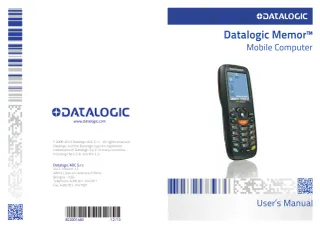
Datalogic Memor Mobile Computer User's Manual
Manual138 pagesPDF 8.2 MB
User's manual for the Datalogic Memor pocket-size mobile computer with laser or imager, covering setup, connections and utilities.
Covers · 1 model
The models it covers
Summary
What is in it
The user's manual for the Datalogic Memor mobile computer, a compact handheld with a laser or 2D imager option. It covers available models and accessories, charging and replacing the battery pack, USB, RS232, WLAN and Bluetooth connections, startup, data capture, keyboards, status indicators and the Control Panel, the Datalogic firmware, configuration and desktop utilities, technical data and reading diagrams, test codes and safety regulations.
Its parts
- Introduction
- Batteries and Maintenance
- Connections
- Use and Functioning
- Technical Features
- Test Codes
- Safety Regulations
From the manual
Key facts from this manual
Some pages are scans or cannot be read; this says only what the readable text supports. Each line names its page in the PDF.
User's manual (December 2013) for the Datalogic Memor, a compact mobile computer with a laser or 2D imager option and Wi-Fi and Bluetooth radios. It lists the models and accessories with their order numbers and walks through battery care, card installation, cable and radio connections, startup and the status lights. It ends with technical data for the laser and imager versions.
- Device
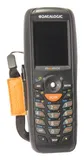
- Compact mobile computer with a laser scanner or a 2D imager option p. 9
- Model numbers
- 944201016 Batch, laser, CE 5.0; with 802.11 and Bluetooth: 944201038 laser, CE 5.0; 944201039 2D imager, CE 5.0; 944201040 laser, WM 6.1; 944201041 2D imager, WM 6.1 p. 11
- Processor and memory
- Marvell XScale PXA310 at 624 MHz; 128 MB RAM; 256 MB flash; microSD card slot p. 9, 104
- Display
- 64K color TFT LCD, 320 x 240 (QVGA), LED backlight, touch screen p. 103
- Keypad
- 23 backlit keys, joystick and side ON/OFF key p. 103
- Wireless
- Summit IEEE 802.11abg with CCX v4 (typically 2.4 and 5.2 GHz); Bluetooth IEEE 802.15, Class 2, Version 2.0 p. 104
- Power
- DC supply 5 V ± 5%; 1 cell Li-Pol or Li-Ion battery, 1100 mAh or 2000 mAh at 3.7 V p. 104
- Batteries
- 94ACC1368 Standard Battery CVR2; 94ACC1367 Large Capacity Battery CVR2 p. 16
- Cradles and charger
- 94A151111 Single Cradle w Aux. Slot; 94A151121 vehicle dock with power adapter; 94A151122 Single Ethernet-USB Host Cradle; 94A151123 Multi Battery Charger p. 16
- Power supply
- 94ACC1324 PG5-30P35 AC/DC supply, EU/USA plug; plug adapters 94ACC1334 (AUS), 94ACC1335 (UK), 94ACC1339 (EU); 94ACC1369 alkaline adapter p. 16
- Cables
- 94A051016 CAB-421 USB A-B-Mini; 94A051022 WIN-NET serial; 94A051024 USB A to Mini A; 94A051966 12 to 24 V power adapter; 94A051020 CAB-427 null modem for the dock p. 16, 29
- Size and weight
- 15.2 x 5.5 x 4.0 cm; 220 g with 1100 mAH battery, 250 g with 2000 mAH battery p. 103
- Environment
- Operating 0° to +50 °C; IP54; 1.2 M drop p. 103
- Scan performance
- Laser: 104 ± 12 scan/sec, 0.10 mm / 4 mils; imager: 60 frames/sec, 0.13 mm / 5 mils p. 105
What this manual walks you through
- Inserting and removing a microSD card p. 13, 14, 15
- Charging the battery pack by power supply, dock, charger or USB p. 17, 18
- Replacing the battery pack p. 20, 21
- Connecting to a host computer by USB, directly or through the Single Dock p. 25, 26
- Connecting a USB keyboard or flash memory device p. 27, 28
- Connecting by RS232, directly or through the dock p. 29
- Using the Wi-Fi and Bluetooth radios p. 30, 31, 32
- Pin assignment of the RS232 serial cable p. 33
- Starting up the mobile computer p. 36
- Reading the status LEDs and taskbar icons p. 50, 51
Good to know
- Charge the batteries for at least 4 hours before first use. p. 18
- For the fastest charging, charge between 0 and +40 °C, never in a closed space where heat builds up. p. 18
- Charging over a direct USB link is slower and works only with the unit off. p. 17
- USB peripherals must draw less than 100mA. p. 27
- The manual advises replacing the rechargeable battery pack every year. p. 17
Questions this manual answers
What battery does the Datalogic Memor use?
The 94ACC1368 Standard Battery or the 94ACC1367 Large Capacity Battery, single-cell packs of 1100 mAh or 2000 mAh at 3.7 V. p. 16, 104
Can I connect a USB keyboard to the Memor?
Yes, a standard 101-key USB keyboard or a USB flash memory device, through the 94A051024 Standard A to Mini A cable. p. 27
What does an orange charging LED on the Memor mean?
The right-side charging LED is orange while the battery is in pre-charge. p. 50
What is the Bluetooth range of the Memor?
Bluetooth models reach a device such as a printer within 10 m. p. 32
Which cable connects the Memor dock to a PC serial port?
A standard null modem cable such as the Datalogic 94A051020 CAB-427 for 9-pin connections. p. 29
Contents
Chapters and sections
Each line opens the PDF at its page.
- REFERENCES6
- GENERAL VIEW7
- 1 INTRODUCTION9
- 2 BATTERIES AND MAINTENANCE17
- 3 CONNECTIONS25
- 4 USE AND FUNCTIONING36
- 4.1 STARTUP36
- 4.2 DATA CAPTURE41
- 4.3 DESCRIPTION OF THE KEYBOARDS45
- 4.4 STATUS INDICATORS50
- 4.5 CONTROL PANEL52
- 4.6 CONNECTING TO OTHER COMPUTERS71
- 4.7 BACKUP DIRECTORY FILE MANAGEMENT81
- 4.8 DATALOGIC FIRMWARE UTILITY82
- 4.9 DATALOGIC CONFIGURATION UTILITY86
- 4.10 DATALOGIC DESKTOP UTILITY87
- 4.11 APPSELECTOR (APPLICATION SELECTOR)102
- 5 TECHNICAL FEATURES103
- 6 TEST CODES109
- SAFETY REGULATIONS113
14 more lines, from page 113 on
The whole text · 18 parts
Read the manual here as text
Its text as extracted from the PDF, unedited, in parts; each page opens the PDF at that page.
- CONTENTS1-5
- Pages 6 to 86-8
- 1 INTRODUCTION9-16
- 2 BATTERIES AND MAINTENANCE17-24
- 3 CONNECTIONS25-35
- 4 USE AND FUNCTIONING, pages 36 to 4536-45
- 4 USE AND FUNCTIONING, pages 46 to 5546-55
- 4 USE AND FUNCTIONING, pages 56 to 6556-65
- 4 USE AND FUNCTIONING, pages 66 to 7566-75
- 4 USE AND FUNCTIONING, pages 76 to 8576-85
- 4 USE AND FUNCTIONING, pages 86 to 9586-95
- 4 USE AND FUNCTIONING, pages 96 to 10296-102
- 5 TECHNICAL FEATURES103-108
- 6 TEST CODES109-112
- SAFETY REGULATIONS, pages 113 to 120113-120
- SAFETY REGULATIONS, pages 121 to 128121-128
- GLOSSARY129-132
- Pages 133 to 138133-138
The file