Manual · Compsee
TurboWedge Installation and Operations Manual
Manual97 pagesPDF 1.2 MB
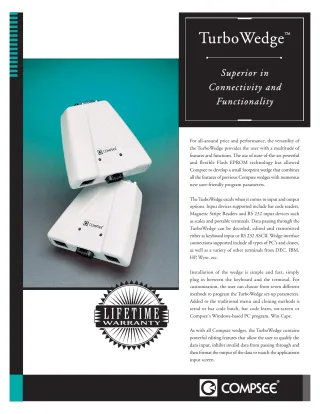
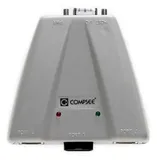
Installation and operations manual for the Compsee TurboWedge 1 and 2 keyboard wedge and dual-port RS 232 decode/interface units.
Covers · 1 model
The models it covers
Summary
What is in it
Compsee's installation and operations manual for the TurboWedge 1 and TurboWedge 2 decode/interface units, which connect bar code, magnetic stripe and RS 232 input devices to a terminal through the keyboard cable or an RS 232 line. It gives a quick start, specifications, keyboard wedge and dual-port RS 232 installation, programming methods, general, scanner port, serial and bar code selections, edit programming, keyboard remapping, status checks and appendices on interfaces and beep sequences.
Its parts
- Introduction
- Installing the Reader - Keyboard Wedge
- Installing the Reader - Dual Port RS 232
- Methods of Programming
- General Program Selections
- Scanner Port Selections
- Serial Input/Output Selections
- Bar Code Selections
- Edit Programming
- Keyboard Remapping
- Status Check
From the manual
Key facts from this manual
Each line names its page in the PDF.
Installation and operations manual 02CO429 for the Compsee TurboWedge 1 and TurboWedge 2, printed 12/99, revision level TW1 = 1.06, TW2 = 1.05. It covers installing the unit as a keyboard wedge or on an RS 232 line, programming the terminal type, the seven programming methods, the specifications, terminal interfaces and cables, beep sequences and the RS 232 auxiliary port.
- Device
- Decode/interface unit that plugs in between keyboard and terminal, or in line on the RS 232 cable between terminal and host p. 8
- Ports
- Port 1: scanner, 9 pin D; Port 2: RS 232 input, 10 pin modular; magnetic stripe reader on Port 2 of Model 1, Port 3 of Model 2 p. 11
- Magnetic stripe
- Model 1: tracks 1, 2 or 3, single or dual track; Model 2: tracks 1, 2 & 3, single, dual or triple track p. 9
- Symbologies
- Autodiscriminates Code 3 of 9, Interleaved 2 of 5, UPC/EAN, Code 93, Plessey, Codabar, Industrial 2 of 5, Code 128, Code 11 p. 9
- Power
- +5V to +14V from the terminal or an optional 9V power supply; 70 mA typical; supplies +5VDC ± 10% to the attached input device p. 10
- Power by interface
- Keyboard wedge: normally powered from the terminal; RS 232 interface: the auxiliary power supply is required p. 10
- Size and weight
- 3.65 in (9.3 cm) long, 3.75 in (9.5 cm) wide, 1.10 in (2.8 cm) high; about 3.5 oz (99.2 g) without cable p. 9
- Environment
- Operating +32° F to +122° F (0°C to 50°C); 0% to 95% relative humidity, non-condensing p. 10
- Scanning speed
- 3 to 45 inches per second on standard density bar codes p. 10
- RS 232 auxiliary port
- 10 position, 10 contact RJ plug; 7 or 8 data bits, 1 or 2 stop bits, even, odd, space, mark or no parity; baud rates 300, 600, 1200, 2400, 4800, 9600, 19.2, 38.4, plus 57.6 and 115.2 on TurboWedge 2 only; CTS/RTS, Xon/Xoff, Xmodem p. 81
- Auxiliary port pins
- 1 RXD, 3 TXD, 5 CTS, 6 +5VDC output, 7 GND, 10 RTS p. 81
- Cables
- Cloning: 02TC016, Port 2 to Port 2; WinCape: RS 232 cable 02TC014; RS 232 host cables 02TC017 to 02TC032 in DB 9 or DB 25, single or dual output, DTE or DCE p. 22, 23, 73
- Terminal type codes
- Default 01; dual port RS 232: 32; single port RS 232: 31; DEC VT 320: 15 p. 14, 15, 16
- Programming methods
- Bar code menu, bar code batch, serial batch, cloning, WinCape, symbology validation, on-screen p. 16
What this manual walks you through
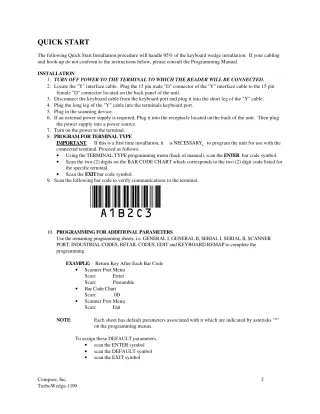
- Quick start installation and programming the terminal type p. 2, 3
- Installing the unit as a keyboard wedge with the Y interface cable p. 11, 12
- Installing the unit on a dual or single port RS 232 line and setting serial communications p. 13, 14
- Connecting a scanner, an RS 232 input device and a magnetic stripe reader p. 11
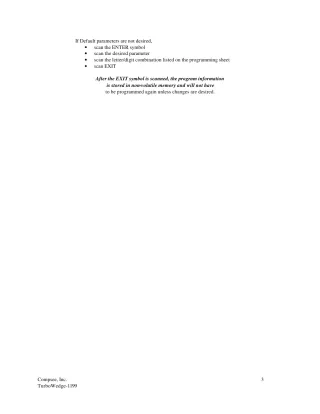
- Resetting all parameters to factory defaults p. 15
- Locking and unlocking programming with Program Lock p. 15
- Cloning the setup from a master unit to another unit p. 22
- Configuring the unit from a PC with WinCape p. 23
- Finding the interface cable and terminal ID for a given terminal p. 71, 72
- Monitoring Input Inhibit on supported terminals p. 90
Good to know
- Turn off power to the terminal before connecting the unit. p. 11
- If the Program Lock code is unknown, the only way to unlock the unit is to send it in for service. p. 15
- Model 1 will not support magnetic stripe track 3 on DEC terminals or on terminals monitoring Input Inhibit. p. 9
- A power supply is required when interfacing through the RS 232 communications line. p. 73
- Unless the terminal type is listed in Appendix G, the unit does not monitor Input Inhibit, however the parameter is set. p. 90
Questions this manual answers
How do I reset a Compsee TurboWedge to factory defaults?
Scan the Default All Parameters bar code on the Program Mode menu; after a high-low beep and then two high beeps, all parameters reset and the terminal ID returns to 01. p. 15
How do I set the terminal type on a TurboWedge?
On the Terminal Type menu scan ENTER, then the two-digit code for the terminal from the bar code chart, then EXIT; the setting is kept in non-volatile memory. p. 12
What cable is used to clone one TurboWedge to another?
Cable 02TC016, plugged into Port 2 of both the master and the receiving unit. p. 22
What if I forget the TurboWedge program lock code?
The manual says the only way to unlock it then is to send the unit in for service. p. 15
Does the TurboWedge need an external power supply?
As a keyboard wedge it is normally powered from the terminal, with some exceptions; on the RS 232 interface the auxiliary power supply is required. p. 10
The whole text · 10 parts
Read the manual here as text
Its text as extracted from the PDF, unedited, in parts; each page opens the PDF at that page.
The file