Manual · Compsee
TurboWedge Menus
Manual15 pagesPDF 66 KB
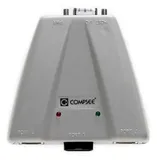
Bar code setup menus for the TurboWedge keyboard wedge decoder: terminal, ports, serial settings, symbologies, editing and key mapping.
Covers · 1 model
The models it covers
Summary
What is in it
A set of bar code programming menus for configuring the TurboWedge decoder by scanning, with defaults marked by an asterisk. The pages cover terminal selection, general selections such as beeper volume and delays, auxiliary port input (RS 232 or magnetic stripe tracks), scanner port options like preamble, postamble and autoscan, serial baud rate, parity and flow control, industrial and retail code selections with UPC and EAN output formats, data edit selections, keyboard re-mapping, status check and program mode functions such as clone in and clone out.
From the manual · read page by page
Key facts from this manual
Each line names its page in the PDF.
Programming menus for the TurboWedge, dated 09/06/02: pages of setup bar codes, with the defaults marked, for terminal type, general options, scanner, serial and auxiliary ports, bar code symbologies, edits, keyboard re-mapping, status check and program mode. Some selections differ between the TurboWedge 1 and TurboWedge 2.
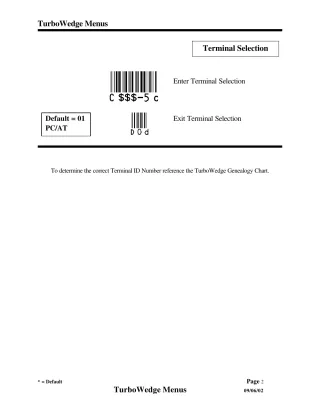
- Terminal selection
- Default terminal 01, PC/AT; other terminal ID numbers come from the TurboWedge Genealogy Chart p. 2
- Auxiliary port input
- RS 232 or magnetic stripe (MSR) input, tracks 1, 2 or 3, combinations of them, or any valid track; Port 2 on TurboWedge 1, Port 3 on TurboWedge 2 p. 4
- Baud rates
- 300, 600, 1200, 2400, 4800, 9600, 19200 p. 7
- Serial format
- Parity mark, space, even, odd or none; 7 or 8 data bits; 1 or 2 stop bits p. 7
- Flow control
- None, XON / XOFF, or RTS / CTS p. 7
- RS 232 input protocols
- Record, Solicit, Burst, ACK / NAK, Xmodem p. 7
- Industrial symbologies
- Codabar, Code 3 of 9, Code I 2 of 5, Code 2 of 5, Code 11, Code 93, Code 128, MSI / Plessey p. 8, 9
- Retail symbologies
- UPC-A, UPC-E, EAN/JAN 8, EAN/JAN 13, with 2 or 5 digit addenda p. 10
- Preamble and postamble
- Up to 16 ASCII characters each, in the scanner port and serial selections p. 5, 6
- Beeper volume
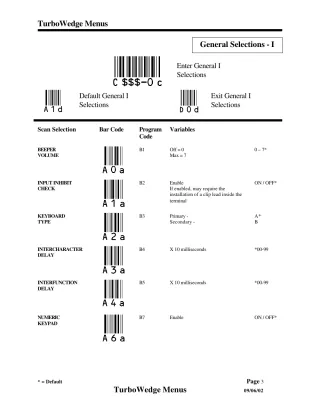
- 0 (off) to 7 (max) p. 3
- Keyboard re-mapping
- Single character replacement, swapping two keys or two ASCII characters, and multiple key function records p. 12
- Program mode
- Default all, on-screen programming mode, WinCape enable, clone in, clone out, bar code learn, program lock p. 14
- Host port
- TurboWedge 2: host port selections set data output on Port 2; not a valid entry on TurboWedge 1 p. 7
What this manual walks you through
- Selecting the terminal type p. 2
- Setting beeper volume, keyboard type, delays and numeric keypad p. 3
- Setting the auxiliary port input, buffering, scale solicit record and switches p. 4
- Adding preambles, postambles, function codes and code identification p. 5, 6
- Setting baud rate, parity, word length, stop bits, flow control and input protocol p. 7
- Enabling bar code symbologies and setting their lengths and check digits p. 8, 9, 10
- Reading the retail code output formats for UPC and EAN p. 10
- Setting up data edits by port and symbology p. 11
- Re-mapping keyboard keys and characters p. 12
- Checking the current settings, and program mode functions such as cloning and program lock p. 13, 14
Good to know
- Enabling the input inhibit check may require installing a clip lead inside the terminal. p. 3
- To delete a preamble or postamble, scan the selection followed by another selection or EXIT. p. 5
- Values are entered by scanning the alpha, digit and on/off bar codes on the last page in sequence. p. 15
Questions this manual answers
How do I set the terminal type on a TurboWedge?
Scan Enter Terminal Selection, then the terminal ID number from the TurboWedge Genealogy Chart, then Exit; the default is 01, PC/AT. p. 2
What baud rates does the TurboWedge support?
300, 600, 1200, 2400, 4800, 9600 and 19200. p. 7
Can the TurboWedge read magnetic stripe cards?
Its auxiliary port input can be set to MSR input on track 1, 2 or 3, combinations of them, or any valid track. p. 4
How do I remove a preamble or postamble on the TurboWedge?
Scan the preamble or postamble selection, followed by another selection or EXIT. p. 5
The whole text · 2 parts
Read the manual here as text
Its text as extracted from the PDF, unedited, in parts; each page opens the PDF at that page.
The file