Manual · Allen-Bradley
Application Note: Enhanced Decoder to SLC 5/03 Enhanced (FRN 6.0) or SLC 5/04 Processor
Manual8 pagesPDF 1.1 MB
Application note for connecting an Allen-Bradley 2755-DS/DD Enhanced Bar Code Decoder to an SLC 5/03 or SLC 5/04 over RS-232.
Covers · 1 model
The models it covers

Summary
What is in it
An Allen-Bradley application note showing how to connect a single 2755-DS/DD Enhanced Bar Code Decoder to the user port (Channel 0) of an SLC 5/03 Enhanced (FRN 6.0 or later) or SLC 5/04 processor using RS-232. It lists the hardware, software and related publications, then gives the cabling diagrams, the SLC 500 Channel 0 user configuration, an example decoder host configuration with CR LF message end, and a sample SLC 500 ladder program that reads and stores the bar code string.
Its parts
- Overview
- Hardware Requirements
- Software Requirements
- Related Publications
- Configuration
From the manual · read page by page
Key facts from this manual
Each line names its page in the PDF.
This is an Allen-Bradley application note (Publication 2755-2.60, July 1997) on connecting a 2755-DS/DD Enhanced Decoder to Channel 0 of an SLC 5/03 Enhanced (FRN 6.0 or later) or SLC 5/04 processor over RS-232. It lists the hardware and software needed, the cabling, the SLC channel and decoder settings, and a sample ladder program that reads bar code data.
- Link
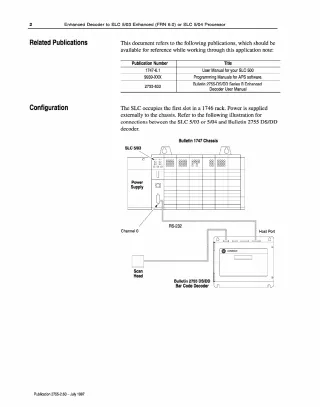
- 2755-DS/DD Host port to Channel 0 of an SLC 5/03 Enhanced (FRN 6.0 or later) or SLC 5/04, over RS-232 p. 1, 3
- Hardware
- 2755-DS/DD decoder, Bulletin 1747 SLC 5/03 Enhanced or 5/04 processor, Bulletin 1746 rack and power supply, 1747-PIC module p. 1
- Software
- SLC 500 Advanced Programming Software; a terminal emulation package such as Procomm or Windows Terminal for the decoder p. 1
- Cable
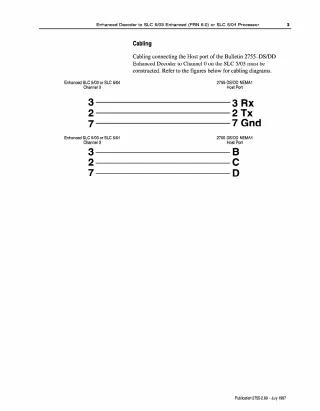
- Built by the user from the decoder Host port to SLC Channel 0; diagrams for NEMA 1 and NEMA 4 decoders p. 3
- SLC Channel 0
- Set to USER, with line feed and carriage return terminators so the ARL reads one message at a time p. 4
- Decoder setting
- END MESSAGE set to [CR] [LF] p. 5
- Ladder program
- ARL reads one ASCII string; COP copies it to an integer file, Length 12 including a one word header and one word trailer p. 6
- Read instruction
- Any SLC ASCII read instruction can replace the ARL, depending on the data format wanted p. 6
What this manual walks you through
- Wiring the decoder Host port to SLC Channel 0 p. 3
- Setting SLC Channel 0 to user mode with terminators p. 4
- Setting the decoder host communications and message format p. 5
- Writing the ladder logic that reads and stores the bar code string p. 6
Good to know
- The SLC 5/03 must be an Enhanced processor at FRN 6.0 or later. p. 1
- The decoder settings shown are only part of the configuration a given application needs. p. 5
Questions this manual answers
Can a 2755-DS decoder connect to an SLC 5/04?
Yes. The decoder Host port connects over RS-232 to Channel 0 of an SLC 5/04 or an SLC 5/03 Enhanced at FRN 6.0 or later. p. 1
What SLC hardware do I need for the 2755 decoder link?
A Bulletin 1747 SLC 5/03 Enhanced or 5/04 processor, a Bulletin 1746 rack and power supply, and a 1747-PIC module for the programming PC. p. 1
Why is the COP length 12 in the SLC sample program?
The 12 words include a one word header and a one word trailer around the bar code data. p. 6
Contents
Chapters and sections
Each line opens the PDF at its page.
The whole text · 1 part
Read the manual here as text
Its text as extracted from the PDF, unedited, in parts; each page opens the PDF at that page.
The file