Manual · Allen-Bradley
Bulletin 2755 Bar Code Decoder to PLC-5/30/40/60 ASCII User Port Application Note
Manual8 pagesPDF 72 KB
Application note for connecting an Allen-Bradley Bulletin 2755-DS/DD bar code decoder to the ASCII user port of a PLC-5/30, /40 or /60.
Covers · 1 model
The models it covers

Summary
What is in it
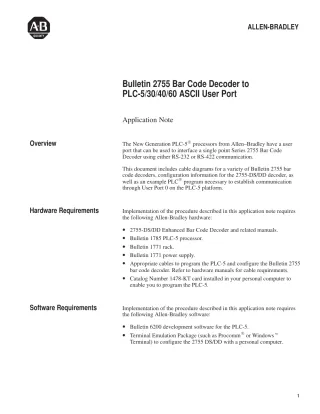
An Allen-Bradley application note showing how to connect a single Bulletin 2755 bar code decoder to User Port 0 of a New Generation PLC-5/30, /40 or /60 processor over RS-232 or RS-422. It gives hardware and software requirements, RS-232 and RS-422 cable diagrams, PLC-5 Channel 0 user mode settings, example 2755-DS/DD decoder configuration screens, and a sample ladder program that reads one bar code string at a time.
Its parts
- Overview
- Hardware Requirements
- Software Requirements
- Related Publications
- Configuration
- Running the Application
From the manual · read page by page
Key facts from this manual
Each line names its page in the PDF.
This is an Allen-Bradley application note (Publication 2755-2.51, September 1994) on connecting a Bulletin 2755 bar code decoder, chiefly the 2755-DS/DD Enhanced Bar Code Decoder, to User Port 0 of a PLC-5/30, /40 or /60 processor. It gives RS-232 and RS-422 cable diagrams, the PLC-5 channel and decoder settings, and a sample ladder program that reads the bar code data.
- Link
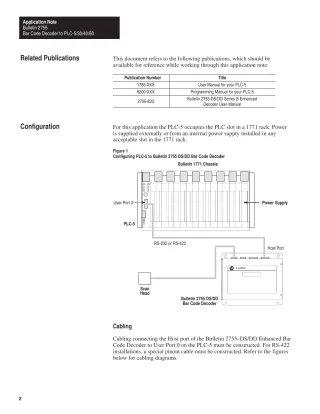
- 2755-DS/DD decoder Host port to User Port 0 of a PLC-5/30, /40 or /60, over RS-232 or RS-422 p. 1, 2
- Hardware
- 2755-DS/DD decoder, Bulletin 1785 PLC-5, Bulletin 1771 rack and power supply, 1478-KT card in the programming PC p. 1
- Software
- Bulletin 6200 PLC-5 development software; a terminal emulation package such as Procomm or Windows Terminal to configure the decoder p. 1
- Cables
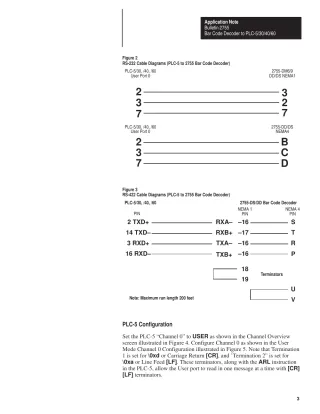
- Built by the user; RS-232 diagrams for NEMA 1 and NEMA 4 decoders, special pinout cable for RS-422 p. 2, 3
- RS-422 run length
- 200 feet maximum p. 3
- PLC-5 Channel 0
- Set to USER; Termination 1 carriage return (\0xd), Termination 2 line feed (\0xa) p. 3
- Decoder setting
- END MESSAGE set to [CR] [LF] in the Host Message Format screen p. 5
- Ladder program
- ARL reads one [CR] [LF] terminated string; COP copies it to an integer file with Length 12 p. 6
- COP length
- 12 words: one string-length word, ten words of bar code data, one word for the terminator p. 6
- Decoder manual
- 2755-833, Bulletin 2755-DS/DD Series B Enhanced Decoder User Manual p. 2
What this manual walks you through
- Wiring the decoder Host port to PLC-5 User Port 0 for RS-232 or RS-422 p. 2, 3
- Setting PLC-5 Channel 0 to user mode with CR and LF terminators p. 3, 4
- Setting the decoder host communications and message format p. 5
- Writing the ladder logic that reads and stores the bar code string p. 6
- Checking the received data in the ASCII file and data table p. 7
Good to know
- RS-422 cable runs are limited to 200 feet. p. 3
- The decoder settings shown are only part of the configuration a given application needs. p. 5
Questions this manual answers
Can a 2755-DS decoder connect straight to a PLC-5 processor?
Yes. The decoder Host port connects to User Port 0 of a PLC-5/30, /40 or /60 over RS-232 or RS-422. p. 1, 2
How long can the RS-422 cable be between a PLC-5 and a 2755 decoder?
Up to 200 feet. p. 3
What terminators does the PLC-5 need to read 2755 decoder data?
Channel 0 in USER mode with Termination 1 as carriage return and Termination 2 as line feed, matching the decoder END MESSAGE of [CR] [LF]. p. 3, 5
Why is the COP length 12 in the sample PLC-5 program?
It covers one word for string length, ten words of bar code data and one word for the [CR] [LF] terminator. p. 6
Contents
Chapters and sections
Each line opens the PDF at its page.
The whole text · 1 part
Read the manual here as text
Its text as extracted from the PDF, unedited, in parts; each page opens the PDF at that page.
The file