Manual · Allen-Bradley
Attended Workstations (Catalog Nos. 2708-DH5B2L & -DH5B4L) (Series B) User Manual
Manual186 pagesPDF 513 KB
User manual for the Allen-Bradley 2708-DH5B2L and -DH5B4L attended workstations: RS-485 networks, menus and A-B VBASIC programming.
Names · 1 model
The models it names
Filed with · 1 model
Also filed with these models on the old site
Summary
What is in it
Allen-Bradley user manual for the 2708-DH5B2L and -DH5B4L Series B attended workstations, data collection terminals that work on an RS-485 network. It covers installing a network with the 2708-NNC connector, connecting bar code scanners, status displays, configuration and diagnostic menus, operating and network design, host communications, and writing, compiling and running A-B VBASIC programs. Appendices give specifications, including the 2708-NP1 and 2708-NP2 power supplies, pin-outs and distance limits.
Its parts
- Introduction
- Installing a Network
- Barcode Connection
- Status Displays
- Configuration Menus
- Operating Procedures
- Network Design
- Host Communications
- What is BASIC?
- Developing and Running an A-B VBASIC Program
- The A-B VBASIC Cross-Compiler (LXB)
- Special Devices in A-B VBASIC
- A-B VBASIC Application Library
From the manual
Key facts from this manual
Each line names its page in the PDF.
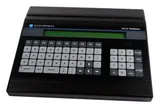
This is the Allen-Bradley user manual for the Series B Attended Workstations 2708-DH5B2L and 2708-DH5B4L, networked data-collection terminals with a keypad, a display and bar code input. It covers network installation, bar code connection, status displays, configuration menus, host communications and A-B VBASIC programming. Appendices give specifications, cable pin-outs, distance limits and error messages.
- Device
- Attended workstation for factory and office data collection: 2708-DH5B2L and 2708-DH5B4L, Series B p. 1, 12, 124
- Display
- 40 character x 2 line dot matrix LCD p. 125
- Keypad
- 63 key sealed keypad with 10 programmable function keys p. 125
- Memory
- 96K battery backup RAM p. 125
- Host ports
- Two ports: RS-232 or RS-422 (RS-422 on Com1 only, Com2 RS-232 only); 75 to 19,200 baud p. 127
- Network
- Polled RS-485 network of up to 1,024 workstations, no controller needed p. 127, 132
- Bar code port
- 9 pin DB-9 connector on the back, +5V on pin 9 p. 30
- Scanners
- 2755-G3 or -G6 hand-held scanner; 2755-W1, -W2 or -W5 wand; 2755-B1 or -B2 slot scanner p. 30
- Bar codes
- Code 3 of 9, Interleaved 2 of 5, UPC, Codabar, UPC/EAN/JAN, Code 128; auto discrimination p. 125
- Power
- External 3 wire AC power supply; specifications given for 2708-NP1 and 2708-NP2 p. 122, 125
- Programming
- Microsoft Visual BASIC (A-B VBASIC) p. 13, 124
- Dimensions
- 2.25 inches high, 9.125 inches wide, 7.75 inches deep p. 122
- Weight
- 4.73 lbs. (2.25 kilograms) p. 122
- Operating temperature
- 4° C to 50° C (40° F to 120° F); NEMA Type 1 enclosure p. 122
What this manual walks you through
- Connecting a bar code scanner and its pin-out p. 30
- Hardware and software features of the workstation p. 124, 125, 126, 127
- Wiring RS-232 null-modem, modem and RS-422 host cables p. 128, 129, 130, 131
- Planning network and RS-232 cable lengths p. 132
- Looking up error messages and prompts p. 139, 140, 141, 142
Good to know
- Network cables longer than 500 feet need terminators. p. 132
- No network may have more than 10,000 feet of cable. p. 132
- RS-232 cable length guidelines run from 100 feet at 9600 baud to 1000 feet at 1200 baud. p. 132
- High quality shielded cable (Belden 8723) is recommended for RS-232 runs. p. 132
- A YES in the Call/Send In column of the error list means the workstation is defective. p. 139
Questions this manual answers
Which bar code scanners work with the Allen-Bradley 2708 workstation?
The 2755-G3 or -G6 hand-held scanner, the 2755-W1, -W2 or -W5 wand, and the 2755-B1 or -B2 slot scanner. p. 30
How many 2708 workstations can be on one network?
Up to 1,024 workstations per network; more than 32 workstations calls for a complex network layout. p. 127, 132
What network connector is used with the 2708-DH5B2L workstation?
The manual highly recommends the 2708-NNC network connector to simplify installation. p. 12
How long can the RS-232 host cable be on a 2708 workstation?
As a guideline, 100 feet at 9600 baud, 200 feet at 4800, 500 feet at 2400 and up to 1000 feet at 1200 baud. p. 132
What memory does the 2708 workstation have?
96K of battery backup RAM for configuration, application programs and data. p. 125
Contents
Chapters and sections
Each line opens the PDF at its page.
- 2708-800, Attended Workstations User Manual1
- Important User Information2
- 1 - Introduction12
- 2 - Installing a Network14
- 3 - Barcode Connection30
- 4 - Status Displays31
- Introduction31
- Summary Status Display (Status Display 0)32
- Network Status (Status Display 1)34
- Reserved Status (Status Display 2)35
- Time Status (Status Display 3)35
- System Reset Status (Status Display 4)35
- Network Queue Status (Status Display 5)36
- Workstation Memory Status (Status Display 6)38
- Program Load Status (Status Display 7)39
- Program Run Status (Status Display 8)40
- Application Status (Status Display 9)41
- 5 - Configuration Menus42
71 more lines, from page 64 on
- 6 - Operating Procedures64
- 7 - Network Design71
- 8 - Host Communications76
- 9 - What is BASIC?85
- 10 - Developing and Running an A-B VBASIC Program87
- 11 - The A-B VBASIC CROSS-COMPILER (LXB)93
- 12 - Special Devices in A-B VBASIC97
- Introduction97
- Device: LCD Display98
- Device: Keypad99
- Device: Barcode Scanners100
- Device: Host Computer102
- Details of Specific Statements and Functions104
- Devices: Communication Ports, Primary and Auxiliary107
- Device: RAM Files109
- Device: Beeper110
- Device: Front Panel LED’s110
- Device: The #9 User Status Display111
- Device: The Egg Timer112
- 13 - A-B VBASIC Application Library113
- A - 2708-DH5B2L and -DH5B4L Workstation Specifications122
- B - Menu Trigger Keys123
- C - Technical Description124
- D - Workstation Communication Pin-Out Diagrams128
- E - Distance Limitations132
- F - Site Parameter List133
- G - Network Pin-Out Diagrams for DB9 Connector137
- H - Error Messages and Prompts139
- I - Time Display Formats143
- J - VBASIC Language Development Kit Programming Conventions and Tips144
- K - A-B VBASIC and Visual BASIC Tips146
- L - Differences Between A-B VBASIC and Visual BASIC148
- M - Application Library Subroutines168
- N - A-B VBASIC Limits179
- Index181
- Back Cover186
The whole text · 25 parts
Read the manual here as text
Its text as extracted from the PDF, unedited, in parts; each page opens the PDF at that page.
- Pages 1 to 111-11
- Pages 12 to 2012-20
- Pages 21 to 2921-29
- Pages 30 to 4130-41
- 5 - Configuration Menus, pages 42 to 4942-49
- 5 - Configuration Menus, pages 50 to 5750-57
- 5 - Configuration Menus, pages 58 to 6358-63
- 6 - Operating Procedures64-70
- 7 - Network Design71-75
- 8 - Host Communications76-84
- 9 - What is BASIC?85-92
- 11 - The A-B VBASIC CROSS-COMPILER (LXB)93-96
- 12 - Special Devices in A-B VBASIC, pages 97 to 10497-104
- 12 - Special Devices in A-B VBASIC, pages 105 to 112105-112
- 13 - A-B VBASIC Application Library113-121
- Pages 122 to 127122-127
- D - Workstation Communication Pin-Out Diagrams128-131
- Pages 132 to 136132-136
- Pages 137 to 142137-142
- Pages 143 to 145143-145
- Pages 146 to 153146-153
- Pages 154 to 161154-161
- Pages 162 to 167162-167
- M - Application Library Subroutines168-178
- Pages 179 to 186179-186
The file