Manual · Videx
DuraTrax & LaserLite Hardware Manual
Manual94 pagesPDF 1.1 MB
Hardware manual for the Videx DuraTrax and LaserLite portable data collectors and their base station, with specifications and pinouts.
Covers · 2 models
The models it covers
Summary
What is in it
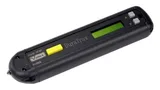
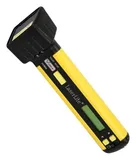
Videx's hardware manual for the DuraTrax and LaserLite portable data collectors. DuraTrax is a contact scanner that reads bar codes and Touch Memory buttons; LaserLite is a portable laser bar code reader. The manual describes the case, display, memory, clock and batteries, scanning with each unit, IR communication through the base station, a bar code reference, product specifications, cable pinouts, label vendors, using several collectors and base stations, and resetting the units.
Its parts
- DuraTrax and LaserLite
- Bar Code Reference
From the manual
Key facts from this manual
Each line names its page in the PDF.
This is the hardware manual for the Videx DuraTrax and LaserLite portable data collectors. It covers the case, display, memory, batteries, scanning, Touch Memory buttons and the LaserLite DuraTrax Base Station, with specifications and cable part numbers. It also shows how to connect one or more base stations and how to reset a unit that locks up.
- Device
- Portable data collectors: DuraTrax is a contact scanner for bar codes and Touch Memory buttons; LaserLite is a laser bar code reader p. 10
- Power
- 4 AA alkaline or nickel-cadmium batteries, plus a rechargeable lithium back-up battery p. 14, 15
- Memory
- 128K, enough for over 3,700 5-digit scans with time and date stamp p. 13
- Display and buttons
- 2-line by 16-character LCD; scan button, two scroll buttons and a lock switch p. 13
- Host link
- Two-way IrDA infrared link to a LaserLite DuraTrax Base Station, a JetEye PC IR station or a built-in IrDA transceiver p. 24
- Symbologies
- Code 3 of 9, Interleaved 2 of 5, Codabar, UPC, EAN, Code 128 p. 18, 21
- Size and weight
- DuraTrax: 6.25 x 1.45 x 1.05 in, 8.8 oz (249.30 g); LaserLite: 7.30 in long, 11.4 oz (322.96 g) p. 12, 42, 43
- Read head
- DuraTrax: 655 nm visible light contact read head behind a sapphire scan tip p. 18
- Touch Memory buttons
- DuraTrax: reads DS1990, DS1991, DS1992, DS1993, DS1994 and other Touch Memory buttons p. 19
- Laser
- LaserLite: visible laser diode, 670nm +/- 10nm p. 42
- Base station
- Two slots; RS-232 to the computer at 9600 bps via an RJ-11 serial port cable; up to 10 on one serial port; 12 VDC, 300 mA adapter p. 24, 44
- Cables
- TWC-001 or TWC-008 serial cable for DOS/Windows, TWC-009 for Macintosh; TWC-006 base station interconnect p. 28, 29
- Battery life
- Up to 100,000 or more scans per set of alkalines; up to 25,000 (500 mAh) or about 50,000 (1200 mAh) on NiCads p. 14
- Resolution
- Minimum 0.0075" width of narrow bar or space p. 42, 43
What this manual walks you through
- Replacing the AA batteries p. 16
- Scanning bar codes with a DuraTrax p. 18, 19
- Reading Touch Memory buttons with a DuraTrax p. 19
- Scanning bar codes with a LaserLite p. 21
- Communicating through a JetEye or built-in IrDA port p. 25
- Connecting the Base Station to a computer p. 27, 28
- Chaining up to ten Base Stations on one serial port p. 29, 30
- Resetting a locked-up unit to Monitor mode p. 84
Good to know
- The Base Station does not recharge batteries; NiCad cells must be taken out and charged in an external charger. p. 14
- Below about 4.0 volts the unit stops; the lithium back-up keeps program and data for up to five days, so store units with AA batteries in. p. 15
- Do not mix nickel-cadmium and alkaline batteries, or new and used ones. p. 17
- In a multiple Base Station setup, send an application to only one unit at a time. p. 30
- The manual states the LaserLite has a Class II laser of one milliwatt maximum; do not stare into the beam. p. 23
Questions this manual answers
What batteries does the Videx DuraTrax use?
Four AA batteries, alkaline or nickel-cadmium. A rechargeable lithium back-up battery keeps the program and data while they are changed. p. 14, 15
How do I reset a DuraTrax or LaserLite that has locked up?
Remove the battery end cap, then hold the scan button while putting it back; the unit beeps three times and enters Monitor mode, and the operating system is then resent. p. 84
Which cable connects the LaserLite DuraTrax Base Station to a PC?
A Videx serial port cable with an RJ-11 plug: TWC-001 or TWC-008 for DOS/Windows, or TWC-009 for a Macintosh. p. 28
Does the DuraTrax base station charge the batteries?
No. The manual calls it a communication device, not a recharger. p. 26
How many scans can a DuraTrax store?
Its 128K memory holds over 3,700 5-digit scans with time and date stamp; more fit without the stamp. p. 13
The whole text · 10 parts
Read the manual here as text
Its text as extracted from the PDF, unedited, in parts; each page opens the PDF at that page.
The file