Manual · Teklogix
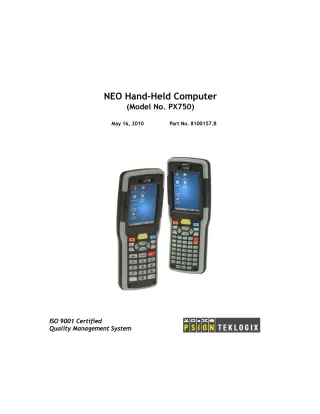
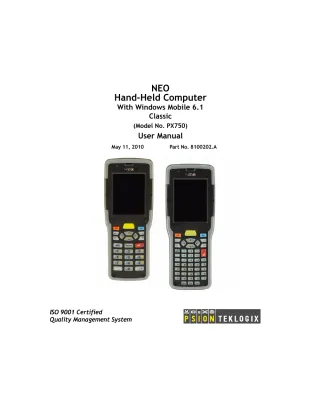
NEO Hand-Held Computer With Windows Mobile 6.1 Classic (Model No. PX750) User Manual
Manual340 pagesPDF 13 MB
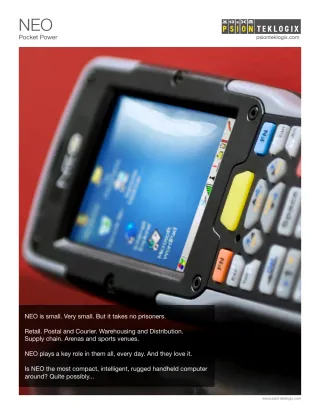
User manual for the Psion Teklogix NEO PX750 hand-held computer (PX750BT and PX750BT8) running Windows Mobile 6.1 Classic.
Covers · 1 model
The models it covers
Summary
What is in it
The user manual for the NEO PX750 rugged hand-held computer with Windows Mobile 6.1 Classic, covering model numbers PX750BT and PX750BT8. It walks through first setup, batteries, keyboards, display, Wi-Fi and Bluetooth, ActiveSync and resets, then the Windows Mobile desktop, the built-in programs and the Settings screens. Later chapters cover peripherals and accessories and the specifications, with appendices on pinouts, the Teklogix Imagers applet and bar code settings.
Its parts
- Introduction
- Basic Checkout
- Get To Know NEO
- Working With Windows Mobile 6.1 Classic
- Programs
- Settings
- Peripheral Devices & Accessories
- Specifications
From the manual
Key facts from this manual
Each line names its page in the PDF.
User manual for the Psion Teklogix NEO hand-held computer, model PX750, running Windows Mobile 6.1 Classic. It supports model numbers PX750BT and PX750BT8. It explains setup, resets, the battery, Windows Mobile programs and settings, accessories, specifications and connector pinouts.
- Device
- Rugged hand-held computer running Windows Mobile 6.1 Classic p. 22
- Processor and memory
- PXA270 at 624 MHz; 128 MB SDRAM, 128 MB Flash p. 248
- Display
- 2.7 in. color 240 x 320 TFT touchscreen, sunlight readable p. 247
- Keyboard
- 48-key alphanumeric or 26-key numeric, LED backlit p. 247
- Battery
- 3.7 V 3300 mAh lithium-ion, Model No. WA3006 p. 25, 229
- Radios
- 802.11b/g (CCX certified) and Bluetooth version 2.0 p. 249, 250
- Scan options
- Optional 1D SE955 laser scanner, 1D EV15 imager or 2D HHP 5000 imager, all user-upgradeable p. 249
- Ports
- Docking port with RS-232, USB and DC input; one microSD slot p. 247, 248
- Size and weight
- 168 x 64 x 34 mm (6.6 x 2.5 x 1.3 in.); 275 g (0.6 lbs.) with battery p. 247
- Operating temperature
- -10 °C to +50 °C (14 °F to 122 °F) p. 248
- Rain and dust
- The manual states IP54, IEC 529, and 26 drops from 1.2 m (4 ft.) to concrete p. 248
- Adaptors and cables
- PX3050 RS-232 adaptor; PX3054 micro-USB adaptor with DC jack; PX3052 micro-USB to Ethernet; PX3053 micro-USB to USB A receptacle; PX3058 micro-USB to USB A p. 230
- Docks and chargers
- PX3001 desktop dock; PX3008 desktop dock with V.92 modem; PX3004 PC and PX3004 NPC quad docks; WA3004 quad and WA3001 single battery chargers p. 233
- Power adaptors
- PX3012 AC wall adaptor and PX3056 cigarette lighter adaptor, each used with PX3054 p. 233, 240
What this manual walks you through
- Charging and installing the battery and switching the unit on and off p. 29, 30
- Connecting the hand-held to a PC through the desktop docking station p. 30
- Setting up wireless network profiles with Wi-Fi Config p. 30
- Using the Getting Started centre for first setup p. 40
- Performing warm and cold resets p. 40, 41
- Attaching the RS-232 and micro-USB adaptors p. 230, 232, 233
- Installing docking stations and troubleshooting USB links p. 234, 239
- Connecting the AC wall adaptor and the vehicle power adaptor p. 239, 240
- Docking connector, battery connector and expansion port pinouts p. 255, 256
Good to know
- Batteries ship about 40% charged and must be fully charged before use. p. 47
- Docking stations do not charge batteries outside 0 °C to 45 °C (32 °F to 113 °F). p. 234
- Files in the RAM Drive partition are lost in a reset unless saved in a Total Recall profile on flash. p. 41
- Turn the unit off before opening the battery cover. p. 29
- A cold reset should be used only in rare, critical situations. p. 41
Questions this manual answers
What battery does the NEO PX750 with Windows Mobile 6.1 use?
A 3300 mAh lithium-ion battery pack, Model No. WA3006. p. 229
How do I warm reset the NEO running Windows Mobile 6.1?
Hold [FN/BLUE] and [ENTER] together for at least two seconds, then release when the screen goes blank. p. 41
What chargers and docks fit the NEO PX750?
The PX3001 desktop dock, the PX3008 dock with modem, the PX3004 quad dock, and the WA3004 quad and WA3001 single battery chargers. p. 233
Which scanners can the NEO have?
An optional 1D SE955 laser scanner, a 1D EV15 imager or a 2D HHP 5000 imager, all user-upgradeable. p. 249
What plugs come with the NEO AC wall adaptor?
Adaptor plugs for the United Kingdom, Australia, Europe and North America. p. 239
Contents
Chapters and sections
Each line opens the PDF at its page.
- Cover1
- Introduction 119
- Basic Checkout 227
- 2.1 Preparing NEO for Operation29
- 2.2 Switching NEO On and Off29
- 2.3 Connecting NEO to a PC30
- 2.4 Wireless Networking – Wi-Fi Config30
- 2.5 Checking The Scanner38
- 2.6 Data Transfer Between the PC & the Hand-Held38
- 2.7 Aligning (Calibrating) the Touchscreen39
- 2.8 The Getting Started Centre40
- 2.9 Resetting NEO Hand-Held40
- Get To Know NEO 343
- Working With Windows Mobile 6.1 Classic 467
- Programs 595
93 more lines, from page 97 on
- 5.1 Programs97
- 5.2 Games97
- 5.3 ActiveSync®97
- 5.4 Calculator98
- 5.5 Office Mobile98
- 5.6 Demo Scanner106
- 5.7 File Explorer106
- 5.8 Getting Started107
- 5.9 Imager Demo107
- 5.10 Internet Sharing107
- 5.11 Notes109
- 5.12 Pictures & Videos113
- 5.13 Internet Explorer115
- 5.14 Messaging116
- 5.15 Remote Desktop Mobile119
- 5.16 Search120
- 5.17 Task Manager120
- 5.18 Tasks120
- 5.19 Wi-Fi Config121
- 5.20 Windows Live121
- 5.21 Windows Media121
- Settings 6123
- 6.1 Settings127
- 6.2 Personal Settings127
- 6.3 App Launch Keys128
- 6.4 Buttons Icon130
- 6.5 Input139
- 6.6 Lock144
- 6.7 Menus145
- 6.8 Owner Information145
- 6.9 Sound & Notifications146
- 6.10 Today Screen147
- 6.11 System Tab Settings148
- 6.12 About149
- 6.13 About Device149
- 6.14 Backlight150
- 6.15 Certificates152
- 6.16 Clock & Alarms154
- 6.17 Customer Feedback154
- 6.18 Dr. Debug154
- 6.19 Encryption156
- 6.20 Error Reporting157
- 6.21 GPS (Global Positioning System)157
- 6.22 Manage Triggers159
- 6.23 Managed Programs162
- 6.24 Memory163
- 6.25 Power Icon164
- 6.26 Regional Settings169
- 6.27 Remove Programs170
- 6.28 Screen170
- 6.29 Task Manager171
- 6.30 Teklogix Imagers Settings173
- 6.31 Teklogix Scanners Settings174
- 6.32 Total Recall180
- 6.33 TweakIT187
- 6.34 Windows Update192
- 6.35 Connections Tab192
- 6.36 Beam195
- 6.37 Bluetooth Setup195
- 6.38 Connection Properties205
- 6.39 Connections – Connecting to the Internet207
- 6.40 Wireless Manager Icon212
- 6.41 Wireless Statistics220
- Peripheral Devices & Accessories 7221
- 7.1 Carrying Accessories223
- 7.2 The Battery229
- 7.3 Adaptor/Cable Options230
- 7.4 Charging Options233
- 7.5 Desktop Docking Station – PX3001234
- 7.6 AC Wall Adaptor – Model No. PX3012239
- 7.7 Cigarette Lighter Adaptor, Model PX3056240
- 7.8 Quad Docking Station – PX3004 PC & PX3004 NPC240
- 7.9 Scanners and Imagers243
- 7.10 Bluetooth Peripherals244
- Specifications 8245
- App A: Pinouts255
- App B: Teklogix Imagers Applet257
- App C: Bar Code Settings295
- Index331
The whole text · 39 parts
Read the manual here as text
Its text as extracted from the PDF, unedited, in parts; each page opens the PDF at that page.
- Cover1-4
- TABLE OF CONTENTS, pages 5 to 105-10
- TABLE OF CONTENTS, pages 11 to 1711-17
- TABLE OF CONTENTS, page 1818
- Introduction 119-26
- Basic Checkout 2, pages 27 to 3427-34
- Basic Checkout 2, pages 35 to 4235-42
- Get To Know NEO 3, pages 43 to 5043-50
- Get To Know NEO 3, pages 51 to 5851-58
- Get To Know NEO 3, pages 59 to 6659-66
- Working With Windows Mobile 6.1 Classic 4, pages 67 to 7667-76
- Working With Windows Mobile 6.1 Classic 4, pages 77 to 8677-86
- Working With Windows Mobile 6.1 Classic 4, pages 87 to 9487-94
- Programs 5, pages 95 to 10495-104
- Programs 5, pages 105 to 114105-114
- Programs 5, pages 115 to 122115-122
- Settings 6, pages 123 to 132123-132
- Settings 6, pages 133 to 142133-142
- Settings 6, pages 143 to 152143-152
- Settings 6, pages 153 to 162153-162
- Settings 6, pages 163 to 172163-172
- Settings 6, pages 173 to 182173-182
- Settings 6, pages 183 to 192183-192
- Settings 6, pages 193 to 202193-202
- Settings 6, pages 203 to 212203-212
- Settings 6, pages 213 to 220213-220
- Peripheral Devices & Accessories 7, pages 221 to 228221-228
- Peripheral Devices & Accessories 7, pages 229 to 236229-236
- Peripheral Devices & Accessories 7, pages 237 to 244237-244
- Specifications 8245-254
- Pages 255 to 264255-264
- Pages 265 to 274265-274
- Pages 275 to 284275-284
- Pages 285 to 294285-294
- App C: Bar Code Settings, pages 295 to 303295-303
- App C: Bar Code Settings, pages 304 to 312304-312
- App C: Bar Code Settings, pages 313 to 321313-321
- App C: Bar Code Settings, pages 322 to 330322-330
- Index331-340
The file