Manual · Symbol
LS 1000 Series Product Reference Guide
Manual104 pagesPDF 1.0 MB
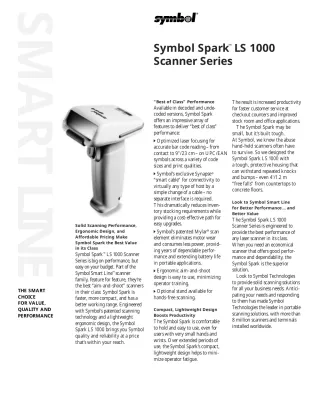
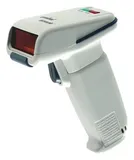
Product reference guide for the Symbol LS 1000 series hand-held laser scanners (LS 1000 and LS 1004): setup, scanning, specifications and programming.
Covers · 1 model
The models it covers
Summary
What is in it
The product reference guide for the Symbol LS 1000 series of hand-held laser scanners, the LS 1000 and LS 1004. It covers unpacking, installing and switching cables, connecting to RS-232C, IBM 468X/9X, wand emulation, OCIA, OCR and keyboard wedge hosts, scanning and aiming technique, battery box use, maintenance, accessories, troubleshooting, technical specifications and pinouts. A chapter of programming bar codes sets the LS 1004's host, beeper, code types, data options and RS-232C parameters.
Its parts
- Introduction and Set-up
- Scanning
- Maintenance & Specifications
- Programming The LS 1004
- Glossary
From the manual
Key facts from this manual
Each line names its page in the PDF.
The Symbol LS 1000 Series Product Reference Guide (70-17529-01 Revision C, February 2001), covering the LS 1000 and LS 1004 hand-held laser scanners. It explains cable installation and host hookups, scanning technique, battery box use, maintenance, specifications, pinouts and beeper codes, and how to program the LS 1004 by scanning bar codes.
- Device
- Hand-held visible laser diode bar code scanner for retail and light industrial use p. 13
- Interfaces
- LS 1004: RS 232C terminals; IBM 4683/4 and 4693/4 through Synapse Smart Cables; OCIA terminals as an XT, AT or PS/2 keyboard wedge; OCR terminals such as Fujitsu and ICL p. 13
- Bar codes
- LS 1004: UPC/EAN, Code 39, Code 39 Full ASCII, Code 93, Codabar, Interleaved 2 of 5, Code 128, EAN 128, Discrete 2 of 5 p. 39
- Scan rate
- 36 (± 3) scans/sec (bidirectional); skew ± 65°, pitch ± 60° from normal p. 37, 39
- Element width
- 0.005 in minimum, 0.020 in maximum p. 38, 40
- Battery box
- One 9-volt battery, alkaline (recommended) or nickel-cadmium rechargeable p. 32
- Cables
- LS 1004: ND1223 RS-232 9-pin female TxD pin 2; ND1224 RS-232 25-pin male TxD pin 3; ND1225 RS-232 25-pin TxD pin 3; ND1222 Synapse Adapter Cable p. 34
- Factory settings
- LS 1004: RS-232C host, 9600 baud, even parity, 7 data bits, two stop bits, no handshaking, CR/LF suffix, all code types p. 48, 50
- Temperature
- Operating 32° to 104°F (0° to 40°C); storage -40° to 140°F (-40° to 60°C); humidity 5% to 95% non-condensing p. 38, 40
- Dimensions
- 4.8 x 3.7 x 2.4 in. (122 x 93 x 60 mm) p. 38, 40
- Durability
- 4-ft. drop to concrete p. 38, 40
- Laser class
- The manual states CDRH Class II and IEC 825 Class 2 p. 38, 40
- LS 1004 pinout
- LS 1004: pin 1 Data (Synapse), 2 VBAT, 3 GND, 4 RTS, 5 RXD, 6 not connected, 7 DTR, 8 TXD, 9 CTS, 10 Clock (Synapse) p. 42
- Print contrast
- 25% minimum dark/light differential, measured at 670 nm p. 37, 39
What this manual walks you through
- Installing and switching the scanner cable p. 14, 15
- Connecting to an RS-232C host with external power or a battery box p. 16, 17, 18, 19
- Connecting the LS 1004 to IBM 468X/469X terminals through Synapse cables p. 20, 21, 22
- Aiming and holding the scanner at an angle to avoid specular reflection p. 26, 27, 28
- Changing or recharging the battery box battery p. 32
- Cleaning the exit window p. 33
- Troubleshooting when nothing scans or data is wrong on the terminal p. 35
- Reading the beeper indications p. 43
- Programming the LS 1004 by scanning parameter bar codes, and its default table p. 47, 48, 49, 50
Good to know
- With some terminals the LS 100x cannot answer host polls until the right host type is selected. p. 16
- For direct host power, the host terminal must supply enough power. p. 40
- Do not spray water or cleaning liquids directly into the window or let abrasives touch it. p. 33
- Do not hold the scanner directly over the bar code; it can tilt up to 65° forward or back. p. 28
- The recharging unit for a nickel-cadmium battery is not supplied by Symbol. p. 32
Questions this manual answers
What cable connects a Symbol LS 1004 to an RS-232 port?
ND1223 (9-pin female, TxD pin 2), ND1224 (25-pin male, TxD pin 3) or ND1225 (25-pin, TxD pin 3), depending on the host. p. 34
How do I reset an LS 1004 to its default settings?
Scan the SET ALL DEFAULTS bar code in the programming chapter. p. 47
What are the LS 1004 default serial settings?
9600 baud, even parity, 7 data bits with parity, two stop bits, no hardware or software handshaking, and a CR/LF suffix. p. 50
What do four short high beeps mean on an LS 1000 series scanner?
Low power: no further scanning is possible until the battery is changed or recharged. p. 43
Can the LS 1004 work as a keyboard wedge?
Yes. It connects to OCIA terminals such as NCR, Nixdorf and ICL through an XT, AT or PS/2 style keyboard, entering scans as keystrokes. p. 13
The whole text · 13 parts
Read the manual here as text
Its text as extracted from the PDF, unedited, in parts; each page opens the PDF at that page.
- 70-17529-01 Revision C, February 20011-4
- Symbol Support Center5-10
- Chapter 1 Introduction and Set-up11-22
- Chapter 2 Scanning23-28
- Chapter 3 Maintenance & Specifications, pages 29 to 3729-37
- Chapter 3 Maintenance & Specifications, pages 38 to 4638-46
- Introduction47-50
- Pages 51 to 5951-59
- Pages 60 to 6860-68
- Pages 69 to 7769-77
- Pages 78 to 8678-86
- Chapter 5 Glossary, pages 87 to 9587-95
- Chapter 5 Glossary, pages 96 to 10496-104
The file